
P6 and Microsoft Project
P6 WBS / LOE ≠ MSP Summary — Outline Map, Not a Span Toggle
P6 WBS / LOE ≠ MSP summary; manual summaries may not span

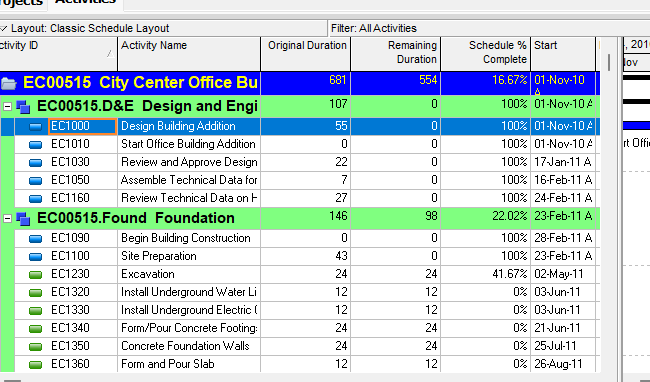
Recommendation: Smart default plus an exception report. Do not add a converter “WBS-span” flag. Map the P6 WBS tree (PROJWBS) to MSP outline / auto-scheduled summary tasks, and the reverse via Outline Level — Oracle’s MSP XML map says Outline Level “builds the WBS structure” and WBS ↔ PROJWBS.wbs_short_name. Keep a P6 WBS Summary activity as a TASK that rolls up a WBS code when scheduled, not as the WBS band, and do not emit a second summary for the same node. Keep LOE as relationship-driven dates, not a typed Task Dependent duration: write last-scheduled dates plus the existing relationships, and report that Project will not recalculate them as LOE. On the way back, map an auto-scheduled MSP summary to PROJWBS, not to a WBS Summary activity. A manually scheduled MSP summary whose dates do not span its children has no P6 analog that Calculate schedule will honor (a scheduled P6 WBS rollup and a WBS Summary activity both span the group; Anticipated Start/Finish are planning leftovers unused once activities exist). Default: keep the outline as PROJWBS, do not copy the typed envelope onto the WBS as a live rollup, put the mismatch on the exception report. One toggle only if silence would lie about that typed envelope: write it to Anticipated Start/Finish and still report that Calculate schedule ignores it once children exist.
What P6 means — WBS is not an activity
Two different things share the word “summary.” Do not collapse them. See P6 WBS and Level of Effort (Task.task_type).
PROJWBS is the WBS tree, not a TASK. Oracle: a WBS is “a hierarchical arrangement of work activities”; “Each WBS element can contain more detailed WBS levels, activities, or both.” XER map: wbs_id (Unique ID), wbs_short_name (WBS Code), wbs_name (WBS Name), parent_wbs_id (Parent WBS), proj_node_flag (Project Node). TASK.wbs_id is the FK to the owning WBS (Oracle label: WBS). Do not invent a TASK row per WBS. Anticipated Start/Finish on the WBS are “manually entered and [are] not affected by scheduling” and are used as Start/Finish only “if there are no activities assigned to the project or WBS.”
WBS Summary is a TASK activity type Oracle prints — still not the PROJWBS node. Professional lists six types; the sixth is WBS summary activity. Oracle: “Use a WBS summary activity to summarize a WBS level. The WBS summary activity comprises a group of activities that share a common WBS level.” “The dates calculated on a WBS summary activity are based on the earliest start date of the activities in the group and the latest finish date of these activities.” “You cannot assign constraints to WBS summary activities.” EPPM: aggregate values “are calculated when the project is scheduled”; relationships “are not considered when the project is scheduled or leveled.” API: “These dates are not live rollups, they are calculated during schedule time.” EPPM “About Activity Types” (five types) does not list WBS Summary; the Activity Type column does. Write both.
LOE is an activity type, not a WBS. Oracle: “A level of effort activity's duration is dependent on its predecessor and/or successor activities.” Duration is earliest early start of preds/succs linked to the start, to latest early finish of preds/succs linked to the finish; the LOE uses its assigned calendar; any relationship type is allowed; no constraints; not leveled. Do not treat it as a typed Task Dependent duration. See Level of Effort (Task.task_type).
XER: TASK.task_type = Activity Type (Oracle column map). The map does not list stored enum strings. Do not invent TT_WBS, TT_LOE, or any TT_*. API prints LEVEL_OF_EFFORT / WBS_SUMMARY — those are API names, not XER %T codes.
What MSP means
Project has no PROJWBS table and no LOE / WBS Summary activity type. Hierarchy is outline indent.
Microsoft: “an indented task becomes a subtask of the task above it, which becomes a summary task. A summary task is made up of subtasks, and it shows their combined information.” “Subtasks and summary tasks create structure, but they don't create task dependencies.” The WBS field is a code on the task: “The default WBS code is the task's outline number.” MSPDI Summary is a boolean (0/1); OutlineLevel is “the level of a task in the project outline hierarchy.” MSPDI Type is Fixed Units / Duration / Work — not P6 activity type.
Auto-scheduled summaries span children. Microsoft: “Summary tasks are always fixed-duration types because a summary task’s start and finish dates are determined by its subtasks.” That is the analog of a scheduled P6 WBS rollup — still not a PROJWBS row, and still not a P6 WBS Summary activity.
Manually scheduled summaries may not span. Microsoft Task Mode: “Microsoft Project will never change the dates of a manually scheduled task.” Changing a summary duration “doesn’t necessarily change the durations of the subtasks.” Top-down: “When you create a top-down summary task, the subtasks are not summed up in the summary task”; a red bar marks a child outside the envelope. Project 2010+: subtask changes “may not be reflected in the summary task” if the summary is Manually Scheduled. That typed envelope is not a P6 WBS and not a P6 WBS Summary activity.
MSPDI 2007–2016 schema pages print Summary and OutlineLevel. They do not print a Manual / Task Mode element (that URL 404s). Do not invent one.
Keep / drop / rewrite
Never write a real MPP. Generate MSPDI XML. See mpxj.md.
XER → MSPDI XML
| Object | Keep | Drop | Rewrite |
|---|---|---|---|
WBS tree (PROJWBS) | Hierarchy; wbs_short_name → MSP WBS; wbs_name as the summary name | Anticipated as a live bar once children exist; WBSSTEP | Outline + auto-scheduled summaries. Oracle: Outline Level “builds the WBS structure.” |
| WBS Summary activity | Last-scheduled dates, calendar, unique text / non-driving assignments | Activity type; constraints / Expected Finish (Oracle forbids); relationships as schedule drivers (ignored when you calculate the schedule) | Do not emit a second summary for the same WBS. Rollup-only → drop the row. Else keep as a normal auto-scheduled task with frozen dates. |
| LOE | Last-scheduled dates, calendar, relationships as written | Activity type; constraints; “recalculate like P6 in Project” | Auto-scheduled task with frozen dates. Do not map to MSP Type 0/1/2. |
| Hammock (Professional only) | Same as LOE if present | Hammock rule (SS/FF only; no own calendar) | Same frozen-date rewrite. EPPM does not list hammock. |
Oracle’s MSP XML import Activity Type sub-table prints only: Ignore Resource Calendars selected → Task Dependent; not selected → Resource Dependent; Mark as Milestone → Start Milestone. It does not print LOE, WBS Summary, or Finish Milestone.
MSP / XML → XER
| Object | Keep | Drop | Rewrite |
|---|---|---|---|
| Auto-scheduled summary | Outline → PROJWBS (parent_wbs_id from indent; wbs_short_name from WBS if present) | Task Mode; MSP Type as P6 activity type; summary as a TASK | WBS node, not a WBS Summary activity. After you calculate the schedule, P6 spans children. |
| Manual summary that spans | Same tree | Task Mode (P6 has none) | Same as auto summary. Report that P6 will keep spanning when you calculate the schedule. |
| Manual summary that does not span | Outline as PROJWBS | The typed envelope as a live P6 rollup | Not a P6 WBS. Not a WBS Summary activity. Optional toggle: copy typed dates to Anticipated Start/Finish (unused once activities exist). Default: discard as live dates; exception report. |
| Leaf task | TASK under the owning WBS | LOE / WBS Summary type (MSP has none) | Task Dependent or Resource Dependent per Oracle’s Ignore-Resource-Calendars flag. Milestone → Start Milestone (Oracle import table). |
Exceptions
User choice — silence would lie
MSP manual summary whose dates/duration do not match children. Microsoft: typed summary duration need not change children; top-down summaries are not summed; a red bar marks a child outside the envelope. P6 has no live analog. Toggle: discard typed envelope (default; P6 will span when you calculate the schedule) vs write Anticipated Start/Finish (planning leftover; unused once activities exist). Either way, report it. Do not invent a WBS-span flag.
No other toggle is required. LOE and WBS Summary activity have smart defaults; claiming they still behave as P6 types after conversion is an exception-report problem, not a config problem.
Silent smart default
PROJWBS↔ MSP outline / auto summary (Oracle Outline Level / WBS Code map).- WBS Summary activity: not a second band; drop if rollup-only; else frozen-date task.
- LOE → MSPDI: frozen last-scheduled dates + keep relationships.
- MSP auto summary → XER:
PROJWBSnode, not a WBS Summary activity. - MSP leaf type: Oracle import sub-table only (Task / Resource Dependent / Start Milestone).
- Output: MSPDI XML, not MPP.
Exception report
- Every LOE (Project will not recompute duration from preds/succs the P6 way).
- Every WBS Summary activity (type dropped; row dropped or frozen; relationships were never schedule drivers).
- Every hammock, if present (Professional-only rule lost).
- Every MSP manual summary whose start/finish/duration does not span children (and the Anticipated vs discard choice).
- Constraints or Expected Finish on LOE / WBS Summary (Oracle forbids; strip and report).
- Custom MSP WBS codes that do not match outline indent (P6 parent is the tree, not the dotted string).
SAL / Zeus must not
- Invent a WBS-span flag.
- Treat LOE as a normal Task Dependent task, or as MSP
Type0/1/2. - Treat an MSP manual summary as a P6 WBS, or as a P6 WBS Summary activity.
- Claim MPXJ writes a real MPP. Generate MSPDI XML.
- Invent XER
task_typetokens (TT_WBS,TT_LOE, or anyTT_*). - Draw a WBS Summary activity as a WBS band, or invent a TASK row per
PROJWBS. - Treat Anticipated Start/Finish as calculated dates or as the Gantt bar once activities exist.
- Map
TASK.task_typeto MSPDI TaskType(those integers are Fixed Units/Duration/Work). - Invent an MSPDI
Manualcolumn from the 2007–2016 schema pages (not printed there).
Sources
- Oracle PROJWBS XER map [27 Aug 2026]
- Oracle TASK XER map [27 Aug 2026]
- Oracle About Work Breakdown Structures [27 Aug 2026]
- Oracle WBS General [27 Aug 2026]
- Oracle activity types [27 Aug 2026]
- Oracle WBS summary activity [27 Aug 2026]
- Oracle About WBS Summary Activities [27 Aug 2026]
- Oracle define activity types [27 Aug 2026]
- Oracle Level of effort activity [27 Aug 2026]
- Oracle About Activity Types [27 Aug 2026]
- Oracle Activity Type column [27 Aug 2026]
- Oracle ActivityType API [27 Aug 2026]
- Oracle MSP XML Task map [27 Aug 2026]
- Microsoft summary tasks [27 Aug 2026]
- Microsoft change a summary task duration [27 Aug 2026]
- Microsoft top-down planning [27 Aug 2026]
- Microsoft Support: subtask changes not reflected on a… [27 Aug 2026]
- Microsoft how Project schedules tasks [27 Aug 2026]
- Microsoft Task Mode field [27 Aug 2026]
- Microsoft WBS fields [27 Aug 2026]
- Microsoft MSPDI Summary element [27 Aug 2026]
- Microsoft MSPDI OutlineLevel [27 Aug 2026]
- Microsoft MSPDI WBS element [27 Aug 2026]
- MPXJ cannot write MPP [27 Aug 2026]