
Relationships & Logic
Look-Ahead vs the Network
A look-ahead is a filter from the Data Date, not a P6 object.
What a planner means
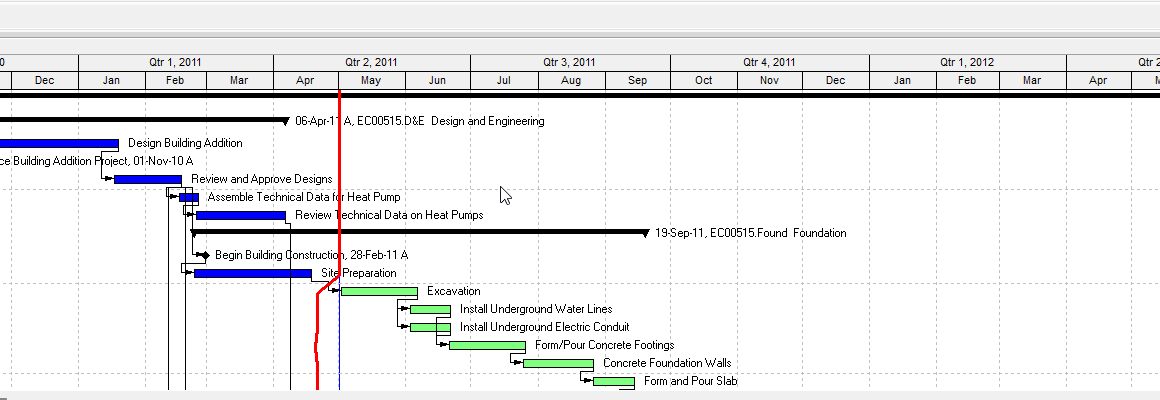
The network is the whole job — every activity and relationship. A look-ahead is a filter plus a layout (and often a print date range) so the field can see near-term work: crews, materials, access, handoffs.
Last Planner (LCI) look-ahead windows are typically 3 to 12 weeks, with 6 weeks preferred on many LPS jobs. A 21-day (3-week) window is the common GC / commercial short-interval plot. It is not the weekly work plan, and P6 does not store a “look-ahead” object — it is built fresh from a filter every time someone opens the layout.
Anchor is the Data Date, not wall-clock today. A 21-day ask should use DD+21D unless the contract says weeks. Whether P6’s 3W filter modifier equals exactly 21 calendar days from that timestamp is unverified — do not assume they are the same without checking. Display time in user preferences matters too: DD+21D can land at start-of-business or close-of-business depending on the project's convention, and that is not a cosmetic difference on a live jobsite.
What it is not
It is not a stored P6 table, not a second as-of, and not the weekly work plan. Filtering rows is not the same as clipping the printed Gantt window — that is Page Setup. Completing the look-ahead does not change Early Start, Total Float, or the Data Date. See Baseline if what you wanted was the snapshot, not the next three weeks.
What belongs in the window
Activities that intersect the next 21 days after the Data Date: in progress, starting in the window, or finishing in it.
A filter that only tests “Start is within range of DD → DD+21D” misses in-progress work that started before the Data Date and finishes after the window. Practice: also include Activity Status = In Progress, or an overlap test (Start ≤ DD+21d and Finish ≥ DD). Filtering rows is not the same as clipping the Gantt print timescale — that is a separate Page Setup control.
Field practice, not an Oracle rule, commonly excludes completed activities and often excludes LOE and WBS-summary activities from the printed list — they span the whole window and clutter a field plot without telling a crew anything actionable.
Building the filter in P6
There is no stock filter named "3 Week Look Ahead" to assume is already on the file — a planner builds one under View → Filter By → New. A clean two-line version:
- Start is within range of DD → DD+4W
- Any of the following — Activity Status equals In Progress
The join on line 2 matters. Combine those two tests with All of the following and the filter returns nothing: an in-progress activity does not also start in the next four weeks, so requiring both conditions on the same row excludes everything mid-stream. A tighter field variant for a critical 3-week cut also excludes Completed and LOE, then tests Any of (Start ≤ DD+3W, Finish ≤ DD+3W) with Total Float ≤ 0 — that produces a critical look-ahead, a narrower list than the general field plot above.
XER 23-10-CE-LIVE data date 31-Jul-26 17:00. A 21-day window starts there, not on the day you open the file.
Must not
- Treat a look-ahead as a stored P6 object.
- Anchor the window on calendar today.
- Invent a third as-of (not today, not a second data date, not the print timescale pretending to be the filter).
- Join “starts in the next 21 days” AND “in progress” with All of the following — that filter returns nothing.
- Assume the filter alone matches the printed Gantt window — the Page Setup timescale is a separate control.
- Assume P6’s
3Wmodifier is exactly 21 calendar days without checking.
Sources
- LCI Last Planner Standard Work 7 [27 Aug 2026]
- Ten Six, 4-week look-ahead [27 Aug 2026]
- Ten Six, critical 3-week look-ahead [27 Aug 2026]
- Oracle Data Date [27 Aug 2026]
- Oracle EPPM rolling print date range [27 Aug 2026]
- Team-proved data date: XER 23-10-CE-LIVE, 31-Jul-26 17:00