
Dates & Status
Actual Start/Finish Are Dates; Remaining Duration
Actual Start/Finish are dates; remaining duration is hours; not MSP Duration−Actual

What a planner means
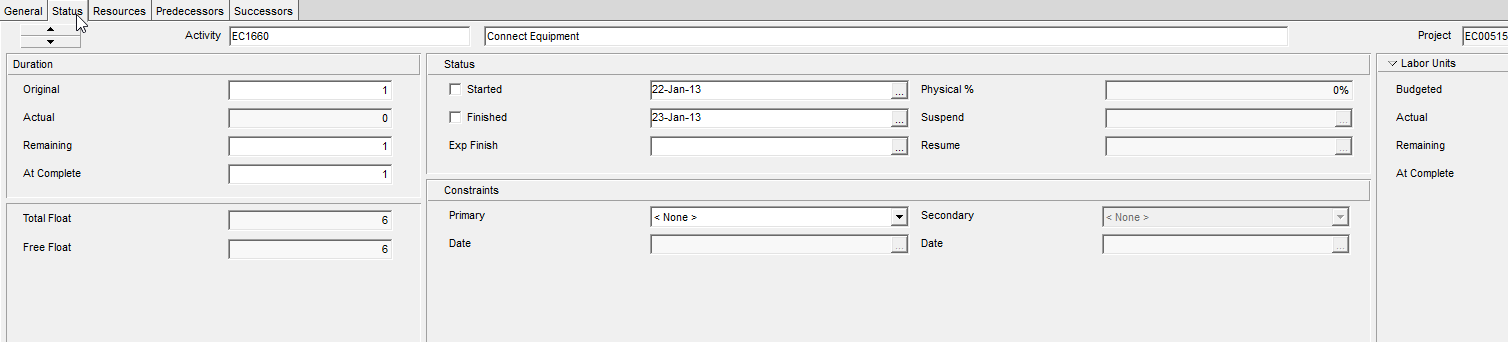
Actual Start and Actual Finish are the dates a planner marks when work actually began or ended, entered on the Status tab as Started or Finished. Remaining duration is a different kind of value entirely — hours of working time still left, measured on the activity calendar. The two are related through the activity's status, but they are not the same object, and setting one does not automatically set the other.
Oracle's Activity Status field has three values: Not Started, In Progress, and Completed. The stored tokens behind TASK.status_code are not listed in Oracle's documentation, so do not invent TK_* values to fill that gap.
| Status | Actual Start | Actual Finish | Remaining duration |
|---|---|---|---|
| Not Started | empty | empty | equals Planned Duration |
| In Progress | set | empty | remaining work (not automatically zero) |
| Completed | set | set | zero |
Entering Actual Start does not, by itself, zero out remaining duration — only marking the activity Completed does that.
Actual duration is a third length
Oracle defines Actual Duration as the total working time, measured on the activity calendar, from Actual Start to Actual Finish if the activity is complete, or from Actual Start to the Data Date if it is still in progress. At Completion Duration is a related but distinct figure — current start through current finish, where the start side is Planned Start until the activity actually starts and then becomes Actual Start, and the finish side is Planned Finish if not started, Remaining Finish if in progress, or Actual Finish if complete.
P6's Duration % Complete is still computed as (Planned − Remaining) / Planned. It does not use Actual Duration or At Completion Duration in that formula. See P6 Remaining Duration vs Percent Complete and percent-complete-map.md for the surrounding detail.
When resources or roles are assigned to an activity, Oracle defines Actual Start as the earliest actual start among those assignments; for a WBS, project, or EPS node, it is the earliest actual start of any activity under that node. And a caution worth carrying forward: when a planner types a start or finish date without a Must Start On or Must Finish On constraint behind it, Oracle is explicit that the dates entered may be changed once the project is scheduled.
XER (TASK)
| Column | Oracle label |
|---|---|
act_start_date | Actual Start |
act_end_date | Actual Finish |
remain_drtn_hr_cnt | Remaining Duration |
status_code | Activity Status |
target_drtn_hr_cnt | Planned Duration |
Microsoft Project
Project computes these differently. Remaining Duration is Duration minus Actual Duration, and % Complete is Actual Duration divided by Duration. Entering a % Complete above zero sets Actual Start to the scheduled start if none has been typed yet; reaching 100% sets Actual Finish to the scheduled finish. Entering an Actual Duration greater than Duration sets remaining duration to zero and % Complete to 100.
Do not carry that MSP formula over to a P6 file. P6's remaining duration is its own stored field, entirely separate from Actual Duration, which is itself computed as Actual Start to Data Date or Actual Start to Actual Finish — not as a subtraction from total duration.
Don't
- Treat Actual Start/Finish as remaining duration, or Remaining Finish as Actual Finish.
- Zero remaining duration just because Actual Start is set.
- Implement MSP's Remaining = Duration − Actual formula on XER data.
- Invent
status_codetokens.