
Dates & Status
Anticipated Start/Finish Are WBS Planning Dates, Not Activity Dates
Anticipated Start/Finish are WBS planning dates; not on TASK; Calculate schedule does not move them
What a planner means
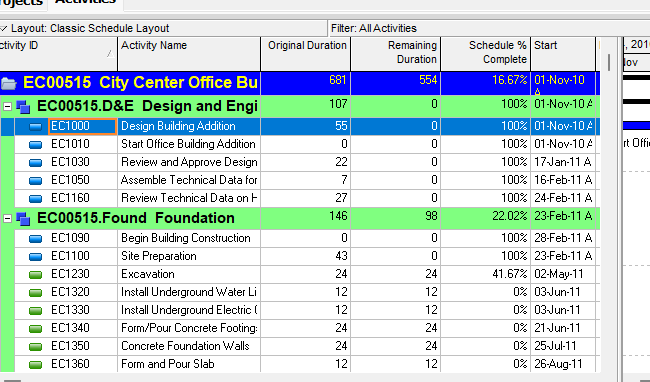
Anticipated Start and Anticipated Finish are typed dates on a project, EPS node, or WBS during planning. Oracle: manually entered; not affected by scheduling. Cannot be entered on an activity.
Oracle: if the WBS (or project) has no activities, Anticipated Start/Finish are used as that row’s Start/Finish. If there are no children, the anticipated date is the start/finish listed for the item.
Once activities exist, Calculate schedule rolls up from TASK dates. Anticipated is then a planning leftover, not the bar.
This is not Expected Finish (activity; primary resource; optional scheduler input). See Expected Finish (Not Remaining Finish, Not a Constraint). Not Planned Start (TASK.target_start_date). Not External Early Start. Not Must Finish By.
The project itself is a PROJWBS row (proj_node_flag). Project anticipated dates live there. See P6 WBS and EPS.
XER
| Column | Oracle label |
|---|---|
PROJWBS.anticip_start_date | Anticipated Start |
PROJWBS.anticip_end_date | Anticipated Finish |
No TASK columns. Do not invent TASK.anticip_start_date.
Microsoft Project
Desktop Project has no Anticipated Start on a summary. A typed Start on a summary is either a rollup or a constraint, and Calculate schedule can move it. Manual-mode placeholder text is not the same object. Do not map Anticipated to Baseline Start or to SNET.
Don't
- Treat Anticipated Start/Finish as activity dates, as calculated dates, or as the Gantt bar when activities exist.
- Store them on TASK.
- Map them to Expected Finish, Planned Start, External Early Start, Must Finish By, or MSP Baseline.