
Baselines
Claim Digger
Claim Digger is a difference report; 16.1 launched it in Visualizer as Schedule Comparison; not in project XER

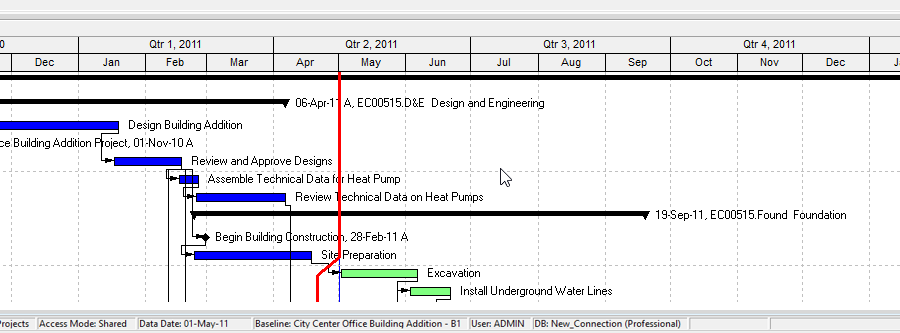
What a planner means
Oracle (older Project Management help): Claim Digger compares two projects, or a project and an associated baseline, to determine what data has been added, deleted, or modified. It writes a project-plan comparison report in one of three file formats. It shipped with the module. You opened it from the Tools menu.
Oracle 16.1: "the Claim Digger reporting feature is launched in P6 Visualizer as Schedule Comparison." Access: Visualizer Add > Schedule Comparison.
Current Professional Tools menu has two different commands:
- Tools > Visualizer — opens Visualizer (enabled when the Activities window is active).
- Tools > Schedule Comparison — "Launches Visualizer. Use Visualizer to create a Schedule Comparison layout…"
Oracle Schedule Comparison: a report of selected fields in a revised project vs its original, or a revised project vs a corresponding baseline. Visualizer also: two projects, two baselines, or a project and a baseline. You can include multiple comparisons in one layout. You pick the project and activity fields, the output format, and whether to group by activity (else by data type).
This is a Visualizer layout type, not Calculate schedule, not Apply Actuals, and not a stored snapshot. See Visualizer. It is not a baseline (see baselines.md) and not a reflection merge (see A Reflection).
Oracle Project > Additional Activities View opens a second Activities window so you can compare projects or baselines side by side. Each view is configured independently. That is not Claim Digger and not the Schedule Comparison report.
Oracle Advanced-tab data types (cited labels only): added/deleted activities; general WBS; added/deleted WBS; general project; project budget; scheduling options; activity code assignments; costs; durations; general activity; notebook topics; relationships; added/deleted relationships; steps; UDFs; constraints; dates; expenses; added/deleted expenses; percent complete; resource assignments; added/deleted resource assignments; units.
Oracle output: HTML, CSV, or ASCII (ASCII: file delimiter and text qualifier). Name and location on the General tab.
XER
Oracle's project XER data map TOC lists no CLAIM, DIGG, COMPARE, SCHEDCOMP, VISUALIZER, VLF, or LAYOUT table. Do not invent one. A project XER does not carry the comparison report or the Schedule Comparison layout.
A Schedule Comparison is a Visualizer layout. Oracle exports Visualizer layouts as .VLF. See Visualizer.
A Viewer parse of a project XER cannot reconstruct the planner's comparison report.
Microsoft Project
Desktop Project Report > Compare Projects: differences between the current version and an earlier or later version of the same project. You pick a Task Table and a Resource Table (or None). Microsoft: the report is only the differences, not a consolidation. It does not compare assignments — tasks and resources only.
That is not Claim Digger and not a Visualizer Schedule Comparison. Do not map them as the same object.
Microsoft also lets you compare scheduled vs baseline on the Tracking Gantt / Variance table. That is baseline fields on the task, not Compare Projects, and not P6 Claim Digger. See baselines.md.
Do not claim MPXJ can write a real MPP.
Don't
- Treat Claim Digger / Schedule Comparison as Calculate schedule, Apply Actuals, Update Progress, or as rewriting dates.
- Treat it as a baseline snapshot or as a reflection merge.
- Treat it as the Visualizer Gantt/TSLD, the Activities
.plf, or Project > Additional Activities View. - Treat a project XER as containing the comparison report or layout.
- Invent CLAIM / DIGG / COMPARE / SCHEDCOMP XER tables.
- Map this object to MSP Compare Projects or Tracking Gantt / Variance and call them the same.
- Claim MPXJ writes a real MPP.
- Claim a Viewer reconstructed the planner's comparison from XER alone.
Sources
- Oracle Claim Digger [27 Aug 2026]
- Oracle P6 Professional 16.1 what's new [27 Aug 2026]
- Oracle Tools menu [27 Aug 2026]
- Oracle P6 Visualizer overview [27 Aug 2026]
- Oracle About P6 Visualizer Layouts [27 Aug 2026]
- Oracle Working with P6 Visualizer Layouts [27 Aug 2026]
- Oracle Creating a New Layout [27 Aug 2026]
- Oracle Layout Options page [27 Aug 2026]
- Oracle Defining Projects [27 Aug 2026]
- Oracle Defining General options [27 Aug 2026]
- Oracle Advanced tab [27 Aug 2026]
- Oracle Project toolbar [27 Aug 2026]
- Oracle XER project map TOC [27 Aug 2026]
- Microsoft Compare two versions of a project [27 Aug 2026]
- Microsoft Review the progress of your schedule [27 Aug 2026]