
Views, Filters & Print
Visualizer
Visualizer is a separate app (Gantt/TSLD/.vlf); not in project XER; not the Activities .plf

What a planner means
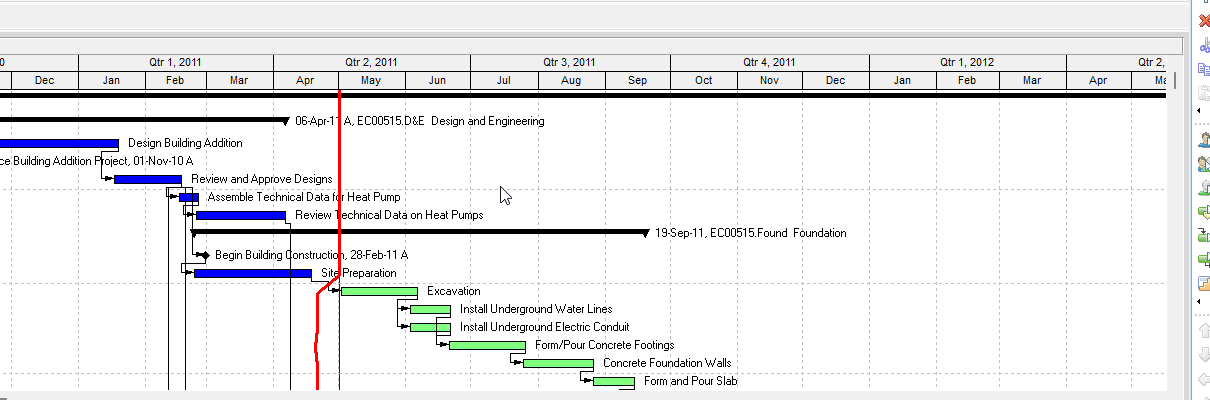
Tools > Visualizer opens a standalone reporting app. Oracle: P6 Visualizer creates customizable Gantt charts, Timescaled Logic Diagrams (TSLD), and Schedule Comparisons. It connects to a P6 Professional or P6 EPPM database. You need Visualizer module access.
Oracle: project data is not sent from P6 Professional. Whether projects are open, scheduled, or filtered in Professional does not matter. You pick projects inside Visualizer.
This is not the Activities window layout (.plf), not File > Page Setup of the current Gantt, and not the Report Wizard (.ERP). See Filters and Layouts Are a View, Not the Schedule, P6 Schedule Print / PDF (Table + Gantt), Professional Reports Are a Stored Definition, Not a Layout.
Oracle Gantt: one row per activity; duration as a horizontal bar on the timescale; a line is a relationship; grouping and sorting set the order. A Gantt can also show a Grid (table). Oracle TSLD: more than one activity per row; condenses the plan and the driving chains; graphic of activities and overall logic by time. You can have only one layout open at a time.
Oracle Schedule Comparison: a report of selected fields in a revised project vs its original, or a revised project vs a corresponding baseline (also: two projects, two baselines, or a project and a baseline). You choose the output format on the layout. This is a Visualizer layout type, not Calculate schedule.
Oracle layout categories: Global, Project, or User. Privileges: Add/Edit/Delete Global Visualizer Layouts / Add/Edit/Delete Project Visualizer Layouts. Filters on Gantt/TSLD are saved with the layout (Standard / Global / Layout / User). Default apply is All selected filters. Layout filters stay on that layout; global and user filters are available to any layout.
Draw, then print or write an XPS. Page Setup lives on the Visualizer Layout Options page — not Professional File > Page Setup.
XER
Share a Visualizer layout as .VLF (Manage Layouts > Export). Oracle names the file after the layout. Import accepts .VLF or a Professional Activity .PLF. Oracle: only Activity view layouts import from Professional, and they become Gantt layouts. Available To: Global, User, or Project. Duplicate names get -1.
Oracle's project XER data map TOC lists no VISUALIZER, VLF, or LAYOUT table. Do not invent one. A project XER does not carry the Visualizer definition.
A Viewer parse of a project XER cannot reconstruct the planner's Visualizer Gantt/TSLD.
Microsoft Project
Desktop Project has a Timeline (View > Timeline; right-click Add to Timeline). Microsoft: a snapshot of key tasks and milestones for status reporting — paste to PowerPoint/Word, print, or email. It also has a Report tab.
Those are not Visualizer, not a TSLD, and not .vlf. Do not map them as the same object. Do not claim MPXJ can write a real MPP.
Don't
- Treat Visualizer as the Activities window layout, a
.plf, print of the current Professional Gantt, or a Report Wizard.ERP. - Treat
.vlfand.plfas interchangeable without conversion (Oracle: Professional Activity.plfimports as Gantt only). - Treat a project XER as containing the Visualizer layout.
- Invent VISUALIZER / VLF / LAYOUT XER tables.
- Treat Professional as sending the open project, filter, or schedule into Visualizer (Oracle: it does not).
- Treat Schedule Comparison as Calculate schedule, Apply Actuals, or as rewriting dates.
- Map this object to MSP Timeline / Report tab and call them the same.
- Claim MPXJ writes a real MPP.
- Claim a Viewer reconstructed the planner's Visualizer layout from XER alone.
Sources
- Oracle P6 Visualizer overview [27 Aug 2026]
- Oracle Launching P6 Visualizer from P6 Professional [27 Aug 2026]
- Oracle Module access [27 Aug 2026]
- Oracle About P6 Visualizer Layouts [27 Aug 2026]
- Oracle Working with P6 Visualizer Layouts [27 Aug 2026]
- Oracle Creating a New Layout [27 Aug 2026]
- Oracle Create or Open dialog [27 Aug 2026]
- Oracle Exporting a Layout [27 Aug 2026]
- Oracle Importing a Layout [27 Aug 2026]
- Oracle Managing a Layout [27 Aug 2026]
- Oracle About Filtering [27 Aug 2026]
- Oracle Printing a Layout [27 Aug 2026]
- Oracle XER project map TOC [27 Aug 2026]
- Oracle XER project map PDF [27 Aug 2026]
- Microsoft Create a timeline in Project [27 Aug 2026]