
P6 and Microsoft Project
Data Date vs Status Date — What SAL Must Not Treat as the Same
Data Date ≠ Status Date; SAL must not treat them as the same calculation

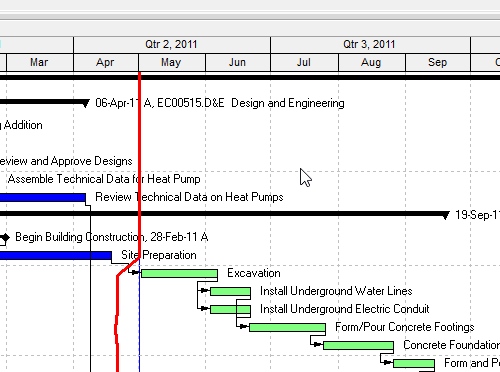
Same idea: the as-of / time-now of a statused schedule. Not the same object. Do not paint one date into the other product’s field and call the calculations equal.
What each actually is
P6 Data Date (Oracle EPS): “The progress point, or ‘as-of date’, for activities in the project. Project status is up-to-date as of the data date.” Set when you schedule, apply actuals, or manually. Professional Dates tab: “The date used as the starting point to calculate the schedule.” Early dates start from it (Oracle Activity Dates). Actual duration for an in-progress activity is working time from Actual Start to the data date. Remaining work sits after it.
Project Status Date (Microsoft): the day you report progress. “The status date is almost never the current date, so you need to set it.” Project > Status Date. Enter NA (or today) to put it back to the current date. MSPDI Project/StatusDate: “Date used for calculation and reporting.” When you enter % complete or actual work, Project may reschedule remaining work around the status date — only if the Advanced calculation checkboxes are on (move completed parts back / remaining parts forward). Earned value (BCWS) is through the status date. Task Status (Complete / On Schedule / Late / Future) is computed against it.
What they are not
| Not this | Why |
|---|---|
| Today / wall clock | Oracle: you set Data Date; it is not “now.” Microsoft: Status Date is almost never the current date. MSPDI CurrentDate is “the system date that Project generated the XML file.” |
| Planned Start / StartDate | P6 plan_start_date is Planned Start. MSPDI StartDate is the project start. Neither is the as-of. |
| Must Finish By / Deadline / Finish | P6 plan_end_date is a project-end constraint (backward pass). See Must Finish by (Project Constraint, Not Data Date). Project Deadline is a different feature. |
| Schedule Finish / Finish | P6 Finish / scd_end_date is the latest early finish from the last run. |
| Expected Finish | Activity-level typed forecast. See Expected Finish (Not Remaining Finish, Not a Constraint). |
| Last Scheduled Date / Last Apply Actuals | Different Oracle EPS columns. |
| Summarized Data Date | sum_data_date — summarization, not the live Data Date. |
Do not treat as the same
- Do not map Data Date → MSPDI
StartDateorCurrentDate. The analogue field isStatusDate. - Do not call
PROJECT.last_recalc_date“Oracle Data Date.” Oracle labels it Last Recalc Date. MPXJ maps it to Status Date. Viewers may use it as the practical as-of; they must not label that mapping Oracle-official. See P6 Data Date (Time-Now / As-Of). - Do not assume remaining-work placement is identical. P6: remaining work is after the data date (actual duration definition). Project: remaining work moves to the status date only if those Advanced options are on. Same as-of idea, different engine.
- Do not use wall-clock today as either date in the Viewer, a PDF header, or a look-ahead filter. Live file 23-10-CE-LIVE is 31-Jul-26 17:00.
- Do not treat a converted Status Date as proof the MSP file was scheduled the P6 way. Mapping the date is not mapping retained logic, expected finish, or calendars.
Detail by product: P6 Data Date (Time-Now / As-Of), status-date.md.
Sources
- Oracle Data Date [27 Aug 2026]
- Oracle Professional Dates tab [27 Aug 2026]
- Oracle Activity Dates [27 Aug 2026]
- Oracle Actual Duration [27 Aug 2026]
- Microsoft Status Date [27 Aug 2026]
- Microsoft Start fields [27 Aug 2026]
- Microsoft Status [27 Aug 2026]
- MSPDI StatusDate vs CurrentDate [27 Aug 2026]
- Team-proved: XER 23-10-CE-LIVE data date 31-Jul-26 17:00