
In Primavera P6
Change an Activity's Duration in the Gantt Chart
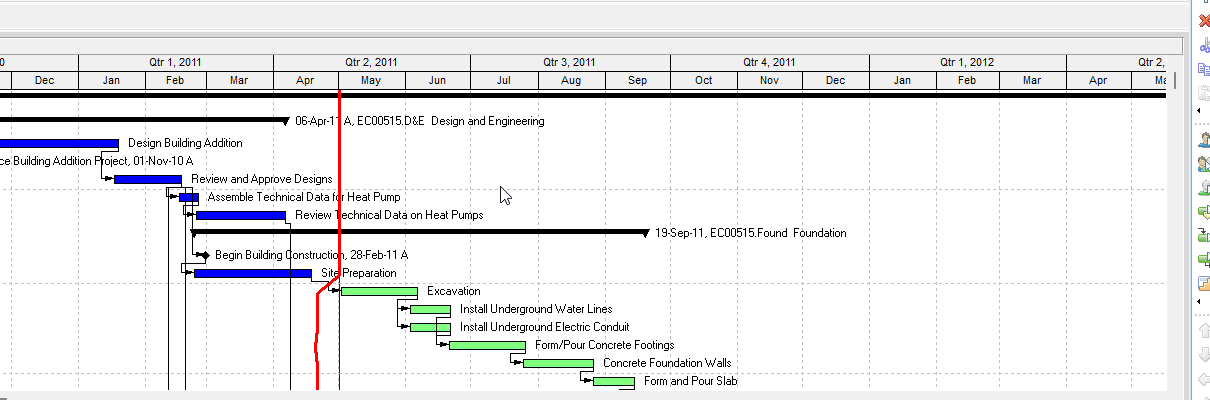
Change an activity's duration in the Gantt Chart is double-ended arrow on the right end; drag right or left

What a planner means
Change an activity's duration in the Gantt Chart is Oracle Change an activity's duration in the Gantt Chart. Double-ended arrow on the right end of the bar. Click and hold. Drag right to increase duration, left to decrease it. Units or units/time adjust per duration type if resources are assigned. Manual future period values may be affected. It is a how-to. It is not stored as its own table. It does not create, edit, or delete a relationship. It is not Change an activity's start and finish dates in the Gantt Chart, not Position a bar in the Gantt Chart, not Change a bar in the Gantt Chart, not Define general activity information, not Remaining Duration as the field object, not Duration types as the object, not TASKPRED, not EPPM Drag lines copied onto Professional, and not Microsoft drag-duration.
Oracle does print a how-to titled Change an activity's duration in the Gantt Chart. Oracle does not print a menu item named Change an activity's duration in the Gantt Chart. That how-to fetched prints no View menu, no Bars, no OK, no Apply, no Save, no Yes, no hand pointer, and no "does not affect activity duration." Do not invent those on this how-to.
Oracle Change an activity's duration in the Gantt Chart (Professional):
- "Move your mouse over the right end of an activity's Gantt Chart bar until it displays a double-ended arrow."
- "Click and hold the mouse button. To increase the duration of the activity, drag the bar to the right. To decrease the duration of the activity, drag the bar to the left."
- "If resources are assigned to the activity, the activity's labor/ nonlabor units or the activity's resource assignment units per time are adjusted when you change the activity's duration in accordance with the activity's duration type."
- "If resources are assigned to the activity, and the resource assignment has manual future period values, the values may be affected when you change the activity duration."
Quote Oracle's labor/ nonlabor spacing. The current G48902 fetch jumbles the numbered step under Note; the same sentences print in that order on the older how-to. Do not invent a left-end resize.
Change an activity's start and finish dates in the Gantt Chart is a different how-to. Hand pointer on the bar end; both dates move; duration does not change; cannot move if already started; Yes on a constraint prompt. Do not collapse. See Change an Activity's Start and Finish Dates in the Gantt Chart.
Duration types and Remaining Duration are different objects. See P6 Duration Types (Four) vs Project Task Types (Three) and P6 Remaining Duration vs Percent Complete.
Future-period buckets is a different object. See Future Period Buckets Are Typed Assignment Units, Not a Curve.
Professional vs EPPM
Professional — double-ended arrow on the right end; drag right to increase, left to decrease; units follow duration type; future-period values may change. No View menu / OK / Apply on that page.
EPPM web — Oracle Gantt View Format of the Activities Page: Drag lines change the start or finish date of an in progress or not started activity, and Remaining Early Start on In Progress. That page fetched does not print double-ended arrow, right end, or "increase the duration." Do not copy EPPM Drag lines onto this duration how-to. Do not copy Professional right-end resize onto EPPM.
Primavera Cloud is a different product (edge drag changes duration). Do not copy it here.
XER
The how-to is not an XER table. Dragging writes activity duration (and may write units). Oracle’s project XER map TOC has no GANTTDURATION / DRAGDURATION table. Do not invent a view %T. A Viewer cannot reconstruct that the planner used this how-to rather than typing Remaining Duration.
Microsoft Project
Microsoft Project can drag a Gantt bar end to change duration. Do not map that as P6 Change an activity's duration in the Gantt Chart. Do not claim MPXJ writes a real MPP.
Don't
- Invent View > Change an activity's duration, OK, Apply, hand pointer, or left-end resize on this how-to.
- Collapse this onto Change start and finish dates (duration stays) or onto typing Remaining Duration.
- Copy EPPM Drag lines onto Professional, or Professional right-end duration drag onto EPPM.
- Copy Primavera Cloud edge-vs-middle drag onto Professional.
- Invent a GANTTDURATION XER table, or treat every duration change as this how-to.
- Map MSP drag-duration as this how-to.
- Claim MPXJ writes a real MPP.