
In Primavera P6
Change Activity Table Font, Color, and Row Height
Change Activity Table font, color, and row height is View, Table Font and Row; Font, Color, row height; OK

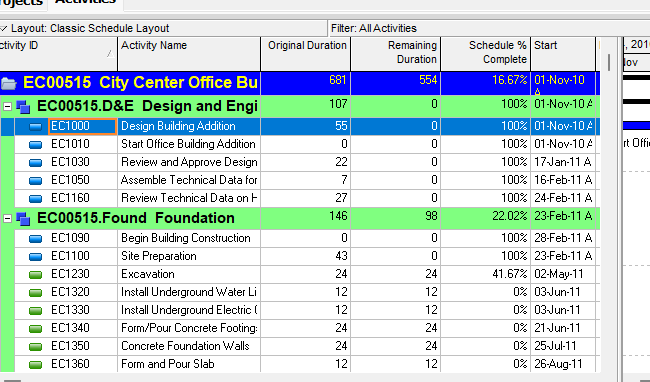
What a planner means
Change Activity Table font, color, and row height is Oracle Change Activity Table font, color, and row height. View, Table Font and Row. Font button. Color button. Row Height area (Keep Current Row Heights / Optimize row heights by content / Select height for all rows). Show Icons. OK. It is a how-to. It is not stored as its own table. It does not create, edit, or delete a relationship. It is not Change group row fonts and colors, not Format grouping bands, not The Activity Table view object, not Define Activity Table columns, not Customize activity column titles, not Change activity information in the Activity Table, not Sort activity information in the Activity Table, not Line Numbers, not TASKPRED, not EPPM Working with Tables / Working with Activity Views copied onto Professional, and not Microsoft table format.
Oracle does print a how-to titled Change Activity Table font, color, and row height. Oracle does not print a menu item named Change Activity Table font, color, and row height. The menu that how-to prints is View, Table Font and Row. Do not invent View > Change Activity Table font, color, and row height.
Oracle Change Activity Table font, color, and row height (Professional):
- "You can specify the font, background color, and row height for information displayed in a table."
- "Choose View, Table Font and Row."
- "To specify a general table font, click the Font button."
- "To select a background color, click the Color button."
- "In the Row Height area: To use the current row heights you set, mark the Keep Current Row Heights checkbox. To automatically size row heights based on the cell content, clear the Keep Current Row Heights checkbox and choose Optimize row heights by content. Mark the checkbox, Do not exceed X lines per row, to limit the amount of lines created by text wrapping and optimizing the row heights. To specify a row height for all rows in the current layout, clear the Keep Current Row Heights checkbox and choose Select height for all rows. Type a new row height in the field, or click the arrow buttons."
- "To display symbols, mark the Show Icons checkbox."
- "Click OK."
That how-to fetched prints no Layout Options bar, no Group and Sort, no Font & Color cell, no Apply, no Save, no Default, and no Columns. Do not invent those on this how-to.
Change group row fonts and colors is a different how-to. View, Group and Sort; Font & Color cell. That is the group band, not the table body. See Change Group Row Fonts and Colors.
The Activity Table is a different object. Table-format view. See Display the Activity Table.
Professional vs EPPM
Professional — View, Table Font and Row; Font; Color; Row Height; Show Icons; OK. No Save on that page.
EPPM web — Oracle Working with Tables lists sort-order indicators, Column Menu, column resizing, grouping levels, column order, selection highlighting, and data-entry controls. That page fetched does not print View, Table Font and Row, Keep Current Row Heights, Optimize row heights by content, Select height for all rows, or Show Icons. Do not copy Professional Table Font and Row onto EPPM. Do not copy EPPM Column Menu / Working with Tables onto Professional.
Primavera Cloud is a different product. Do not copy it here.
XER
The how-to is not an XER table. Oracle’s project XER map TOC has no TABLEFONT / TABLEROW / FONTROW / LAYOUTFONT table. Do not invent a view %T. Changing table font, color, or row height does not write TASK. A Viewer cannot reconstruct that the planner used this how-to.
Microsoft Project
Microsoft Project can format table text and row height. Do not map that as P6 Change Activity Table font, color, and row height. Do not claim MPXJ writes a real MPP.
Don't
- Invent View > Change Activity Table font, color, and row height, or invent Layout Options bar / Apply / Save on this how-to.
- Collapse this onto Change group row fonts and colors or Format grouping bands.
- Copy EPPM Working with Tables / Column Menu onto Professional, or Professional Table Font and Row onto EPPM.
- Invent a TABLEFONT XER table, or reconstruct the how-to from TASK rows.
- Map MSP table format as this how-to.
- Claim MPXJ writes a real MPP.