
In Primavera P6
Change the Background Lines in the Gantt Chart
Change the background lines in the Gantt Chart is View, Bars; Options; Sight Lines; Apply

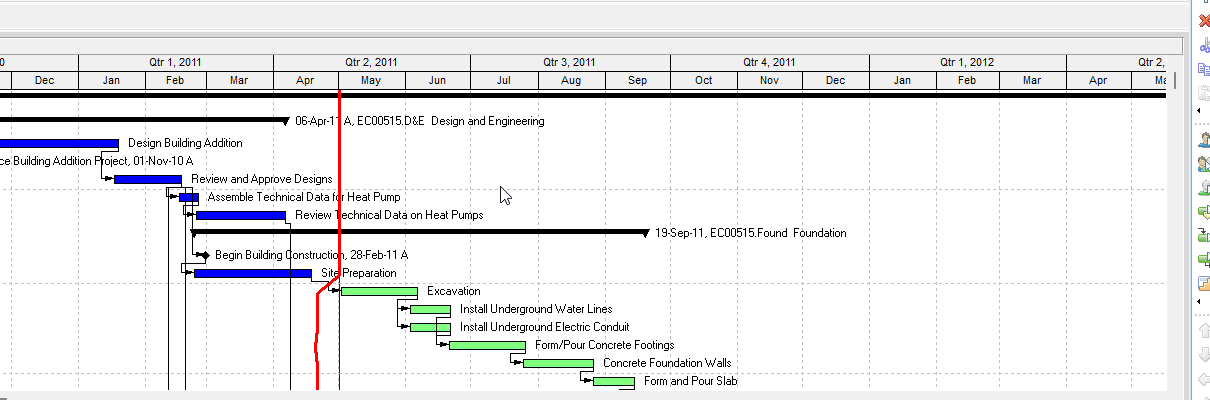
What a planner means
Change the background lines in the Gantt Chart is Oracle Change the background lines in the Gantt Chart. View, Bars; or Layout Options bar → Bars. Options. Sight Lines tab. Horizontal: Show Major Lines (before every Summary bar); Show Minor Lines Every plus a row interval. Vertical: Show Major Lines Every (line style, number of time intervals, time unit); Show Minor Lines Every formatted the same way. Apply views without closing. It is a how-to. It is not stored as its own table. It does not create, edit, or delete a relationship. It is not the Sight Lines object note, not View, Barchart Options copied onto this page, not Show or hide relationship lines in the Gantt Chart, not Customize the data date line, not Progress Line, not a curtain, not Add / Change / Position a bar, not Display the Gantt Chart, not Change a Gantt Chart's background lines (Tracking), not TASKPRED, not EPPM Configuring Activity View Gantt Chart Sight Lines option copied onto Professional, and not Microsoft gridlines.
Oracle does print a how-to titled Change the background lines in the Gantt Chart. Oracle does not print a menu item named Change the background lines in the Gantt Chart. The menu that how-to prints is View, Bars. Do not invent View > Change the background lines. Do not invent View, Barchart Options on this how-to.
Oracle Change the background lines in the Gantt Chart (Professional):
- "Choose View, Bars. You can also click the Layout Options bar and choose Bars."
- "Click Options."
- "Click the Sight Lines tab."
- "To show background horizontal lines before every Summary bar, mark the Show Major Lines checkbox in the Horizontal Lines section."
- "To show background horizontal lines at a specific interval of rows, mark the Show Minor Lines Every checkbox in the Horizontal Lines section, then type or select the row interval at which you want to the minor lines to be displayed."
- "To show background vertical lines based on a time interval you specify, mark the Show Major Lines Every checkbox in the Vertical Lines section. Select the line style and specify the number of time intervals to display the sight line, then select the time unit."
- "To show minor vertical lines, mark the Show Minor Lines Every checkbox and format the lines as described in Step 6."
- "To view your changes without closing this dialog box, click Apply."
That how-to fetched prints no OK, no Save, no Default, no View, Barchart Options, no General tab, no Data Date, no Progress Line, and no Show Relationships. Do not invent those on this how-to.
Sight Lines is a different object note. The Sight Lines tab fields. This how-to is the Change page. Leave Sight Lines Are Gantt Background Gridlines, Not an XER Table as the object.
Customize the data date line is a different how-to. Bar Chart Options Data Date tab. Do not collapse it onto Sight Lines.
Show or hide relationship lines in the Gantt Chart is a different how-to. Show Relationships. Do not collapse relationship lines onto background sight lines.
Professional vs EPPM
Professional — View, Bars / Layout Options bar → Bars; Options; Sight Lines; Horizontal Show Major Lines / Show Minor Lines Every; Vertical Show Major Lines Every / Show Minor Lines Every; Apply. No OK on that page.
EPPM web — Oracle Configuring Activity View Gantt Chart: "Select the Sight Lines option to show vertical lines between each segment of the timescale." That page fetched does not print View, Bars, Options, Horizontal Lines, Show Major Lines before every Summary bar, or Show Minor Lines Every. Do not copy Professional Sight Lines tab onto EPPM. Do not copy EPPM Sight Lines checkbox onto Professional.
Primavera Cloud is a different product. Do not copy it here.
XER
The how-to is not an XER table. Oracle’s project XER map TOC has no SIGHTLINE / BACKGROUNDLINE / GANTTLINE / LAYOUTSIGHT table. Do not invent a view %T. Changing background lines does not write TASK. Layouts travel as .plf. A Viewer cannot reconstruct that the planner used this how-to.
Microsoft Project
Microsoft Project can show Gantt gridlines. Do not map that as P6 Change the background lines in the Gantt Chart. Do not claim MPXJ writes a real MPP.
Don't
- Invent View > Change the background lines, or invent View, Barchart Options / OK / Save on this how-to.
- Collapse this onto the Sight Lines object, Data Date line, Progress Line, or Show Relationships.
- Copy EPPM Sight Lines checkbox onto Professional, or Professional Horizontal / Vertical checkboxes onto EPPM.
- Invent a SIGHTLINE XER table, or reconstruct the how-to from TASK dates.
- Map MSP gridlines as this how-to.
- Claim MPXJ writes a real MPP.