
Views, Filters & Print
Sight Lines Are Gantt Background Gridlines, Not an XER Table
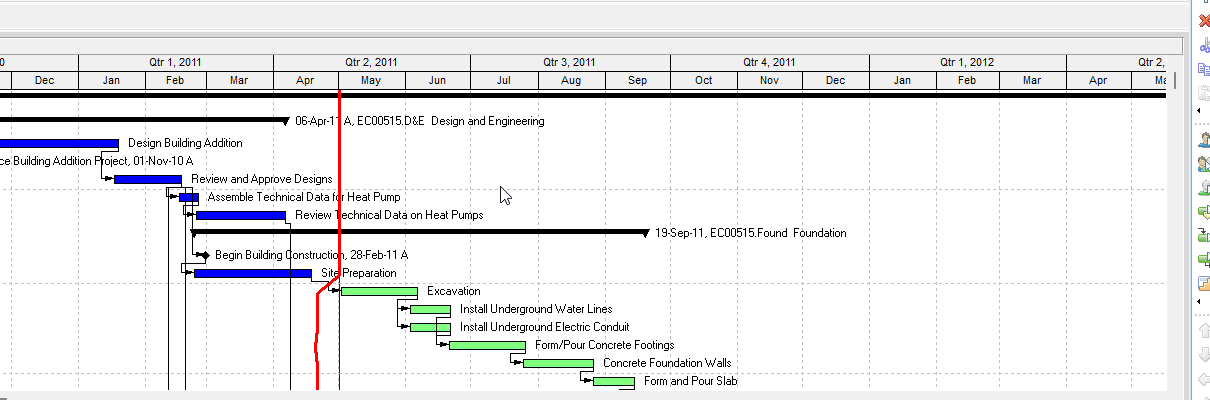
Sight Lines are Bar Chart Options Gantt background gridlines (horizontal major/minor + vertical date-interval); .plf not XER; not Data Date, Progress Line,…

What a planner means
Sight Lines (Oracle: the Sight Lines tab of Bar Chart Options) are Gantt Chart background lines. Oracle Change page: "background horizontal lines" and "background vertical lines." They are not Gantt bars (the Bars dialog Timescale / Filter / style list — Gantt Bars Are Layout Bar Definitions, Not an XER Table), not Progress Line (Bar Chart Options Progress Line tab — Progress Line), not a curtain attachment (Curtain Attachment), not the Data Date line (Bar Chart Options Data Date tab — P6 Data Date (Time-Now / As-Of)), and not the filter/layout object itself (Filters and Layouts Are a View, Not the Schedule).
Professional — Oracle: View, Bars (or Layout Options bar → Bars) → Options → Sight Lines tab. The same Options dialog "customize[s] your current Gantt Chart display." Tabs Oracle names: General, Collapsed Bars, Data Date (Activities and Tracking only), Sight Lines, Progress Line (Activities window only).
Oracle names these Sight Lines fields:
Horizontal Lines
- Show Major Lines — Tab: "Mark to display a horizontal line above each summary bar in the Gantt Chart." Change page: "background horizontal lines before every Summary bar."
- Style — "Select a line style for the horizontal lines from the drop down list. The line can be solid, or contain dashes and dots."
- Show Minor Lines Every — "Mark to display a horizontal line at specific row intervals."
- Rows — "Type or select the row interval at which you want to display horizontal lines in the Gantt Chart."
Vertical Lines
- Show Major Lines — Tab: "Mark to specify the number of intervals to display the major vertical lines, and to select a date interval to use to display the major vertical sight lines." Change page: "background vertical lines based on a time interval you specify"; mark Show Major Lines Every; "Select the line style and specify the number of time intervals to display the sight line, then select the time unit."
- Style — "Select a line style for the vertical lines from the drop down list. The line can be solid, or contain dashes and dots."
- Start — "Select a date for the sight lines to be drawn from, according to the date interval selected."
- Show Minor Lines Every — Tab: "Mark to specify the number of intervals to display the minor vertical lines, and to select the date interval to use to display the minor vertical sight lines." Change page: format minor vertical lines the same way as major.
- Start — same Start wording on the minor vertical lines.
Oracle did not print a color picker on the Sight Lines tab pages fetched (the Data Date tab does: Style / Size 1–10 pixels / Color). Do not invent Sight Lines color. Oracle did not list the date-interval tokens (day / week / month / …) on those Sight Lines pages. Do not invent them.
The same dialog's General tab also names Horizontal Lines (Show Major Lines / Show Minor Lines Every / Rows) with the same "above each summary bar" / "specific row intervals" wording, plus Show Relationships, Show Legend, Limit Text Label Characters To, and notebook-item Width/Height. Oracle did not say the General-tab Horizontal Lines are a second object. Vertical date-interval lines, Style, and Start are on the Sight Lines tab. Show Relationships is not a sight line.
Data Date line is a different tab: Style, Size 1–10 pixels, Color. Progress Line is a different tab (Activities window only).
Change page: Apply "view your changes without closing this dialog box."
EPPM web — Oracle Working with the Activity Gantt Chart: "Vertical sightlines appear at each minor increment (bottom) of the timescale." Configuring Activity View Gantt Chart (Customize View → Gantt tab): "Select the Sight Lines option to show vertical lines between each segment of the timescale." Gantt View Format: Sight Lines "Show or hide vertical sight lines in the Gantt." Those pages also name Data date line, Relationship lines, Non-work time shading, Progress Spotlight, and Timescale. They do not print View > Bars, Layout Options bar → Bars, the Sight Lines tab, major/minor, Style, Start, or Rows. Do not copy those Professional menus onto EPPM. EPPM sightlines on those pages are a vertical show/hide tied to the view timescale, not the Professional major/minor date-interval / Start dialog.
XER
Sight Lines are a Gantt / layout setting. Oracle's project XER data map TOC lists no SIGHTLINE, SIGHT, SIGHT_LINE, GRIDLINE, BAR, BARS, GANTT, LAYOUT, or VIEW table. Do not invent one. Layouts travel as .plf, not in a project XER. See Filters and Layouts Are a View, Not the Schedule.
Oracle did not name an XER column for show/hide, major vs minor, horizontal vs vertical, Style, Rows, date interval, time-interval count, or Start.
A Viewer parse of one XER cannot reconstruct whether the planner had sight lines on, or how they were drawn.
Microsoft Project
Desktop Project has Gridlines. They are not the same object.
Microsoft: right-click the chart portion of the Gantt Chart view → Gridlines. Line to change Current Date; Normal area Type and Color. Gantt bars "don't move to reflect the progress of tasks. Instead, you can use the gridline for the current date to see where tasks should be according to the schedule."
Microsoft: Format > Gridlines, Line to change Status Date, then a line style and color. That is a vertical date line for the status date, not P6 Sight Lines and not Progress Lines.
Microsoft VBA GridlinesEdit "Edits gridlines." If the Gantt Chart is active, Item can be pjBarRows, pjGanttCurrentDate, pjGanttPageBreaks, pjGanttProjectFinish, pjGanttProjectStart, pjGanttRows, pjGanttSheetColumns, pjGanttSheetRows, pjGanttStatusDate, pjGanttTitleHorizontal, pjGanttTitleVertical, pjMajorColumns, or pjMinorColumns. NormalType: pjNoLines, pjContinuous, pjCloseDot, pjDot, or pjDash. Interval is "A number from 0 to 99 that specifies the interval between gridlines." Example: GridlinesEdit Item:=pjMajorColumns, NormalColor:=pjRed.
Microsoft ProgressLines is a different command: "the Progress Lines command in the Gridlines drop-down" on Gantt Chart Tools → Format. No effect if the active view is not a Gantt view. See Progress Line.
Do not map P6 Sight Lines (horizontal above summary bars / every n rows; vertical major/minor date interval + Start) to MSP Current Date, Status Date, pjMajorColumns / pjMinorColumns, or Progress Lines and call them the same command. The pages fetched do not print Oracle's Show Major Lines / Show Minor Lines Every / Start enum on the Microsoft Gridlines dialog. Do not claim MPXJ can write a real MPP.
Don't
- Treat Sight Lines as Gantt bars, Progress Line, a curtain, the Data Date line, or the filter/layout object.
- Treat EPPM Sight Lines show/hide (vertical lines at each minor timescale increment / between each timescale segment) as the Professional Sight Lines tab (major/minor, Style, Start, Rows).
- Invent a SIGHTLINE / SIGHT / GRIDLINE / BAR / LAYOUT / VIEW XER table, or treat any TASK / PROJECT date column as this decoration.
- Invent a Sight Lines color field. Oracle printed Color on the Data Date tab, not on the Sight Lines tab pages fetched.
- Copy Professional View > Bars / Layout Options bar → Bars / Sight Lines tab onto EPPM as if Oracle printed those menus there.
- Treat General-tab Show Relationships as a sight line, or Sight Lines as TASKPRED.
- Map this object to MSP Gridlines (Current Date / Status Date / pjMajorColumns / pjMinorColumns), or to MSP Progress Lines, and call them the same.
- Claim MPXJ writes a real MPP.
- Claim a Viewer reconstructed the planner's Sight Lines on/off or draw options from an XER.
Sources
- Oracle Sight Lines tab - Bar Chart Options [27 Aug 2026]
- Oracle Change the background lines in the Gantt Chart [27 Aug 2026]
- Oracle Bar Chart Options dialog [27 Aug 2026]
- Oracle General tab - Bar Chart Options [27 Aug 2026]
- Oracle Data Date tab - Bar Chart Options [27 Aug 2026]
- Oracle Working with the Activity Gantt Chart [27 Aug 2026]
- Oracle Configuring Activity View Gantt Chart [27 Aug 2026]
- Oracle Gantt View Format of the Activities Page [27 Aug 2026]
- Oracle XER project map TOC [27 Aug 2026]
- Oracle Exporting and Importing Layouts [27 Aug 2026]
- Microsoft Work with the Gantt Chart view [27 Aug 2026]
- Microsoft set the status date [27 Aug 2026]
- Microsoft Application.GridlinesEdit [27 Aug 2026]
- Microsoft Application.ProgressLines [27 Aug 2026]