
In Primavera P6
Cut WBS
Cut WBS is Edit > Cut / Paste of a WBS element; a move, not Copy WBS; no Copy WBS Options

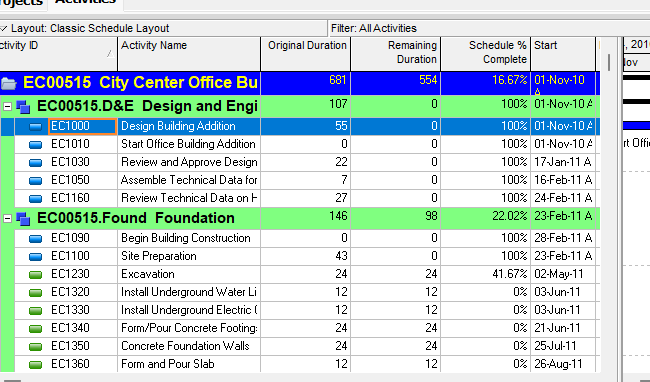
What a planner means
Cut WBS is Edit > Cut then Edit > Paste of a WBS element in Project > WBS. Oracle does not print a menu item named Cut WBS. The how-to Oracle names is Cut and paste a work breakdown structure element. That page names no dialog. It does not open Copy WBS Options or Copy Activity Options. Oracle sources it as a move. It is a command. It is not stored data. It is not Copy WBS, not Cut Activity, not Copy Activity, not Copy Project, not Delete WBS, not Dissolve, not Add WBS from Template, not a WBS Summary activity, and not Fill Down.
Oracle Cut and paste a work breakdown structure element (Professional):
- "Choose Project, WBS."
- "Select the WBS element you want to cut and paste, then choose Edit, Cut."
- "Select the WBS element to which you want to add the cut element, then choose Edit, Paste."
Notes Oracle printed on that page:
- "When you cut and paste a WBS element, the element's activity assignments are also pasted."
- "When connected to a P6 EPPM database: When you cut and paste a WBS within the same project, the WBS, activities, and associated risks from P6 are moved; risks are not moved if you cut and paste the WBS to a different project."
Quote those notes. Do not invent a Professional-database risks sentence. Do not invent a Cut WBS Options dialog.
Copy WBS is a different command. Copy WBS is Edit > Copy / Paste of a WBS element plus Copy WBS Options (and Copy Activity Options if Activities is marked). See Copy WBS.
Cut Activity is a different command. Cut Activity is Edit > Cut / Paste of activities in the Activities window. It does not move a PROJWBS node. See Cut Activity.
Delete WBS is a different command. Oracle Delete a work breakdown structure element: Project, WBS → Edit, Delete. If the WBS is assigned to activities, Oracle prompts to delete the WBS and those activities or reassign the assignments to the parent WBS. See P6 WBS and Copy WBS.
Dissolve is a different command. Edit > Dissolve removes an activity and joins its predecessors to its successors. It is not a WBS command. See Dissolve Removes an Activity and Joins Its Predecessors to Its Successors.
WBS Summary is not this command. WBS Summary is a TASK activity type. It is not a PROJWBS node and not Edit > Cut of a WBS. See P6 Activity Types (Six) — Not MSP Task Type and P6 WBS.
Professional vs EPPM
Professional — the how-to above. WBS window: Edit menu / Edit toolbar / shortcut (right-click) cut, copy, and paste WBS elements. Same Cut/Paste as any data object when the selected object is a WBS element. See Copy WBS for Edit Menu / Toolbar enable lists. Do not invent a printed item titled Cut WBS.
The Professional EPPM-database note allows cut-and-paste to a different project and says risks are not moved in that case. Do not collapse that onto EPPM web.
EPPM web — Working with WBS Elements: "You cannot cut WBS elements from one project and paste them to another project. If you need to move WBS elements to a different project, copy the WBS elements and paste them to the new location, and then delete the original entries." You cannot cut a WBS if all open projects are checked out in P6 Professional or opened exclusively by another user, you lack the required security privileges, or you have Contributor project module access. That page also names copy-and-paste exception lists (same-project vs different-project). Do not copy those copy-exception lists onto this Cut command. Do not copy Professional Edit > Cut onto EPPM Context Cut.
XER
None. Oracle’s project XER map TOC has no CUTWBS / CUT_WBS / CUTWBSOPTIONS table. After the command you see the same PROJWBS row (and its TASK rows) under a different parent_wbs_id (or a different proj_id if Professional pasted into another project). Do not invent that Cut creates a new wbs_id. Do not treat a changed parent_wbs_id as “the planner used Cut.”
Microsoft Project
Microsoft Copy a task, resource, or Project element: use Cut to move. If the selection is a summary task, subtasks move with it. That is not Copy WBS Options and not this Professional how-to. Do not map P6 Cut WBS to MSP Cut of a summary / Organizer as the same command. Do not claim MPXJ writes a real MPP.
Don't
- Treat Cut WBS as Copy WBS, Cut Activity, Copy Activity, Copy Project, Delete WBS, Dissolve, Add WBS from Template, a WBS Summary activity, or Fill Down.
- Invent a Cut WBS Options dialog, or invent that this how-to opens Copy WBS Options / Copy Activity Options / Renumber Activity IDs.
- Invent a CUTWBS / CUT_WBS XER table, or treat a changed
parent_wbs_idas “the planner used Edit > Cut.” - Collapse Professional’s EPPM-database “risks are not moved if you cut … to a different project” onto EPPM web’s “You cannot cut WBS elements from one project and paste them to another project.”
- Copy EPPM copy-and-paste exception lists (Issues, Risks, documents, codes) onto this Cut command.
- Copy Professional Edit > Cut onto EPPM Context Cut, or treat EPPM Add WBS from Template as Edit > Cut.
- Claim a Viewer reconstructed that the planner last used Cut WBS from an XER.
- Map P6 Cut WBS to MSP Cut of a summary task / Organizer as the same command.
- Claim MPXJ writes a real MPP.
Sources
- Oracle Cut and paste a work breakdown structure element [27 Aug 2026]
- Oracle same how-to, ordered steps [27 Aug 2026]
- Oracle Working with WBS Elements [27 Aug 2026]
- Oracle Work Breakdown Structure window [27 Aug 2026]
- Oracle Copy and paste a work breakdown structure element [27 Aug 2026]
- Oracle Cut and paste activities in the Activity Table [27 Aug 2026]
- Oracle XER project map TOC [27 Aug 2026]
- Oracle PROJWBS [27 Aug 2026]
- Microsoft Copy a task, resource, or Project element [27 Aug 2026]
- Related [27 Aug 2026]