
In Primavera P6
Data Date Line
Data Date line is Bar Chart Options Data Date-tab Gantt decoration (Style / Size 1–10 px / Color; Activities and Tracking); .plf not XER; not…

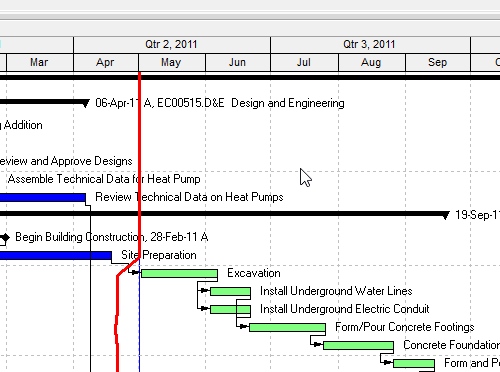
What a planner means
Data Date line (Oracle: the Data Date tab of Bar Chart Options) is a Gantt Chart decoration — how the as-of line is drawn. Oracle Customize page: "You can customize the data date line in the Activities and Tracking windows." It is not the Data Date itself (the progress point / as-of date — P6 Data Date (Time-Now / As-Of)), not Progress Line (Bar Chart Options Progress Line tab — Progress Line), not Sight Lines (background horizontal/vertical gridlines — Sight Lines Are Gantt Background Gridlines, Not an XER Table), not Progress Spotlight (the update-window curtain; Professional can drag this line to set that window — Progress Spotlight (a View, Not a Field)), not Timescale (Timescale), not Gantt bars (Gantt Bars Are Layout Bar Definitions, Not an XER Table), not a curtain attachment (Curtain Attachment), and not print header/footer Data Date text (P6 Schedule Print / PDF (Table + Gantt)).
Professional — Oracle: View, Bars (or Layout Options bar → Bars) → Options → Data Date tab. Tracking: display the layout, then View, Bars, or Display Options bar (right pane, Top Layout window) → Top Layout Options, Bars → Options → Data Date tab.
Bar Chart Options (Bars → Options, or View, Barchart Options) "customize[s] your current Gantt Chart display." Tabs Oracle names: General, Collapsed Bars, Data Date (Activities and Tracking windows only), Sight Lines, Progress Line (Activities window only). Do not copy the Progress Line tab onto Tracking.
Oracle names these Data Date tab fields:
- Style — Tab: "Select a line style for your data date from the drop down list. The line can be solid, or contain dashes and dots." Customize page: "To change the style for your data date line, select a style from the drop down list. The line can be solid, or contain dashes and dots."
- Size — Tab: "Select a value between 1 and 10 pixels to set the thickness of your data date line." Customize page: "To change the thickness of your data date line, select a value between 1 and 10 pixels. This option is only available when the solid line is selected as the style. If your line style is something other than the solid line and you increase the size to a number greater than one, the bar style will switch to a solid line."
- Color — Tab: "Click to choose a color for your data date line." Customize page: "To change the color of your data date line, choose a color from the color palette."
Customize page: Apply "To view your changes without closing this dialog box."
Oracle did not print on the Professional Data Date tab / Customize pages fetched: a show/hide checkbox, a default color, the word "vertical," dash/dot token names, or that this tab sets the project's Data Date. Do not invent them. The date the line sits on is the project Data Date (P6 Data Date (Time-Now / As-Of)), not a field on this tab.
Dragging the line is Spotlight, not this tab. Oracle Progress Spotlight: "You can also drag the data date line until you reach the new date you want. P6 Professional highlights the activities that fall between the last data date and the new data date." Highlight-for-updating: "To increase/decrease the area between the previous data date and the new date by one or more timescale increments, drag the data date line in the Gantt Chart." That changes the spotlight window (and turns off automatic scheduling until you calculate the schedule). It is not Style / Size / Color. See Progress Spotlight (a View, Not a Field).
EPPM web — Configuring Activity View Gantt Chart (Customize View → Gantt tab): "Select the Data date line option to show the data date on the Gantt." That page also names Relationship lines, Non-driving relationships, Sight Lines, Non-work time shading, and Timescale. It does not print View, Bars, Layout Options bar → Bars, the Data Date tab, Style, Size 1–10 pixels, Color, or Apply.
Working with the Activity Gantt Chart: "In the Gantt chart, a vertical blue line represents the current data date for the project." That page also names vertical sightlines, non-work time shading, and Progress Spotlight. It does not print Style / Size / Color.
Gantt View Format Gantt Settings: Data Date "Show or hide the vertical line representing the Data Date in the Gantt. If multiple projects are open, the line is drawn on the earliest data date for all open projects." That page also names Relationships, Sight Lines, Progress Spotlight, and Timescale. It does not print the Professional Data Date tab.
EPPM print Edit Content Options tab: Data Date "Select to include the data date line on the Gantt chart." That is a print show/hide, not the Professional Style / Size / Color tab and not print header/footer Data Date text.
Do not copy Professional View, Bars / Data Date tab / Style / Size / Color onto EPPM. Do not copy EPPM "vertical blue line," show/hide, "earliest data date for all open projects," or print Data Date onto Professional. Oracle did not print those EPPM sentences on the Professional pages fetched.
XER
The Data Date line (Style / Size / Color) is a Gantt / layout setting. Oracle's project XER data map TOC lists no DATADATELINE, DATADATE, DATELINE, GANTT, LAYOUT, or VIEW table. Do not invent one. Layouts travel as .plf, not in a project XER. See Filters and Layouts Are a View, Not the Schedule.
Oracle did not name an XER column for Style, Size, or Color.
The date the line can sit on is not this decoration:
PROJECT.last_recalc_date— Last Recalc Date. MPXJ maps it to Status Date. Common converter practice treats it as the Data Date. Not Oracle-labeled Data Date, and not this line's Style / Size / Color. See P6 Data Date (Time-Now / As-Of).PROJECT.last_schedule_date— Last Scheduled Date (P6 EPPM only). Different field.PROJECT.sum_data_date— Summarized Data Date (P6 Professional only). Summarization, not the live data date.
A Viewer parse of one XER cannot reconstruct whether the planner had this line on, or its Style / Size / Color.
Microsoft Project
Desktop Project has Status Date and Current Date gridlines. They are not the same object.
Microsoft: Format > Gridlines, Line to change Status Date, then a line style and color. That is a vertical date line for the status date (Project's as-of analogue — P6 Data Date (Time-Now / As-Of)), not P6 Style / Size / Color and not Progress Lines.
Microsoft: right-click the chart portion of the Gantt Chart view → Gridlines. Line to change Current Date; Normal area Type and Color. Gantt bars "don't move to reflect the progress of tasks. Instead, you can use the gridline for the current date to see where tasks should be according to the schedule." That is today, not the status date.
Microsoft VBA GridlinesEdit: if the Gantt Chart is active, Item can be pjGanttStatusDate or pjGanttCurrentDate (also pjGanttProjectStart, pjGanttProjectFinish, pjMajorColumns, pjMinorColumns, and others). NormalType: pjNoLines, pjContinuous, pjCloseDot, pjDot, or pjDash.
Microsoft Progress Lines is a different command: "the Progress Lines command in the Gridlines drop-down" on Gantt Chart Tools → Format. Microsoft: "you can display progress lines for the status date, current date, or regular intervals." See Progress Line.
Do not map P6 Data Date line (Professional Style / Size 1–10 pixels / Color; EPPM show/hide / "vertical blue line") to MSP Status Date, Current Date, pjGanttStatusDate / pjGanttCurrentDate, or Progress Lines and call them the same command. The pages fetched do not print Oracle's Data Date tab or 1–10 pixels on the Microsoft Gridlines dialog. Do not claim MPXJ can write a real MPP.
Don't
- Treat this line's Style / Size / Color as the Data Date (
last_recalc_date), as Progress Line, as Sight Lines, as Progress Spotlight, as Timescale, as Gantt bars, as a curtain, or as print header/footer Data Date text. - Treat dragging the data date line (Spotlight / highlight-for-updating) as this tab.
- Treat EPPM Data date line show/hide / "vertical blue line" / earliest-of-open-projects as the Professional Data Date tab (Style / Size 1–10 pixels / Color).
- Treat EPPM print Data Date ("include the data date line") as the Professional Style / Size / Color tab.
- Invent a Professional show/hide, a Professional default color, or Professional "vertical." Oracle printed those on EPPM pages, not on the Professional Data Date tab pages fetched.
- Invent a DATADATELINE / DATADATE / DATELINE / GANTT / LAYOUT / VIEW XER table, or treat
last_recalc_dateas this decoration. - Copy Professional View, Bars / Data Date tab onto EPPM as if Oracle printed those menus there.
- Map this object to MSP Status Date, Current Date, or Progress Lines and call them the same.
- Claim MPXJ writes a real MPP.
- Claim a Viewer reconstructed the planner's Data Date line Style / Size / Color from an XER.
Sources
- Oracle Customize the data date line [27 Aug 2026]
- Oracle Data Date tab - Bar Chart Options [27 Aug 2026]
- Oracle Bar Chart Options dialog [27 Aug 2026]
- Oracle Progress Spotlight [27 Aug 2026]
- Oracle Highlight activities for updating [27 Aug 2026]
- Oracle Configuring Activity View Gantt Chart [27 Aug 2026]
- Oracle Working with the Activity Gantt Chart [27 Aug 2026]
- Oracle Gantt View Format of the Activities Page [27 Aug 2026]
- Oracle Edit View of the Print Options Dialog Box [27 Aug 2026]
- Oracle PROJECT XER map [27 Aug 2026]
- Oracle XER project map TOC [27 Aug 2026]
- Oracle Exporting and Importing Layouts [27 Aug 2026]
- Microsoft set the status date [27 Aug 2026]
- Microsoft Work with the Gantt Chart view [27 Aug 2026]
- Microsoft Application.GridlinesEdit [27 Aug 2026]