
Dates & Status
Suspend / Resume (Not a Calendar Exception, Not an MSP Split)
Suspend/Resume is activity nonwork; not a calendar exception; not an MSP split

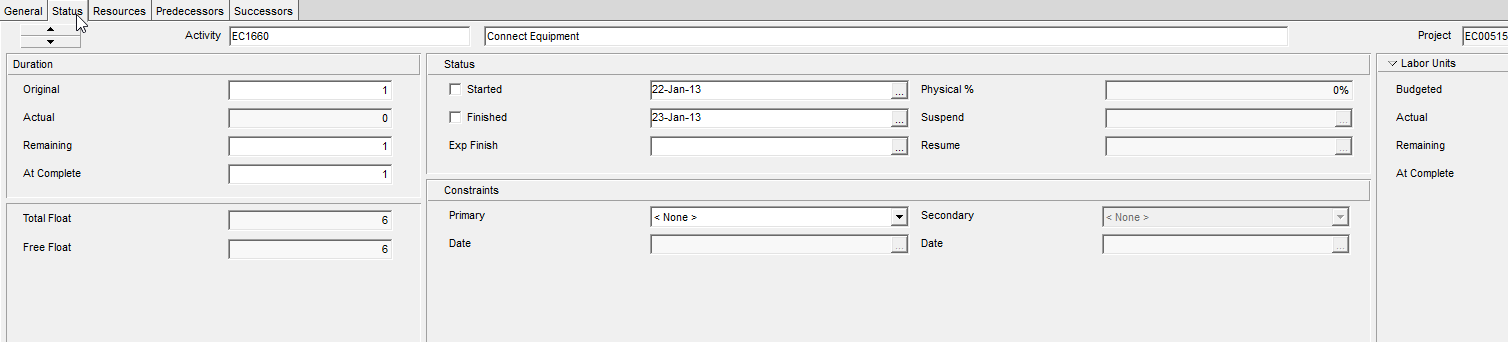
What a planner means
Work on an in-progress activity stopped for a while, then started again. Status tab: Suspend date, later Resume date. Example (Oracle): an event interrupts the work, or resources put it on hold.
XER: TASK.suspend_date (Suspend Date), TASK.resume_date (Resume Date).
Rules Oracle actually states
- The activity must have an Actual Start before you can record a suspend date.
- Only Task Dependent and Resource Dependent activities. Not LOE, not milestones, not WBS Summary.
- Suspend/resume is at the beginning of the specified day.
- The gap is nonwork time on the activity calendar (and resource calendar for resource-dependent). Units and costs are not spread across the suspend period. Actual duration is time actually worked, not the gap.
- Resume must be later than suspend and earlier than Actual Finish (EPPM Dates columns).
- Gantt: bar necking — Bars > Bar Settings > Activity nonwork intervals (neck between suspend and resume). Calendar nonwork time is a separate necking option.
What it is not
- Not a calendar holiday (that is
CALENDAR.clndr_dataexceptions). - Not remaining duration. Remaining duration is still working time from remaining start to remaining finish.
- Not Expected Finish or a constraint.
Microsoft Project
Project has split tasks and Stop/Resume fields. Not the same object. Oracle’s own MSP XML note: “Suspend and resume dates in Microsoft Project are not honored when imported to P6” — the gap comes in as a zero-value bucket on the assignment. The other direction: MSP honors P6 suspend/resume when spreading planned units into Baseline Work, but Actual Work / remaining is only honored up to the suspend date (or the data date) under the rules on that page.
Do not treat an MSP split as a P6 suspend/resume pair, or drop suspend_date/resume_date on convert and call the bar continuous.