
Dates & Status
Update Progress Estimates On-Schedule Progress for a New Data Date
Update Progress estimates on-schedule progress for spotlighted or selected activities; not Apply Actuals, not Spotlight

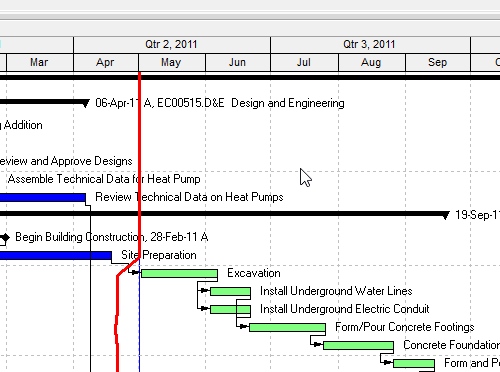
What a planner means
Update Progress (Tools > Update Progress in Professional) is a command. It opens the Update Progress dialog and estimates progress for spotlighted or selected activities as of a New Data Date. Oracle: use it when activities are progressing on schedule. It is not Apply Actuals, not Progress Spotlight, and not typing Started/Finished on the Status tab.
Oracle: P6 Professional estimates progress only for activities that were supposed to take place. After you spotlight (View > Progress Spotlight, or drag the data-date line), you can update the project automatically as "on time." Update Progress then applies actual dates to activities that should have started and finished, updates actual and remaining durations, and updates remaining units according to the new data date. Apply also changes the Current Data Date to the New Data Date you specify.
Oracle Tools toolbar: Update Progress and Apply Actuals are separate icons. Apply Actuals is the Auto Compute / timesheets job. See Apply Actuals Posts Progress and Moves the Data Date. Spotlight is the yellow curtain that selects the window. See Progress Spotlight (a View, Not a Field).
Dialog (Oracle):
- Current Data Date / New Data Date
- When using Progress Spotlight: update all highlighted Gantt activities, or only selected activities
- When actuals are applied from timesheets: recalculate remaining duration from the activity duration type, or always recalculate (Oracle: all activities treated as Fixed Units and Fixed Units/Time)
Apply calculates (Oracle wording):
- sets Actual Start to Project Planned Start, if the Project Planned Start is earlier than the new data date
- Remaining Duration = Early Finish − new Data Date; Actual Duration = Original Duration − Remaining Duration
- Actual Units = Units Percent Complete × At Complete Units
- sets Actual Finish to Planned Finish, if Planned Finish is earlier than the new data date
Privilege: Apply Actuals project security privilege.
Oracle on manual future-period buckets: actuals use the specified manual planned or budgeted unit distribution; the manual remaining distribution is not considered. When planned/budgeted and remaining differ, planned/budgeted overwrite remaining. See Future Period Buckets Are Typed Assignment Units, Not a Curve.
Oracle also says you can estimate progress automatically after setting Auto Compute Actuals, via Tools > Apply Actuals. That is the other command.
XER
Update Progress is a command. It is not an XER table. After it runs you see dates, units, and a new data date. Do not invent an UPDATEPROG / UPDPROG table.
Microsoft Project
Update Project (Project tab, Status group) can Update work as complete through a date you type. Options: Set 0% or 100% complete only, or Set 0%–100% complete; Selected tasks or Entire project. If you do not specify a date, Project uses the current or Status Date. Status Date is a separate control (Project > Status Date). There is no Progress Spotlight curtain and no Apply Actuals privilege. Do not map P6 Update Progress to Update Project and call them the same command. Do not claim MPXJ can write a real MPP.
Don't
- Treat Update Progress as Apply Actuals, as Progress Spotlight, as Calculate schedule, or as Status-tab actuals.
- Treat Spotlight as the command that writes progress (it only highlights).
- Invent an Update Progress XER table, or claim the command writes
apply_actuals_date. - Map Update Progress to MSP Update Project as the same calculation.
- Claim MPXJ writes a real MPP.
Sources
- Oracle Update Progress dialog [27 Aug 2026]
- Oracle Update progress for spotlighted activities [27 Aug 2026]
- Oracle Updating progress [27 Aug 2026]
- Oracle Tools toolbar [27 Aug 2026]
- Oracle Progress Spotlight [27 Aug 2026]
- Microsoft Update Project [27 Aug 2026]
- Microsoft Update work / Update Project [27 Aug 2026]
- Microsoft Status Date [27 Aug 2026]