
Views, Filters & Print
Summarizer Stores Rolled-Up EPS Totals; It
Summarizer rolls project data for EPS/summarized pages; Enable Summarization is not Publication; not Calculate schedule

What a planner means
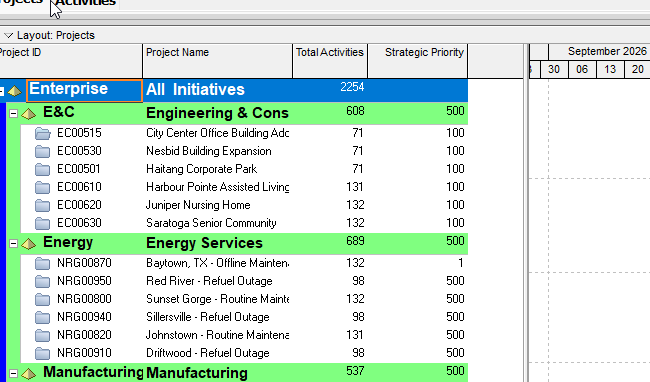
Summarize is a service/command that rolls project data and saves summary values to the project database. Oracle: the Summarizer Service (web summarizer) creates summary data (a summary record of aggregate totals in columns) and spread data (a sub-summary for each spread period). Some pages use that data for unit/cost spreads and aggregated (rolled-up) values at EPS, project, and WBS level. The summarizer typically runs less frequently than the publisher, so changes take longer to show in summarized data than in published data.
This is not Schedule. It is not Publication Services / Enable Publication / Extended Schema. See Publication. It is not the live Activities-window WBS band. Oracle: the Activities page is live (except Resource Availability, which is published). On the EPS page, costs, units, dates, and activity counts are summarized; durations are live but calculated from summarized data.
Professional: Tools > Summarize, then Open Projects or All Projects. P6 Professional considers each project's summary settings before including it. New summary values overwrite previously calculated summary values. On a Professional database, global resource summaries recalculate only when you choose All Projects; Professional can also summarize on a schedule. On an EPPM database from the client: the job is queued as an ASAP service (not run locally); global resource summaries always occur; enterprise project summaries do not occur from the client.
EPPM web: EPS Actions → Summarize Projects (the selected project or EPS node). From Activities, currently open projects. Or schedule it on Project Scheduled Services. If you run the summarizer from Scheduled Services you can summarize the entire EPS; otherwise an EPS node uses the sum of the project records beneath it.
Enable Summarization (Project Preferences → Analytics & Services; EPS column) determines whether a project will be summarized. If cleared, it will not be. Clearing it in the EPS table asks whether to delete the summary information. REST: when true, the Summarizer automatically summarizes the project; when false, the project is skipped during the summary run.
Oracle: when a project is summarized, a scheduled service creates summary data for all project data shown in EPS columns; project and WBS data for each financial period or week/month, including totals; and resources and roles by project plus totals for all projects (enterprise resource summary). An EPS element gets EPS summary records for all projects in that node. Resource-related features that use summary data rely on enterprise (EPS) resource records — each is the sum of all assignments for a resource; summarizing a project creates/updates those records.
Oracle does not summarize Requested projects, Templates, or Baselines. A project that is checked out in Professional, or opened exclusively by another user, cannot be summarized even if Enable Summarization is on (the exclusive user can summarize that project).
Summarize to WBS Level: depth of the WBS hierarchy for which summary data is calculated and stored. Level 1 is the project. Level 3 stores the project plus first- and second-level WBS. Last Summarized On / EPS Last Summarized Date: the date the project was last summarized; blank if never. Contains Summary Data: whether the project has been summarized. Contains Summarized Data Only (Professional only): keep only summarized data (no individual activities) — for projects managed outside the Professional database, including summarizing external Microsoft Project .MPD files into Professional for summary-level tracking.
Summarize Project based on (high-level resource planning vs detailed activity resource assignments) is a separate option. Changing it deletes the previous summary data the next time the project is summarized. See High-Level Planning Assignments Sit on WBS or Project, Not TASK.
EPS Summarize Resources/Roles by WBS: if selected, P6 creates resource and role summaries to the Summarize to WBS Level.
Application Services page: summarize by calendar (WBS Level and Resource/Role Assignment = Week or Month) and/or by financial periods.
Oracle: publisher and summarizer always use the project baseline for earned-value calculations, regardless of the project's "Baseline to be used for earned value calculations" setting. Summarized pages compare against the Project Baseline only. See baselines.md.
A WBS Summary activity type is a TASK. That is not this service. See P6 WBS and P6 Activity Types (Six) — Not MSP Task Type.
XER
Summarize is a command/service. Oracle's project XER map has no summary-data or spread-data table. Do not invent TASKSUM / SUMDATA / PROJSUM as an XER %T. Oracle says summary data tables temporarily store and share the data — that is the application database, not a cited XER table.
| Column | Oracle label |
|---|---|
PROJECT.batch_sum_flag | Enable Summarization |
PROJECT.sum_data_date | Summarized Data Date (P6 Professional only) |
PROJECT.last_tasksum_date | Last Summarized Date |
PROJECT.sum_only_flag | Contains Summarized Data Only (P6 Professional only) |
PROJECT.wbs_max_sum_level | WBS Max Summarization Level |
PROJWBS.sum_data_flag | Contains Summary Data |
sum_data_date is not last_recalc_date (Last Recalc Date). Do not invent that last_tasksum_date is the Settings-tab Last Summarized On field (Oracle labeled the column Last Summarized Date; the UI also has Last Summarized On). Do not invent that wbs_max_sum_level is the Summarize to WBS Level list (Oracle labeled the column WBS Max Summarization Level). Do not invent that PROJWBS.sum_data_flag is the EPS project Contains Summary Data checkbox.
PROJECT.sum_assign_level is labeled sum_assign_level. Oracle did not say that is Summarize Project based on. See High-Level Planning Assignments Sit on WBS or Project, Not TASK.
PROJECT.sum_base_proj_id is Project Baseline. That is which baseline summarized/published EV uses, not the summarizer command. See baselines.md.
px_enable_publication_flag is Enable Publication. Not this flag.
Microsoft Project
Desktop Project has summary tasks: indent a task and the task above becomes a summary task that shows combined subtask information. That is an outline. It is not P6 Summarize / Enable Summarization / the Summarizer service. Do not map them. Do not treat Professional Contains Summarized Data Only (Oracle: can summarize external Microsoft Project .MPD files into the Professional database) as MSP outline summary tasks. Do not claim MPXJ can write a real MPP.
Don't
- Treat Summarize as Calculate schedule, Publication, Apply Actuals, or live Activities WBS rollup.
- Treat Enable Summarization as Enable Publication.
- Treat
sum_data_dateas the Data Date /last_recalc_date. - Invent that
last_tasksum_dateis Last Summarized On, or thatwbs_max_sum_levelis Summarize to WBS Level. - Invent a
TASKSUM/SUMDATAXER table. - Invent that
sum_assign_levelis Summarize Project based on. - Treat a WBS Summary activity, or an MSP summary task, as this service.
- Claim MPXJ writes a real MPP.
Sources
- Oracle About Summary Data [27 Aug 2026]
- Oracle Working with the Summarizer Service [27 Aug 2026]
- Oracle Summarized, Published, and Live Data Usage in P6 [27 Aug 2026]
- Oracle Summarizing Projects [27 Aug 2026]
- Oracle Configuring Project Summarization and… [27 Aug 2026]
- Oracle Analytics & Services Tab [27 Aug 2026]
- Oracle Summary Columns of the EPS Table [27 Aug 2026]
- Oracle Services Page [27 Aug 2026]
- Oracle Summarize project data [27 Aug 2026]
- Oracle Rolling up data with the summary service [27 Aug 2026]
- Oracle Set a project's summarization options [27 Aug 2026]
- Oracle Settings tab — Project Details [27 Aug 2026]
- Oracle REST Project [27 Aug 2026]
- Oracle REST Summarize Project job [27 Aug 2026]
- Oracle XER PROJECT [27 Aug 2026]
- Oracle XER PROJWBS [27 Aug 2026]
- Oracle XER project map TOC [27 Aug 2026]
- Oracle XER project map PDF [27 Aug 2026]
- Microsoft Create and work with subtasks and summary… [27 Aug 2026]