
Collection
Views, Filters & Print
Layouts, filters, Gantt, print · 46 topics.
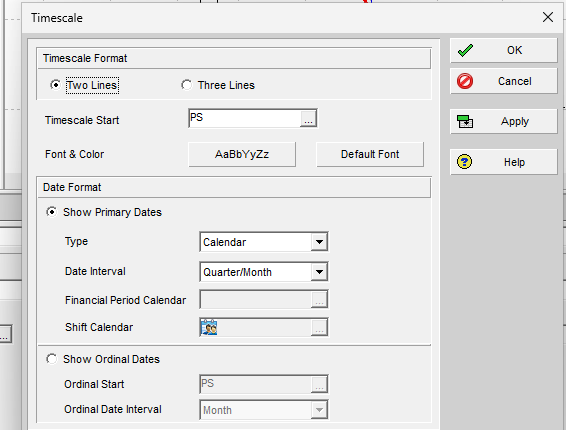
Timescale is a view setting. It is not a schedule object.
Topics
46
- A Location
Location is lat/long on project/activity/resource; not an activity code
Views, Filters & Print - A Reflection
Reflection is a mergeable what-if copy; What-If status alone is not a reflection
Views, Filters & Print - Activity Feedback
TASKFDBK is resource comments on an activity; not TASKMEMO, not Discussion
Views, Filters & Print - Activity Network
Activity Network is a Show-on-Top WBS diagram; not Trace Logic or TASKPRED; positions as .ANP, no XER table
Views, Filters & Print - Activity Usage Profile
Activity Usage Profile is a Show-on-Bottom histogram of activity units/cost; not the usage spreadsheets or Resource Usage Profile; no XER table
Views, Filters & Print - Activity Usage Spreadsheet
Activity Usage Spreadsheet is a timescaled activity view; not Resource Usage Spreadsheet; not editable; no XER table
Views, Filters & Print - Admin Categories
Admin Categories is Admin > Admin Categories standard category dictionaries; not Admin Preferences; no ADMINCAT table
Views, Filters & Print - Admin Preferences
Admin Preferences is Admin > Admin Preferences enterprise defaults; not User Preferences; no table on project XER
Views, Filters & Print - Check Out
Check Out is remote lock-and-copy; Exclusive is a session lock
Views, Filters & Print - Check Schedule
Check Schedule is a health/quality report; not Calculate schedule; no XER table
Views, Filters & Print - Columns
Columns is Layout Options bar / View > Columns Available/Selected list plus Edit Column title/width/alignment; .plf not XER; not Group and Sort or…
Views, Filters & Print - Costs Are Stored in the Base Currency
Costs stored in base currency; view currency is display only
Views, Filters & Print - Currencies
Currencies is Admin > Currencies the currency dictionary; not User Preferences Currency; CURRTYPE is currencies.md
Views, Filters & Print - Curtain Attachment
Curtain is a Gantt date-range decoration saved with the layout; not Spotlight; no XER table
Views, Filters & Print - Discussion
Discussion is an activity comment thread; Unread Comments is Team Member, not Feedback; no table on project XER
Views, Filters & Print - Estimate History
PROJEST is a saved Professional top-down / function-point estimate; not Independent ETC, remaining duration, or spending plan
Views, Filters & Print - Filter Activities According to the Resource Usage Profile
Filter activities according to the Resource Usage Profile is Display Activities for Selected: Resource or Time Period
Views, Filters & Print - Filter Activities According to the Resource Usage Spreadsheet
Filter activities according to the Resource Usage Spreadsheet is Display Activities for Selected: Resource or Assignments
Views, Filters & Print - Filters and Layouts Are a View, Not the Schedule
Filter/layout is a view; not in project XER; .plf is separate
Views, Filters & Print - Future Period Buckets Are Typed Assignment Units, Not a Curve
Typed assignment buckets (Manual curve); not FINDATES, TASKFIN, or 21-point curves
Views, Filters & Print - Gantt Bars Are Layout Bar Definitions, Not an XER Table
Gantt bars are View > Bars / Bar Chart Options layout definitions (Current / Baseline / Float timescales, filters, necking, labels); .plf not XER; not…
Views, Filters & Print - Global Change
Global Change is a batch edit (If/Then); PCF not XER; not a filter
Views, Filters & Print - Group and Sort
Group and Sort is Layout Options bar / View > Group and Sort grouping bands and within-group sort; .plf not XER; not a filter or Collapse To
Views, Filters & Print - Group and Sort Resource Usage Spreadsheet Columns in the Activities Window
Group and sort Resource Usage Spreadsheet columns in the Activities window is Display Options bar, Group and Sort By
Views, Filters & Print - High-Level Planning Assignments Sit on WBS or Project, Not TASK
Planning-page resource/role demand on WBS or project; not TASKRSRC; WBSRSRC_QTY only, no assignment-header table
Views, Filters & Print - Independent ETC
Independent ETC is typed on WBS; calculated ETC uses the WBS technique
Views, Filters & Print - Issues and Thresholds — Not Schedule Logic
PROJISSU / PROJTHRS / ISSUHIST; monitor writes issues; not schedule logic
Views, Filters & Print - Job Services
Job Services is Tools > Job Services the interval scheduler; not Apply Actuals, Summarize, Schedule, or Publication
Views, Filters & Print - P6 Activity Constraints (Task.cstr_type)
TASK.cstr_type codes and float effects
Views, Filters & Print - P6 Schedule Print / PDF (Table + Gantt)
Print current layout; Data Date in header; Timescale Start/Finish is its own control
Views, Filters & Print - P6 View > Collapse to (WBS Level)
View > Collapse To; project node = level 1; depth not code dots
Views, Filters & Print - Professional Reports Are a Stored Definition, Not a Layout
Professional Report Wizard/Editor is a stored definition (.ERP); not in project XER; not BI Publisher or a layout
Views, Filters & Print - Publication
Enable Publication queues project data into the Extended Schema for reports; not Check Out, not a baseline
Views, Filters & Print - Risks Are Uncertain Events, Not Issues or Thresholds
PRORISK / RISKTYPE (Professional); not issues; not project thresholds; XML for EPPM
Views, Filters & Print - Schedule Log
Schedule Log is an HTML/text report of the last schedule run; not an XER table
Views, Filters & Print - Security Profiles
Security Profiles is Admin > Security Profiles global and project privilege sets; not Users; no table on project XER
Views, Filters & Print - Send Project Creates an XER and Emails It; It
Send Project is File > Send Project; creates an XER and emails it; not File > Export, Job Services Export, or Check Out
Views, Filters & Print - Sight Lines Are Gantt Background Gridlines, Not an XER Table
Sight Lines are Bar Chart Options Gantt background gridlines (horizontal major/minor + vertical date-interval); .plf not XER; not Data Date, Progress Line,…
Views, Filters & Print - Summarizer Stores Rolled-Up EPS Totals; It
Summarizer rolls project data for EPS/summarized pages; Enable Summarization is not Publication; not Calculate schedule
Views, Filters & Print - Text Attachment
Text attachment is custom Gantt text (View > Attachments → Text); not a notebook or curtain; no XER table
Views, Filters & Print - Timescale
Timescale is Layout Options bar Gantt/profile/spreadsheet date-axis format (Calendar/Fiscal/Week of Year, Date Interval, ordinal); .plf not XER; not print…
Views, Filters & Print - Tracking
Tracking is Enterprise > Tracking (Project Explorer / Resource Explorer; four layout types including Resource Analysis and Project Gantt/Profile); not…
Views, Filters & Print - Types of Tracking Layouts
Types of tracking layouts is four types: Project Table, Project Bar Chart, Project Gantt/Profile, Resource Analysis
Views, Filters & Print - User Preferences
User Preferences is Edit > User Preferences per-user time/date/currency and session settings; not Admin Preferences; no table on project XER
Views, Filters & Print - Users
Users is Admin > Users login accounts; Global Access / Project Access / Module Access; not Security Profiles; no table on project XER
Views, Filters & Print - Visualizer
Visualizer is a separate app (Gantt/TSLD/.vlf); not in project XER; not the Activities .plf
Views, Filters & Print