
In Primavera P6
Change Activity Information in the Activity Table
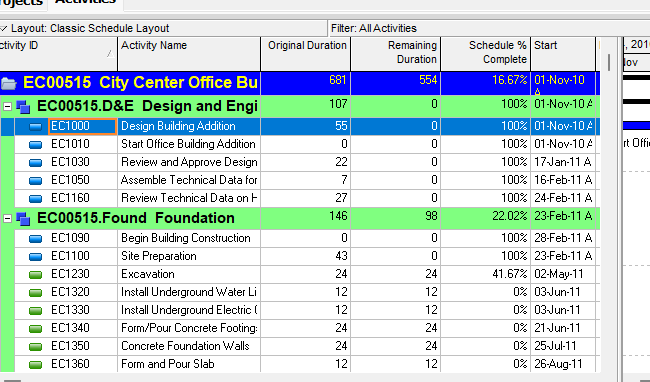
Change activity information in the Activity Table is double-click the information; not Details

What a planner means
Change activity information in the Activity Table is Oracle Change activity information in the Activity Table. Double-click the information you want to change. You may need the required security privileges to edit certain activity information. It is a how-to. It is not stored as its own table. It does not create, edit, or delete a relationship. It is not Define general activity information, not Edit Activity as a menu name, not The Activity Table view object, not Define Activity Table columns, not Customize activity column titles, not Sort activity information in the Activity Table, not Change Activity Table font, color, and row height, not Add activities in the Activity Table, not Copy / Cut and paste activities in the Activity Table, not Change an activity's WBS assignment, not Change an activity's start and finish dates in the Gantt Chart, not Change an activity's duration in the Gantt Chart, not Fill Down, not Global Change, not TASKPRED, not EPPM Working with Activities / Configuring General Activity Information copied onto Professional, and not Microsoft table-cell edit.
Oracle does print a how-to titled Change activity information in the Activity Table. Oracle does not print a menu item named Change activity information in the Activity Table. Do not invent Edit > Change activity information or View > Change activity information.
Oracle Change activity information in the Activity Table (Professional):
- "To change activity information, double-click the information you want to change."
Note: "You may need the required security privileges to edit certain activity information."
That how-to fetched prints no Project, Activities, no Activity Details, no General tab, no OK, no Apply, no Save, no Yes, no Enter, no F2, no Fill Down, and no column list. Do not invent those on this how-to.
Define general activity information is a different how-to. Project, Activities; Activity Details tabs. That is the Details surface. This how-to is the table-cell surface. Do not collapse them. See Edit Activity.
The Activity Table is a different object. Table-format view. Show or hide is View > Show on Top > Table. See Display the Activity Table.
Define Activity Table columns is a different how-to. View, Columns; which fields show. It does not edit activity values. See Define Activity Table Columns.
Professional vs EPPM
Professional — Double-click the information you want to change. Security privileges may be required. No Save on that page.
EPPM web — Oracle Working with Activities: "You can select activities and update them within the grid or on the detail windows." That page fetched prints Grid, Gantt, Context, Expand Dock / Collapse Dock, Show/Hide Tabs. It does not print double-click the information you want to change. Do not copy Professional double-click onto EPPM. Do not copy EPPM grid / dock onto Professional.
Primavera Cloud is a different product. Do not copy it here.
XER
The how-to is not an XER table. After it runs you may see changed TASK fields. Oracle’s project XER map TOC has no CHANGEACT / EDITTABLE / TABLEEDIT table. Do not invent a command %T. A Viewer cannot tell this how-to from Define general activity information, import, or Global Change.
Microsoft Project
Microsoft Project lets you edit values in the Gantt table. Do not map that as P6 Change activity information in the Activity Table. Do not claim MPXJ writes a real MPP.
Don't
- Invent a menu named Change activity information, or invent Project, Activities / Details / Save on this how-to.
- Collapse this onto Define general activity information or Edit Activity as if they were one surface.
- Treat this as Define Activity Table columns or Customize activity column titles.
- Copy EPPM grid / dock onto Professional, or Professional double-click onto EPPM.
- Invent a CHANGEACT XER table, or reconstruct the how-to from a changed TASK field.
- Map MSP table-cell edit as this how-to.
- Claim MPXJ writes a real MPP.