
In Primavera P6
Copy Project
Copy Project is Edit > Copy / Paste of a project plus Copy Project Options; not a reflection, baseline, or import

What a planner means
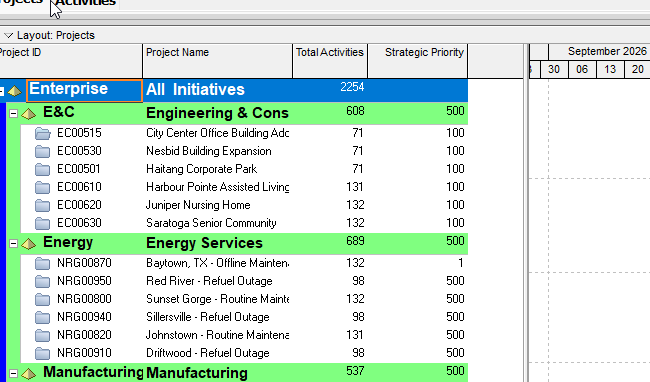
Copy Project is Edit > Copy then Edit > Paste of a project (or EPS node) in Enterprise > Projects. Oracle does not print a menu item named Copy Project. The dialog Oracle names is Copy Project Options. It is a command. It is not stored data. It is not Create Reflection, not Create Baseline, not File > Import, not File > Export, not File > Send Project, not File > Check Out, not Copy WBS, not Copy Activity, not Fill Down, and not Range Copy.
Oracle Copy and paste a project: "Open the project you want to copy." "Choose Enterprise, Projects, then select the project you want to copy." "Choose Edit, Copy, or click the Copy icon on the Edit toolbar." "Select the position in the EPS where you want to copy the project." "Choose Edit, Paste, or click Paste icon on the Edit toolbar." "In the Copy Project Options dialog box, mark the checkbox next to each type of information you want to copy." "Click OK."
Oracle Copy an EPS node or project: "Choose Enterprise, Projects, then select the EPS node or project you want to copy." "Choose Edit, Copy." "Click the location in the EPS where you want to paste the new EPS node/project." "Choose Edit, Paste." "Mark the checkboxes beside any optional information you want to include in the copied EPS node or project in the Copy Project Options, Copy WBS Options, and Copy Activity Options dialog boxes."
Quote both how-tos. The project how-to names Copy Project Options in the steps. The EPS/project how-to names Copy Project Options, Copy WBS Options, and Copy Activity Options. Do not collapse those lists. Do not invent that one how-to's dialog list is the other's.
Professional — Edit Menu: Copy "Copies the selected data object." Enabled when the active window is "All." Corresponding toolbar: Edit Toolbar. Paste "Pastes a copied or cut data object. This command is enabled after you copy or cut a data object." Enabled when "All." Edit Toolbar. This is the same Copy/Paste as any other data object. Copy Project is that command when the selected object is a project (or EPS node) in Projects.
Edit Toolbar Copy: "Copies the selected data object." Yes (displays by default). Enabled when "All except Tracking." Ctrl+C. Edit > Copy. Tip: "This icon is enabled in the Resource Assignments window so that you can copy resource assignments and paste them into another application, such as Microsoft Excel. You cannot paste a resource assignment row in the Resource Assignments window." Edit Toolbar Paste: "Pastes a copied or cut data object. This icon is enabled after you copy or cut a data object." Yes. Enabled when "All except Tracking and Resource Assignments." Ctrl+V. Edit > Paste. Do not collapse Edit Menu "All" and Edit Toolbar "All except Tracking" / "All except Tracking and Resource Assignments" into one invented window list.
Hot keys: Alt-E, C = Copy. Alt-E, P = Paste. Quote both the toolbar Ctrl+C / Ctrl+V and the hot keys. Do not collapse them.
Create Reflection is a different command. Oracle Create a Reflection: Projects view, right-click the project, Create Reflection. If the project has baselines, Copy Baselines (mark Copy per baseline). A reflection is named like the source with reflection appended, internally links to the source for merge, and has What-If status. Edit > Copy / Paste does not create that link and does not open Create Reflection. See A Reflection.
Create Baseline is a different command. A baseline is a copy, or snapshot, of project data at a given time. You create one by saving a copy of the current project or converting another project. Copy titles get a - Bx suffix. Converted projects leave the EPS. See baselines.md. Copy Project Options Baselines is an optional include on this paste. It is not Maintain Baselines / Update Baseline. See Update Baseline Merges Selected Current-Project Data Into an Existing Baseline.
Copy WBS is a different command. Oracle Copy and paste a work breakdown structure element: Project, WBS → Edit, Copy → Edit, Paste → Copy WBS Options → (if Activities is marked) Copy Activity Options → Renumber Activity IDs. That is not Enterprise > Projects Edit > Copy of a project. See the Copy WBS Options / Copy Activity Options names below only as the EPS/project how-to printed them.
Copy Activity is a different command. Oracle Copy and paste activities in the Activity Table / Activity Network: Activities window Edit > Copy / Paste, then Copy Activity Options and Renumber Activity IDs. Not this command.
Fill Down is a different command. Edit > Fill Down copies first-selected-row text down a column. See Fill Down Copies First-Selected-Row Text Down a Table Column.
Import / Export / Send Project / Check Out are different commands. File > Import reads a file. File > Export writes a file. File > Send Project emails an XER. File > Check Out is remote lock-and-copy. See File > Import Starts the Import Wizard; It, File > Export Starts the Export Wizard; It, Send Project Creates an XER and Emails It; It, Check Out.
Professional dialog fields Oracle names
Oracle Copy Project Options dialog box: "Use the Copy Project Options dialog box to specify which optional project information you want to copy when you create a copy of an existing project." Quote the checkboxes Oracle printed. Do not invent others. Do not copy the EPPM EPS-page list onto this dialog.
- Risks — "When connected to a P6 EPPM database, mark this checkbox to copy P6 risk information to the new project. When connected to a P6 Professional database, mark this checkbox to copy risk information to the new project."
- Issues and Thresholds — "Mark this checkbox to copy issue and threshold information to the new project."
- Reports — "Mark this checkbox to copy reports to the new project."
- Documents — "Mark this checkbox to copy documents to the new project."
- Funding Sources — "Mark this checkbox to copy funding sources to the new project."
- Baselines — "Mark this checkbox to copy baselines to the new project." "Note if the project you are copying does not contain any baselines, this checkbox will be disabled."
- Summary Data — "Mark this checkbox to copy summary data to the new project."
- Enable Publication for copied projects — "Mark this checkbox to enable the publication option for the new project."
- Visualizer Layouts — "Mark this checkbox to copy P6 Visualizer layouts saved with the project to the new project."
- Do not show this dialog again — "Mark to indicate that you do not want this dialog box to appear next time you create a copy of a project."
What gets copied vs not: Oracle said "optional project information" and "mark the checkbox next to each type of information you want to copy." Oracle printed no "always copied" field catalog (no Project ID, WBS, calendar, or activity list that is copied regardless of checkboxes). Do not invent one. Unmarked optional types are the types you did not mark to copy. Oracle did not print a "never copied" list on this dialog.
Notes Oracle printed on the how-tos (quote Oracle):
- "You must group the projects by EPS in order to copy Summary Data."
- "If you select Do Not Show This Window Again in the Copy Options dialog box settings are retained until you reopen the module." Quote Do Not Show This Window Again / Copy Options dialog box (how-to) and Do not show this dialog again / Copy Project Options (dialog page). Do not collapse the names.
- "If you want to copy or move a project and have the copied or moved project's Responsible Manager value automatically changed to another value, then you need to first open the project to copy or move and group and sort the Projects view by Responsible Manager. Then copy or move the project to the appropriate responsible manager."
- "The administrator should not assign any of the following privileges to users who should not have access to view cost information while copying and pasting project/EPS or assigning WBS and Fill Down on the WBS column in the Activities view: View Project Costs/Financials, Edit WBS Costs/Financials, and Edit EPS Costs/Financials."
- "When you select an EPS node to copy, all of the selected EPS node's subordinate EPS nodes/projects are also copied, even if you do not select them."
Copy WBS Options / Copy Activity Options — named on the EPS/project how-to as the other optional-information dialogs. Quote only the checkboxes Oracle printed on those dialog pages. Do not invent that they are the Copy Project Options list.
Oracle Copy WBS Options dialog box: "Use the Copy WBS Options dialog box to specify which optional WBS information you want to copy when you copy a WBS element."
- Notebook
- WBS Milestones
- WPs & Docs
- Activities
- Do not show this dialog again
Oracle Copy Activity Options dialog box: "Use the Copy Activity Options dialog box to specify which information should be copied when you copy an activity."
- Resource & Role Assignments — "Mark to copy resource and role assignments (including future period assignment values)."
- Relationships
- Only between copied activities — "Mark this checkbox when you want to preserve relationships between copied activities, not relationships to other activities that are not being copied."
- Expenses
- Activity Codes
- WPs & Docs
- Notebook
- Steps
- Financial Period Data — "Mark to copy stored past financial period actual values."
- Do not show this dialog again — "Mark to indicate that you do not want this dialog box to appear next time you copy an activity or work breakdown structure element."
Do not copy Copy WBS / Copy Activity checkbox names onto Copy Project Options. Do not copy Copy Project Options names onto Copy WBS or Copy Activity.
EPPM — do not copy Edit > Copy onto the web
Do not copy Professional Enterprise > Projects / Edit > Copy / Edit > Paste / Edit Toolbar / Ctrl+C / Ctrl+V / Alt-E, C / Alt-E, P / the three Professional dialogs onto EPPM web.
Oracle EPPM Copy Project Options Dialog Box of the EPS Page or Copy WBS Options Dialog Box of the Activities Page: "Use this dialog box to select the project or WBS data that will be copied along with the project, WBS or template." Getting Here: EPS page — "Select the project or template to copy, click Context and select Copy." "Select an EPS node to paste the project or template into, click Context and select Paste." That is Context Copy / Paste, not Edit > Copy.
EPPM dialog groups Oracle named (quote Oracle; do not copy this list onto Professional Copy Project Options):
Project & WBS Data or WBS Data options: Documents; Funding Sources ("only visible if you are copying a project or template"); Issues ("only visible if you are copying a project or WBS"); Risks ("only available if you are copying a project or WBS"); Activities; Notebooks; WBS Milestones; High Level Resource Planning Assignments; Reports ("only visible if you are copying a project or template"); Summary Data ("only visible if you are copying a project or template"); Project Codes ("only visible if you are copying a project or WBS"); Secure Project Codes (same visibility; "You must be signed in as a user with privileges to view and edit secure codes for both the source and destination to be able to copy secure codes.").
Activity Data options: Activity Codes ("If selected, global and project activity codes are copied. EPS activity codes are only copied if the data is pasted within the same EPS node as the data you copied."); Secure Activity Codes; Copy EPS codes at project level ("only visible if you are copying a WBS"); Expenses ("only visible if you are copying a project or template"); Notebook Items; Relationships; Only between copied Activities; Resource and Role Assignments; Assignment Codes; Secure Assignment Codes; Steps; Financial Period Data; Risks; WP and Docs ("only visible if you are copying a project or template").
Baselines options: "Select the Include option for each baseline with data that you want to copy to the project. This option is only visible if you are copying a project or template." That is per-baseline Include, not Professional's one Baselines checkbox.
Enable publication for copied projects option — "Determines whether to enable the Enable Publication option for the pasted copies of the projects. This option is only visible if you are copying a project or template."
EPPM tips Oracle printed (quote Oracle):
- "You can copy multiple projects or WBS elements, or a single EPS element. You cannot copy multiple EPS elements."
- "You cannot copy and paste a project unless you have the privilege to view costs for a project."
- "When you copy and paste some types of data, including when you copy multiple WBS nodes, or when you copy a project, the new data might not appear immediately. The process runs as a background service and you will see a notification once it has completed."
Oracle EPPM Cutting, Copying, and Pasting Data: Context Copy or Cut, then Context Paste. "projects, including their WBS, activities, steps and other associated data items." "EPS nodes, including their project & WBS data and activity data." "You cannot paste data into a different EPS node, if you do not have the privilege to export data from the original parent EPS node." "When you copy and paste projects, WBS nodes, activities, resources, or roles you can choose to exclude secure codes from being pasted with the rest of the data."
Oracle EPPM Creating Projects is a different path: Context Add Project. Tip: "You can copy a project from an existing project or template." "To configure advanced options, you must select a project to copy. This will enable the Advanced tab. If you select to copy a template, the Advanced tab will not be enabled." "You can perform the cut, copy, and paste functions to create new projects from existing projects." Do not copy Add Project / Advanced tab onto Professional Edit > Copy. Do not copy Professional Edit > Copy onto Add Project.
Professional connected to an EPPM database (printed on the Professional how-tos; quote Oracle; do not copy these sentences onto EPPM web menus):
- "You cannot paste data into a different EPS node, if you do not have the privilege to export data from the original parent EPS node."
- "When you copy an EPS node, any template projects in that EPS are copied even though you cannot see them in P6 Professional."
- "P6 Professional uses a job service to copy projects and EPS nodes. This means that you can carry on working while the project or EPS is copied in the background. To see the progress of the job, choose Tools, Job Status." Copy-and-paste-a-project also: "You must group the projects by EPS in order to copy projects and EPS nodes using the job service."
Professional Copy Project Options names Visualizer Layouts. The EPPM EPS dialog fetched does not. EPPM names High Level Resource Planning Assignments, Project Codes, Secure Project Codes, Assignment Codes, Secure Assignment Codes, Copy EPS codes at project level, and per-baseline Include. Professional Copy Project Options does not. Do not collapse the two dialogs.
XER
Copy Project is a command. It is not an XER table. After it runs you see another PROJECT (and the tables that project carries). Do not invent a COPYPROJECT / COPYPROJ / COPY_PROJECT / COPYOPTIONS table.
Oracle's project XER data map TOC lists no COPYPROJECT, COPYPROJ, COPY_PROJECT, or COPYOPTIONS table. Oracle did not name an XER column for "the planner used Copy Project."
PROJECT.source_proj_id is labeled Source Project — the reflection link. See A Reflection. PROJECT.orig_proj_id is Original Project. PROJECT.sum_base_proj_id is Project Baseline. Do not treat any of those as "this row was created by Edit > Copy."
A Viewer parse of one XER cannot reconstruct whether the planner used Edit > Copy / Paste, Create Reflection, Create Baseline, File > Import, or typed a new project.
Microsoft Project
Desktop Project has File > Save As of the plan file. Microsoft Create a new project from another project or template: "Open the project or template you want to use as the basis for the new project." "Click File > Info." "Under Project Information, change the project's start date and finish date." "Click Save As and pick a new name and a new home for the project." "You can start working on your new project right away, but chances are you'll need to clean up some of the existing project information before you do." Same page: save the old project as a template to strip progress information, "leaving only tasks and resources behind." File > New from a template is that other path.
Microsoft Organizer copies reports, calendars, and views to another project or Global.MPT. Microsoft: "You can’t copy task information using the Organizer." That is not Copy Project.
They are not the same command. P6 Copy Project is Edit > Copy / Paste of a project in the EPS plus Copy Project Options checkboxes Oracle named. Project Save As writes another plan file. Microsoft did not print Copy Project Options, Copy WBS Options, or Copy Activity Options. Do not invent an analog. Do not claim MPXJ can write a real MPP.
Don't
- Treat Copy Project as Create Reflection, as Create Baseline / Update Baseline, as File > Import / Export / Send Project / Check Out, as Copy WBS, as Copy Activity, as Fill Down, or as Range Copy.
- Invent a COPYPROJECT / COPYPROJ / COPY_PROJECT / COPYOPTIONS XER table, or treat
source_proj_id/orig_proj_id/sum_base_proj_idas "the planner used Edit > Copy." - Invent Copy Project Options checkboxes Oracle did not print. Professional names Risks, Issues and Thresholds, Reports, Documents, Funding Sources, Baselines, Summary Data, Enable Publication for copied projects, Visualizer Layouts, Do not show this dialog again.
- Copy the EPPM EPS-page checkbox list (Project Codes, Secure codes, High Level Resource Planning Assignments, per-baseline Include, Assignment Codes, Copy EPS codes at project level) onto Professional Copy Project Options.
- Copy Professional Edit > Copy / Edit Toolbar / Ctrl+C / Alt-E, C / the three Professional dialogs onto EPPM, or treat EPPM Context Copy / Add Project Advanced as Edit > Copy.
- Collapse Edit Menu "All" and Edit Toolbar "All except Tracking" into one invented window list.
- Claim a Viewer reconstructed that the planner last used Copy Project from an XER.
- Map P6 Copy Project to MSP Save As / File > New / Organizer as the same command.
- Claim MPXJ writes a real MPP.
Sources
- Oracle Copy and paste a project [27 Aug 2026]
- Oracle Copy an EPS node or project [27 Aug 2026]
- Oracle Copy Project Options dialog box [27 Aug 2026]
- Oracle Copy WBS Options dialog box [27 Aug 2026]
- Oracle Copy Activity Options dialog box [27 Aug 2026]
- Oracle Copy and paste a work breakdown structure element [27 Aug 2026]
- Oracle Edit Menu [27 Aug 2026]
- Oracle Edit Toolbar [27 Aug 2026]
- Oracle Using Hot Keys [27 Aug 2026]
- Oracle Create a Reflection [27 Aug 2026]
- Oracle What is a reflection [27 Aug 2026]
- Oracle Copy Project Options Dialog Box of the EPS Page… [27 Aug 2026]
- Oracle Cutting, Copying, and Pasting Data [27 Aug 2026]
- Oracle Creating Projects [27 Aug 2026]
- Oracle XER project map TOC [27 Aug 2026]
- Oracle PROJECT [27 Aug 2026]
- Microsoft Create a new project from another project or… [27 Aug 2026]
- Microsoft Copy reports, calendars, and views in Project… [27 Aug 2026]