
Views, Filters & Print
Curtain Attachment
Curtain is a Gantt date-range decoration saved with the layout; not Spotlight; no XER table

What a planner means
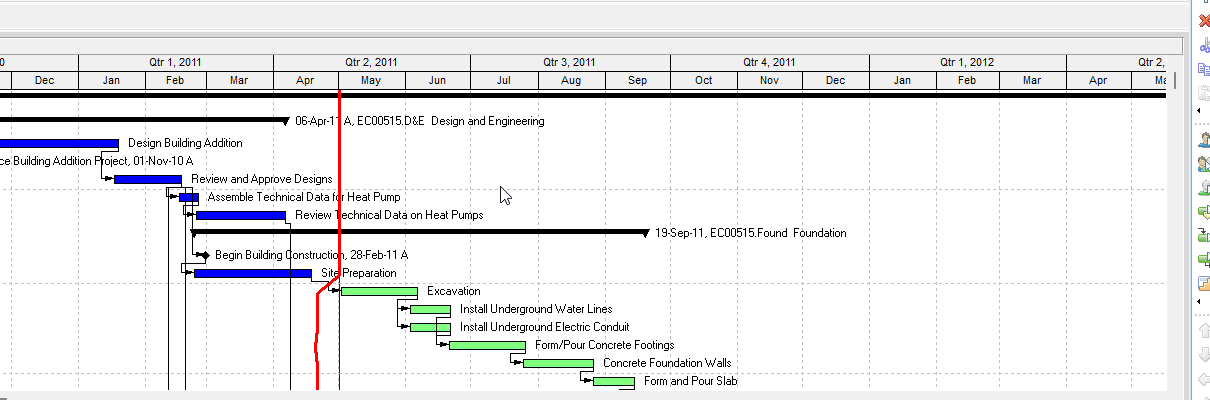
Curtain (Oracle: curtain attachment) is a Gantt Chart decoration. Oracle View menu: "Curtain attachments highlight a specific time period in a Gantt Chart." It is not Progress Spotlight (the yellow update-window band that selects activities between the last data date and a new data date — Progress Spotlight (a View, Not a Field)), not Progress Line (Progress Line), not a look-ahead filter (Look-Ahead 21-Day / 3-Week Window), and not a text attachment (the other Attachments object: "custom text you enter in a Gantt Chart").
Professional — Activities window Gantt only. Oracle View menu: Attachments "is enabled when you display a Gantt Chart in the Activities window." Display toolbar corresponding menu: View > Attachments. Add path on the Add page: Activities window, Layout Options bar → Attachments, Curtain, Add Curtain.
Oracle Curtain Attachment dialog: "highlight a specific time period in a Gantt Chart." Fields Oracle names:
- Display curtain attachment — "Mark or clear the checkbox to display or hide the curtain attachment."
- Start Date / Finish Date — browse to select the curtain display dates.
- Color — "select a color for the curtain."
- Fill Pattern — "The fill pattern of the selected curtain's start and finish dates."
- Delete — "available when you are using the dialog box to edit an existing curtain. Click to remove the curtain from the Gantt Chart."
Add page: mark Display, pick Start and Finish Dates, color, fill pattern, OK. Oracle: "The data range defaults to the longest date interval. For example, if the date interval is Month/Week, the default range will be one month." You can "manually shift the entire curtain or change the start and finish dates" — "Move the mouse pointer over the curtain and click and drag the curtain to the new dates."
Oracle: curtains "are added to the open layout, not the open project." "If you save the open layout after adding a curtain attachment, the attachment is saved as part of the layout. The curtain attachment is then displayed whenever you view the layout, unless you subsequently choose to delete or hide the curtain attachment." Dialog tip: "you will need to save the layout to make curtain attachment additions and deletions permanent."
Hide one — double-click the curtain, clear Display, OK. Oracle: hide does not delete. "If you save the layout after hiding the attachments, the attachments are still available for display by all users who have access to the layout."
Hide All — Layout Options bar → Attachments, Curtain, Hide All. "only available if at least one curtain attachment is currently displayed."
Show All — Layout Options bar → Attachments, Curtain, Show All. "only available if at least one curtain is currently hidden."
Delete — double-click, click Delete. Oracle: "If the curtain attachment you delete is part of a saved layout, you must save your changes to the layout after deleting the attachment; otherwise, the attachment will not be deleted."
Display toolbar: icon → Curtain → Add opens the dialog; icon → Curtain → show or hide all. Same command as View > Attachments.
EPPM web — Oracle's Working with the Activity Gantt Chart page fetched documents a data-date line, sightlines, "timescale background is shaded to indicate non-work time based on the global default calendar," and Progress Spotlight ("highlights all activities that should have progressed during a specific time period"). That page does not print View > Attachments, Layout Options bar → Curtain, or the Curtain Attachment dialog. Do not copy those Professional menus onto EPPM as if Oracle printed them there. EPPM non-work shading is calendar shading, not this Start/Finish/Color/Fill attachment.
XER
The curtain is a Gantt / layout setting. Oracle's project XER data map TOC lists no CURTAIN, ATTACH, ATTACHMENT, or LAYOUT table. Do not invent one. Layouts travel as .plf, not in a project XER. See Filters and Layouts Are a View, Not the Schedule.
Oracle did not name an XER column for show/hide, Start Date, Finish Date, color, or fill pattern.
A Viewer parse of one XER cannot reconstruct whether the planner had a curtain on, or its dates/color/fill.
Microsoft Project
Desktop Project has no curtain attachment command. Do not invent one.
Microsoft documents a Current Date Gantt gridline (right-click the chart → Gridlines → Line to change Current Date) and Progress Lines (status date / current date / intervals). Those are date lines, not a user-placed shaded Start–Finish band saved with a P6 layout. See Progress Line and msp/progress-line.md.
Do not map this object to MSP Progress Lines, the Status Date / Current Date gridline, or a Gantt bar style and call them the same. Do not claim MPXJ can write a real MPP.
Don't
- Treat a curtain attachment as Progress Spotlight, as Progress Line, as the Data Date, as a look-ahead filter, or as a text attachment.
- Treat EPPM non-work time shading, sightlines, or the data-date line as this Professional curtain.
- Invent a CURTAIN / ATTACH / ATTACHMENT / LAYOUT XER table, or treat any TASK / PROJECT date column as this decoration.
- Treat hide as delete. Oracle: hidden curtains stay on the saved layout.
- Treat the curtain as stored in a project XER. It is saved with the layout (.plf).
- Copy Professional View > Attachments / Layout Options bar → Curtain onto EPPM as if Oracle printed those menus there.
- Map this object to MSP Progress Lines, the Current Date / Status Date gridline, or a bar style and call them the same.
- Claim MPXJ writes a real MPP.
- Claim a Viewer reconstructed the planner's curtains from an XER.
Sources
- Oracle Add a curtain attachment in a Gantt Chart [27 Aug 2026]
- Oracle Curtain Attachment dialog [27 Aug 2026]
- Oracle Hide a curtain attachment [27 Aug 2026]
- Oracle Hide all curtain attachments [27 Aug 2026]
- Oracle Display all curtain attachments [27 Aug 2026]
- Oracle Delete a curtain attachment [27 Aug 2026]
- Oracle View Menu [27 Aug 2026]
- Oracle Display toolbar [27 Aug 2026]
- Oracle Add a text attachment [27 Aug 2026]
- Oracle Working with the Activity Gantt Chart [27 Aug 2026]
- Oracle XER project map TOC [27 Aug 2026]
- Oracle Exporting and Importing Layouts [27 Aug 2026]
- Microsoft Work with the Gantt Chart view [27 Aug 2026]
- Microsoft set the status date [27 Aug 2026]