
In Primavera P6
Customize Activity Column Titles
Customize activity column titles is View, Columns; Edit Column; a new title; OK

What a planner means
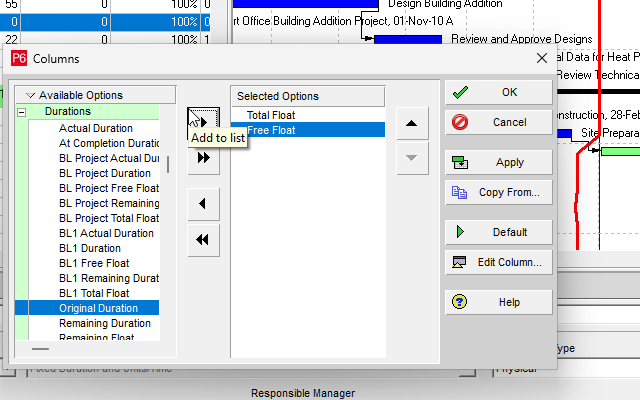
Customize activity column titles is Oracle Customize activity column titles. View, Columns; or Layout Options bar → Columns. In Available Columns or Selected Options, select the column; Edit Column; type a new title; OK. You can also set width and alignment. Then OK or Apply on the Columns dialog. Default in the Edit Column dialog restores the default title. It is a how-to. It is not stored as its own table. It does not create, edit, or delete a relationship. It is not Define Activity Table columns, not The Activity Table view object, not Change activity information in the Activity Table, not Sort activity information in the Activity Table, not Change Activity Table font, color, and row height, not View activity relationships in the Activity Table, not Change Resources tab columns, not Line Numbers, not TASKPRED, not EPPM Renaming Columns / Configuring Activity View Columns copied onto Professional, and not Microsoft Field Settings.
Oracle does print a how-to titled Customize activity column titles. Oracle does not print a menu item named Customize activity column titles. The menu that how-to prints is View, Columns. Do not invent View > Customize activity column titles.
Oracle Customize activity column titles (Professional):
- "To update columns in the Activity Table, click OK, or to view your changes without closing the Columns dialog box, click Apply."
- "Choose View, Columns. You can also click the Layout Options bar and choose Columns."
- "In the Available Columns or Selected Options section, select the column whose title you want to change."
- "Click Edit Column."
- "In the Edit Column dialog box, type a new title, then click OK. You can also specify a new width and alignment for the column."
Note (quote those sentences):
- "The default column title appears in parentheses after the new title in the Columns dialog box; however, only your revised title appears in the actual layout."
- "To restore the default column title, click Default in the Edit Column dialog box."
That page fetched prints no Save, no Rename, no New Name, no Open Column Menu, and no Download.
Define Activity Table columns is a different how-to. View, Columns; add/remove/order fields between Available Columns and Selected Options; Copy From; OK or Apply. It does not print Edit Column or a new title. See Define Activity Table Columns.
The Activity Table is a different object. Table-format view. Show or hide is View > Show on Top > Table. See Display the Activity Table.
Professional vs EPPM
Professional — View, Columns / Layout Options bar → Columns; Edit Column; type a new title; OK; then OK or Apply. Default in Edit Column restores the default title. Default title stays in parentheses in the Columns dialog.
EPPM web — Oracle Renaming Columns: "Click Open Column Menu in a column heading and click Rename Column." Rename Column dialog: New Name or Default; Rename; then Save View. "When you click Download, your customized column names appear in the Excel file." That page fetched does not print View, Columns, Edit Column, Selected Options, width, alignment, or Apply. Do not copy Professional Edit Column / OK or Apply onto EPPM. Do not copy EPPM Open Column Menu / Rename Column / New Name / Save View / Download onto Professional.
Primavera Cloud is a different product. Do not copy it here.
XER
The how-to is not an XER table. Oracle’s project XER map TOC has no COLUMNTITLE / COLTITLE / EDITCOLUMN / LAYOUTTITLE table. Do not invent a view %T. Renaming a column title does not write TASK. A Viewer cannot reconstruct that the planner used this how-to.
Microsoft Project
Microsoft Project can rename table column titles in a view. Do not map that as P6 Customize activity column titles. Do not claim MPXJ writes a real MPP.
Don't
- Invent View > Customize activity column titles, or invent Save / Rename / New Name / Open Column Menu on the Professional how-to.
- Treat this as Define Activity Table columns or The Activity Table.
- Copy EPPM Open Column Menu / Rename Column / Save View / Download onto Professional, or Professional Edit Column / Apply onto EPPM.
- Invent a COLUMNTITLE XER table, or reconstruct the how-to from TASK rows.
- Map MSP column rename as P6 Customize activity column titles.
- Claim MPXJ writes a real MPP.