
In Primavera P6
Delete Activity
Delete Activity is Edit > Delete of an activity; not Dissolve; no XER table

What a planner means
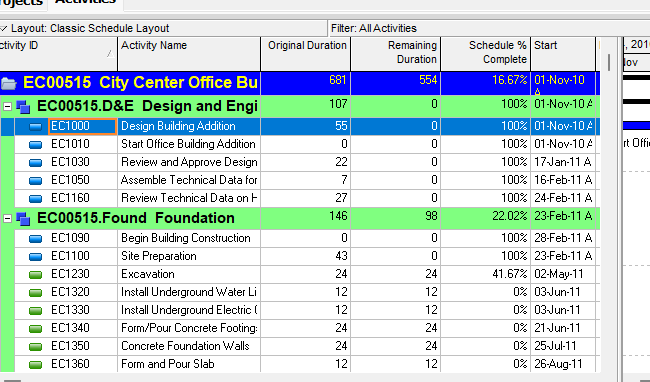
Delete Activity is Edit > Delete of an activity in Project > Activities. Oracle does not print a menu item named Delete Activity. The how-to Oracle names is Delete an activity. It is a command. It is not stored data. It is not Dissolve, not Delete WBS, not Cut Activity, not Copy Activity, not Fill Down, not Unlink Activities, not Delete of a relationship, not Change an activity's WBS assignment, and not EPPM Context Delete of a generic entry.
Oracle Delete an activity (Professional):
- "Choose Project, Activities."
- "Select the activity you want to delete, then choose Edit, Delete."
- "Click Yes to confirm that you want to delete the selected activity."
Tip Oracle printed: "To remove an activity, but maintain the relationship between its predecessor and successor activities, dissolve the activity instead of deleting it."
Quote that tip. Do not invent a dialog title. The how-to names Edit, Delete and Yes only. Do not invent Delete Activity Options, Merge or Delete, or any other button. The how-to fetched prints no associated-data catalog (no relationships, resources, steps, expenses, codes, notebooks, Activity ID, or calendar list) beyond that dissolve tip. Do not invent what is removed with the activity beyond the sentences Oracle printed.
Professional — Activities window: "Use the Edit menu on the Menu bar or use the Edit toolbar to add, delete, cut, copy, paste, link, renumber, or dissolve activities, and to undo an action." That is shortcut Delete, not a printed item titled Delete Activity. The Activities-window task list names Delete an activity once, under adding and defining general activity information. The Activity Table and Activity Network sections of that page fetched do not print a separate delete how-to. Do not invent Table vs Network delete paths.
Edit Menu: Delete "Deletes the selected data object." Enabled when the active window is "All except Tracking." Corresponding toolbar: Edit Toolbar. This is the same Delete as any other data object. Delete Activity is that command when the selected object is an activity in Activities. Do not collapse Edit Menu Delete "All except Tracking" and Edit Menu Cut "All except Tracking and Resource Assignments" into one invented window list.
Edit Toolbar Delete: "Deletes the selected data object." Yes (displays by default). Enabled when "All except Tracking." Del or Delete. Edit > Delete. Quote both the toolbar Del or Delete and the hot key. Do not collapse them.
Hot keys: Alt-E, L = Delete. The same hot-keys table also prints Alt-E, L = Select All. Quote both rows. Do not invent which command that key runs.
Delete Activities privilege (Professional project profile): "Determines whether the profile will enable users to remove activities from projects." The Professional privilege page fetched does not print Delete Project Data with Timesheet Actuals. Do not copy that EPPM privilege onto Professional.
Dissolve is a different command. Edit > Dissolve removes an activity and joins its predecessors to its successors. You cannot dissolve unless the activity has a predecessor and a successor. See Dissolve Removes an Activity and Joins Its Predecessors to Its Successors.
Delete WBS is a different command. Edit > Delete of a WBS element in Project > WBS. If the WBS is assigned to activities, Oracle prompts Merge or Delete WBS Element(s). That can delete those activities as part of deleting the WBS. It is not Activities-window Edit > Delete of an activity. See Delete WBS.
Cut Activity is a different command. Edit > Cut / Paste of activities is a move. It does not remove the activity. See Cut Activity.
Copy Activity is a different command. Edit > Copy / Paste opens Copy Activity Options and Renumber Activity IDs. See Copy Activity.
Fill Down is a different command. Edit > Fill Down copies first-selected-row text down a column. See Fill Down Copies First-Selected-Row Text Down a Table Column.
Unlink Activities is a different command. Edit > Unlink Activities "Removes relationships between the selected activities." It does not remove the activity.
Delete relationships is a different command. Activities-window tasks name Delete relationships in the Activity Network and Delete relationships in the Gantt Chart. Those remove a relationship, not the activity.
Change an activity's WBS assignment is a different command. Activity Details General tab → WBS field. That how-to does not print Edit, Delete.
Professional vs EPPM
Professional — the how-to, Edit Menu / Edit Toolbar / Alt-E, L, and Delete Activities privilege above.
EPPM web — do not copy Professional Project, Activities / Edit > Delete / "Click Yes" / Edit Toolbar / Del or Delete / Alt-E, L onto EPPM.
Oracle EPPM Working with Activities: Row Actions Menu — "Add and delete activities or add, delete, expand, and collapse WBS elements with this menu." That page fetched is not a delete how-to. It does not print Edit > Delete, Click Yes, or Save.
Oracle EPPM Deleting Entries is a generic path that names activities as one example ("The steps for deleting any entry in the entire application, such as activities, steps, or users, are generally the same."): select an entry (Ctrl for additional entries; Shift for contiguous) → Context and select Delete → "If prompted to confirm, click Yes." → "If it becomes active, click Save." Do not collapse Row Actions (Working with Activities) and Context (Deleting Entries) into one invented menu. Do not invent a dedicated EPPM how-to titled Delete an activity. Oracle Creating Activities fetched does not print delete.
EPPM Delete Activities privilege: "Determines whether the profile will enable users to remove activities from projects." Same sentence as Professional.
EPPM also prints Delete Project Data with Timesheet Actuals: "Determines whether the profile will enable users to delete activities and resource assignments for projects that have timesheet actuals. This includes cutting an activity with timesheet actuals and pasting the activity to another project." "To delete activities with timesheet actuals, users must also have the 'Delete Activities' project privilege assigned to their profile." Quote those sentences on EPPM only. Do not copy them onto Professional Edit > Delete. The Professional delete how-to fetched does not print timesheet actuals.
Do not copy Primavera Cloud "Deleting an activity also deletes any predecessor or successor activity relationships" onto P6 Professional or EPPM. That sentence was not on the P6 pages fetched.
XER
None. Oracle’s project XER map TOC has no DELETEACTIVITY / DELACT / DELETE_ACTIVITY / DELETEACT table. After the command the TASK row is gone. Do not treat a missing TASK row as “the planner used Delete.” Do not invent a child-table catalog (TASKPRED, TASKRSRC, TASKPROC, PROJCOST, TASKACTV, TASKMEMO) as “what Delete writes.” Oracle did not print those tables on the delete how-to.
TASK is the activity. See P6 Activity Types (Six) — Not MSP Task Type. Do not invent that Delete renumbers remaining TASK.task_code values. Oracle did not print that.
A Viewer parse of one XER cannot reconstruct whether the planner used Edit > Delete, Dissolve, Delete WBS with Delete Element(s), never imported the activity, or imported after it was already gone.
Microsoft Project
Microsoft: "When you insert, move, or delete a task, Project automatically updates the ID numbers so that the ID numbers always reflect the current task order." That is the ID field (list position), not P6 Activity ID (TASK.task_code).
Microsoft Inactivate: "When you inactivate a task, it stays in the project plan, but does not affect resource availability, the project schedule, or how other tasks are scheduled." Microsoft Active field: "Unlike deleted tasks, inactive tasks are recoverable." Reactivated tasks "retain any dependencies, constraints, or resource assignments associated with them."
Microsoft Unlink Tasks removes a dependency. It does not delete the task. Microsoft Autolink inserted or moved tasks is insert/move, not delete.
They are not the same command. P6 Delete Activity is Edit > Delete of a TASK (Yes to confirm; dissolve if you want pred/succ joined). Project Delete removes a task and renumbers ID. Project Inactivate leaves the task in the plan. Microsoft did not print Dissolve, WBS band, or Delete Activity Options. Do not map P6 Delete Activity to MSP Delete, Inactivate, Unlink Tasks, or Autolink as the same command. Do not claim MPXJ writes a real MPP.
Don't
- Treat Delete Activity as Dissolve, Delete WBS, Cut Activity, Copy Activity, Fill Down, Unlink Activities, Delete of a relationship, Change an activity's WBS assignment, or EPPM generic Context Delete of a non-activity entry.
- Invent a DELETEACTIVITY / DELACT / DELETE_ACTIVITY XER table, or treat a missing TASK row as “the planner used Edit > Delete.”
- Invent a Delete Activity Options / Merge or Delete dialog, or invent a dialog title for the Yes confirm.
- Invent an associated-data catalog (relationships, resources, steps, expenses, codes, notebooks, Activity ID, calendar) beyond the dissolve tip Oracle printed.
- Invent that Delete renumbers remaining Activity IDs. Oracle did not print that.
- Collapse Edit Menu Delete "All except Tracking" and Edit Menu Cut "All except Tracking and Resource Assignments" into one invented window list.
- Collapse hot-keys Alt-E, L = Delete and Alt-E, L = Select All into one invented command.
- Copy Professional Edit > Delete / Edit Toolbar / Del / Alt-E, L / "Click Yes" onto EPPM, or treat EPPM Row Actions / Context Delete as Edit > Delete.
- Collapse EPPM Row Actions and EPPM Context into one invented menu.
- Copy EPPM Delete Project Data with Timesheet Actuals / "If it becomes active, click Save" onto Professional Edit > Delete.
- Copy Primavera Cloud relationship-delete wording onto P6.
- Claim a Viewer reconstructed that the planner last used Delete Activity from an XER.
- Map P6 Delete Activity to MSP Delete of a task / Inactivate / Unlink Tasks / Autolink as the same command.
- Claim MPXJ writes a real MPP.
Sources
- Oracle Delete an activity [27 Aug 2026]
- Oracle same how-to, ordered steps [27 Aug 2026]
- Oracle Activities window [27 Aug 2026]
- Oracle Edit Menu [27 Aug 2026]
- Oracle Edit Toolbar [27 Aug 2026]
- Oracle Using Hot Keys [27 Aug 2026]
- Oracle Project Privilege Definitions [27 Aug 2026]
- Oracle Dissolve an activity [27 Aug 2026]
- Oracle Delete a work breakdown structure element [27 Aug 2026]
- Oracle Cut and paste activities in the Activity Table [27 Aug 2026]
- Oracle Working with Activities [27 Aug 2026]
- Oracle Deleting Entries [27 Aug 2026]
- Oracle About Removing and Deleting Data [27 Aug 2026]
- Oracle Creating Activities [27 Aug 2026]
- Oracle Project Privilege Definitions [27 Aug 2026]
- Oracle XER project map TOC [27 Aug 2026]
- Oracle TASK [27 Aug 2026]
- Microsoft ID fields [27 Aug 2026]
- Microsoft Inactivate a task [27 Aug 2026]
- Microsoft Active (task field) [27 Aug 2026]
- Related [27 Aug 2026]