
In Primavera P6
Copy Activity
Copy Activity is Edit > Copy / Paste of activities plus Copy Activity Options; not Copy WBS or Copy Project

What a planner means
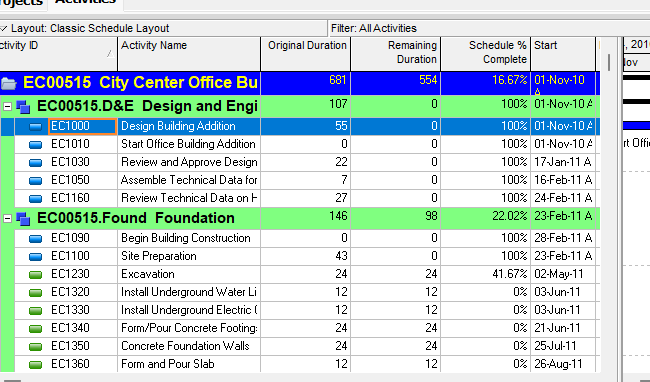
Copy Activity is Edit > Copy then Edit > Paste of activities in the Activities window (Activity Table or Activity Network). Oracle does not print a menu item named Copy Activity. The dialog Oracle names is Copy Activity Options. Paste then opens Renumber Activity IDs. If you selected Replace Beginning Characters, the Duplicates dialog box may appear. It is a command. It is not stored data. It is not Copy WBS, not Copy Project, not Cut and paste activities, not Dissolve, not Fill Down, not Range Copy, not Edit > Renumber Activity IDs, not Link Activities, and not EPPM Context Copy of activities.
Oracle Copy and paste activities in the Activity Table: "Select the activity you want to copy. To select multiple activities, use Ctrl+click." "Click Edit, Copy." "Select the WBS band where you want to insert the copied activities, then click Edit, Paste." "In the Copy Activity Options dialog box, mark the checkbox next to each type of information you want to copy, then click OK." "In the Renumber Activity IDs dialog box, select how to create activity IDs for copied activities. Click OK." "If you selected the Replace Beginning Characters option on the previous dialog box, the Duplicates dialog box may appear after clicking OK. If it appears, enter a new activity ID and click OK."
Oracle Copy and paste activities in the Activity Network: same Copy / Copy Activity Options / Renumber / Duplicates steps. Paste target is different: "Select the group band or another activity within the group band where you want to insert the copied activities, then click Edit, Paste." "If activities are not grouped in the Activity Network, you do not need to select a group band."
Quote both how-tos. Do not collapse WBS band (Activity Table) and group band or another activity within the group band (Activity Network) into one invented paste target.
Professional — Activities window: "Use the Edit menu on the Menu bar or use the Edit toolbar to add, delete, cut, copy, paste, link, renumber, or dissolve activities, and to undo an action." That is shortcut Copy / Paste, not a printed item titled Copy Activity. Edit Menu: Copy "Copies the selected data object." Enabled when the active window is "All." Corresponding toolbar: Edit Toolbar. Paste "Pastes a copied or cut data object. This command is enabled after you copy or cut a data object." Enabled when "All." Edit Toolbar. This is the same Copy/Paste as any other data object. Copy Activity is that command when the selected object is an activity in Activities.
Edit Toolbar Copy: "Copies the selected data object." Yes (displays by default). Enabled when "All except Tracking." Ctrl+C. Edit > Copy. Tip: "This icon is enabled in the Resource Assignments window so that you can copy resource assignments and paste them into another application, such as Microsoft Excel. You cannot paste a resource assignment row in the Resource Assignments window." Edit Toolbar Paste: "Pastes a copied or cut data object. This icon is enabled after you copy or cut a data object." Yes. Enabled when "All except Tracking and Resource Assignments." Ctrl+V. Edit > Paste. Do not collapse Edit Menu "All" and Edit Toolbar "All except Tracking" / "All except Tracking and Resource Assignments" into one invented window list.
Hot keys: Alt-E, C = Copy. Alt-E, P = Paste. Quote both the toolbar Ctrl+C / Ctrl+V and the hot keys. Do not collapse them.
Notes Oracle printed on both activity how-tos (quote Oracle):
- "When connected to a P6 EPPM database: When you copy and paste activities within the same project, any associated risks from P6 are also copied; risks are not copied when you copy and paste activities to a different project."
- "When connected to a P6 Professional database: When you copy and paste activities within the same project, any associated risks are also copied; risks are not copied when you copy and paste activities to a different project."
Quote both sentences. Do not collapse "from P6" (EPPM-database) and the Professional-database sentence into one invented note. Professional Copy Activity Options does not name a Risks checkbox. Do not invent one.
Copy WBS is a different command. Oracle Copy and paste a work breakdown structure element: Project, WBS → Edit, Copy → Edit, Paste → Copy WBS Options. "If the Activities checkbox is marked, the Copy Activity Options dialog box appears." Then Renumber Activity IDs. That is not Activities-window Edit > Copy of activities. Copy WBS Options is a different dialog. See Copy WBS. Do not rewrite that note. This command does not open Copy WBS Options. This command does not copy a PROJWBS node.
Copy Project is a different command. Oracle Copy and paste a project: Enterprise, Projects → Edit, Copy → Edit, Paste → Copy Project Options. The EPS/project how-to also names Copy WBS Options and Copy Activity Options as the other optional-information dialogs on that paste. "This dialog box does not appear when you copy a project" is printed on the on-paste Renumber Activity IDs page. See Copy Project. Do not collapse Copy Project Options onto this command.
Cut and paste activities is a different command. Oracle Cut and paste activities in the Activity Table: select activities → Edit, Cut → select the WBS band → Edit, Paste. Activity Network: Edit, Cut → select the group band (or another activity box within the group band) → Edit, Paste. Those how-tos do not open Copy Activity Options or Renumber Activity IDs. They are a move, not a copy. Risks on those pages are moved, not copied.
Edit > Renumber Activity IDs is a different command. Oracle Renumber activity IDs in the Activity Table: select activities → Edit, Renumber Activity IDs. "This task renumbers activity IDs for the current project and, if applicable, renumbers the same activity IDs in baselines for this project." It opens the same-named dialog without copying an activity. Edit Menu: Renumber Activity IDs "Opens the Renumber Activity IDs dialog box. Use the Renumber Activities IDs dialog box to specify how to renumber selected activity IDs." Enabled when "Activities." Corresponding toolbar: None. That command is not this paste.
Dissolve is a different command. Edit > Dissolve removes an activity and joins its predecessors to its successors. See Dissolve Removes an Activity and Joins Its Predecessors to Its Successors.
Fill Down is a different command. Edit > Fill Down copies first-selected-row text down a column. See Fill Down Copies First-Selected-Row Text Down a Table Column.
Range Copy is a different command. Oracle Copy and paste a range of cells: Range Copy / Range Paste of spreadsheet cell values, not an activity row.
Link Activities / Unlink Activities are different commands. Edit > Link Activities creates a finish-to-start between the activities you select, in list order. Edit > Unlink Activities "Removes relationships between the selected activities." Neither copies an activity.
Professional dialog fields Oracle names
Oracle Copy Activity Options dialog box: "Use the Copy Activity Options dialog box to specify which information should be copied when you copy an activity." Quote the checkboxes Oracle printed. Do not invent others. Do not copy the EPPM Activities-page list onto this dialog. Do not copy Copy WBS Options or Copy Project Options names onto this dialog.
- Resource & Role Assignments — "Mark to copy resource and role assignments (including future period assignment values)."
- Relationships — "Mark to copy activity relationships."
- Only between copied activities — "Mark this checkbox when you want to preserve relationships between copied activities, not relationships to other activities that are not being copied."
- Expenses — "Mark to copy activity expenses."
- Activity Codes — "Mark to copy activity code value assignments."
- WPs & Docs — "Mark to copy work product or document assignments."
- Notebook — "Mark to copy activity notebooks."
- Steps — "Mark to copy activity steps."
- Financial Period Data — "Mark to copy stored past financial period actual values."
- Do not show this dialog again — "Mark to indicate that you do not want this dialog box to appear next time you copy an activity or work breakdown structure element."
What gets copied vs not: Oracle said "which information should be copied when you copy an activity" and "mark the checkbox next to each type of information you want to copy." Oracle printed no "always copied" field catalog (no Activity ID, Activity Name, calendar, dates, duration, activity type, or constraint list that is copied regardless of checkboxes). Do not invent one. Unmarked optional types are the types you did not mark to copy. Oracle did not print a "never copied" list on this Professional dialog. Do not copy the EPPM "When you copy an activity, the following data items are not copied" list onto this Professional dialog.
The activity how-tos fetched do not print the WBS how-to sentence "If you select Do Not Show This Window Again in the Copy WBS Options or Copy Activity Options dialog box, the dialog box settings are retained until you reopen the module." Quote Do not show this dialog again from this dialog page. Do not invent that the activity how-tos printed Do Not Show This Window Again or the retain-until-reopen sentence.
Renumber Activity IDs on this paste is the dialog that opens after Copy Activity Options. Oracle Renumber Activity IDs dialog box (on-paste page): "Use the Renumber Activity IDs dialog box to specify how to create activity IDs when you copy and paste an activity." "This dialog box does not appear when you copy a project." Quote the options Oracle printed on that page. Do not copy the Edit > Renumber Activity IDs page onto this paste dialog.
- Increment Activity ID Based on Selected Activities — "Select to increment activity IDs using the increment value you specify. For example, if the increment value is set to 10 and you select to copy activity ID AF567, the activity ID increments to AF577 when it is pasted. However, if an activity ID of AF567 already exists, then the pasted activity ID increments to AF587."
- Auto-Number — "Select to renumber activity IDs using the criteria you specify. For example, if the copied activity ID is AF567 and the increment level is set to 50, the Prefix is set to KK, and the Suffix is 400, then the pasted activity ID is KK400. However, if an activity ID of KK400 or an activity ID of KKxxx, where xxx is higher than 400, already exists, then the activity ID becomes the next available KKxxx number."
- Replace Beginning Characters — "Select to replace the beginning characters of the copied activity IDs with the characters specified in the Replace With text field. Type the number of beginning characters to be replaced in the Number of Characters text field." Worked example: Number of Characters 2, Replace with JY, copied ID AF567 → JY567 unless that ID already exists; then Duplicates.
- Do not show this dialog again — "Mark to indicate that you do not want this dialog box to appear next time you copy an activity or work breakdown structure element."
The Edit > Renumber Activity IDs dialog page (different command) says: "Use the Renumber Activity IDs dialog box to specify how to renumber selected activity IDs in the current project and, if applicable, to renumber the same activity IDs in all applicable baselines for this project." That page names Renumber Selected Activities in Baselines. The on-paste page fetched does not. Do not invent that this paste dialog has Renumber Selected Activities in Baselines. Do not collapse the two same-named dialog pages.
Oracle Duplicates dialog box: "Use the Duplicates dialog box to enter a unique activity ID when renumbering or pasting an activity." Cancel: "When pasting activities, cancels the action and does not paste the activities listed in the dialog box. When renumbering activities, does not renumber any activity IDs, including activity IDs that are not duplicates." Quote both Cancel sentences. Do not collapse paste-cancel and renumber-cancel.
EPPM — do not copy Edit > Copy onto the web
Do not copy Professional Activities / Edit > Copy / Edit > Paste / Edit Toolbar / Ctrl+C / Ctrl+V / Alt-E, C / Alt-E, P / the Professional Copy Activity Options list / the on-paste Renumber dialog onto EPPM web.
Oracle EPPM Copying and Pasting Activities: "You can copy and paste activities. When you copy and paste activities, you can control which data types are copied to the new activities." Steps: Navigation Menu → Projects → Activities → select one or more activities → Context and select Copy → "Select a single activity in the grouping band that you want to paste the new activities into, or if the grouping band is empty, select the grouping band itself." → Context and select Paste → Copy Activity Options → "Select the data items to be copied." → OK → Save. That is Context Copy / Paste, not Edit > Copy.
The EPPM Copy Activity Options Getting Here fetched also prints Context Copy / Paste (select activities; paste into "a project or WBS node"). Quote both paste-target sentences. Do not collapse grouping band (how-to) and project or WBS node (dialog Getting Here) into one invented target.
Notes on that EPPM how-to (quote Oracle; do not copy them onto Professional):
- "Hold down the Ctrl key while clicking to select multiple rows in a table. Hold down the Shift key to select contiguous rows."
- "When you copy an activity, the following data items are not copied: Issues, Assignment UDF values, Expense UDF values, Step UDF values, Activity Feedback, and Status Update History (from Team Member interfaces only)"
- "If you copy a WBS that includes activities, then Issues, Assignment UDF values, Expense UDF values, and Step UDF values are copied for each activity."
- "Risk Assignments are copied for each activity when you copy activities or WBS elements to the same project. If you copy activities or WBS elements to a different project, Risk Assignments are not copied."
Oracle EPPM Copy Activity Options Dialog Box of the Activities Page: "Use this dialog box to select the activity data that will be copied along with the activities." Quote the options Oracle printed. Do not copy this list onto Professional Copy Activity Options.
- Resource and Role Assignments — "Determines whether or not to copy resources and role assignment data."
- Assignment Codes — "Determines whether or not to copy assignment code data."
- Secure Assignment Codes — "Determines whether to make copies of secure codes assigned to assignments. You must be signed in as a user with privileges to view and edit secure codes for both the source and destination to be able to copy secure codes."
- Relationships — "Determines whether to copy relationship data."
- Only between copied Activities — "Determines whether to copy relationship data for only the activities being copied. If you select this option, relationships to activities you are not copying will not be included."
- Expenses — "Determines whether to copy expense data. This option is only visible if you are copying a project or template."
- Activity Codes — "Determines whether to copy activity code data." "If selected, global and project activity codes are copied. EPS activity codes are only copied if the data is pasted within the same EPS node as the data you copied."
- Secure Activity Codes — "Determines whether to copy secure activity code data. You must be signed in as a user with privileges to view and edit secure codes for both the source and destination to be able to copy secure codes."
- Notebook Items — "Determines whether to copy notebook data."
- Steps — "Determines whether to copy step data to the project or template."
- Financial Period Data — "Determines whether to copy financial period data to the project."
- WP and Docs — "Determines whether to copy Work Product and Document data to the project. This option is only visible if you are copying a project or template."
- Risks — "Determines whether to copy risk data. This option is only available if you are copying a project or WBS."
Oracle printed those visibility sentences on this Activities-page dialog. Do not invent whether Expenses, WP and Docs, or Risks appear on an activity-only paste. Do not invent a reconciliation with the how-to Risk Assignments sentences.
Professional Copy Activity Options names Resource & Role Assignments, WPs & Docs, Notebook. The EPPM Activities-page dialog fetched names Assignment Codes, Secure Assignment Codes, Secure Activity Codes, Notebook Items, WP and Docs, and Risks. Professional Copy Activity Options does not. Do not collapse the two dialogs.
Oracle EPPM Copy Project Options Dialog Box of the EPS Page or Copy WBS Options Dialog Box of the Activities Page is a different dialog (Context Copy of a project or WBS). Getting Here on the Activities page: "Select the WBS to copy." That is not Context Copy of activities. See Copy WBS and Copy Project.
Oracle EPPM Renumbering Activities is a different path: select activities → Context and select Renumber Activity IDs. "If you copy and paste activities, you might need to renumber the activities to fit the numbering format of their new location." The EPPM Copying and Pasting Activities how-to fetched does not print Renumber Activity IDs as a paste step. Do not invent that EPPM paste opens that dialog. Do not copy Professional on-paste Renumber onto EPPM Context Renumber Activity IDs.
Oracle EPPM Cutting, Copying, and Pasting Data: Context Copy or Cut, then Context Paste. "activities, including their steps and other associated data items." "You cannot cut an activity and paste it to another project if timesheet actuals are applied and you do not have the 'Delete Project Data with Timesheet Actuals' privilege." "When you copy and paste projects, WBS nodes, activities, resources, or roles you can choose to exclude secure codes from being pasted with the rest of the data. This includes secure assignment codes where the data you copy includes assignments."
XER
Copy Activity is a command. It is not an XER table. After it runs you see another TASK (and the related rows that activity carries if those Copy Activity Options were marked). Do not invent a COPYACTIVITY / COPYACT / COPY_ACTIVITY / COPYACTIVITYOPTIONS table.
Oracle's project XER data map TOC lists no COPYACTIVITY, COPYACT, COPY_ACTIVITY, or COPYACTIVITYOPTIONS table. Oracle did not name an XER column for "the planner used Copy Activity."
TASK is the activity. TASK.task_code is Activity ID. See P6 Activity Types (Six) — Not MSP Task Type. Do not treat a new TASK row as "this row was created by Edit > Copy."
A Viewer parse of one XER cannot reconstruct whether the planner used Edit > Copy / Paste of an activity, Copy WBS with Activities marked, typed a new activity, or imported.
Microsoft Project
Desktop Project has Copy of a task. Microsoft Copy a task, resource, or Project element: right-click Copy of a task row, then Paste. "Project copies or moves the following associated information with the task or resource: notes, linked or embedded objects, and subtasks, if the selection is a summary task." "When copying a task within the same project, the task's ID numbers are regenerated." Autolink inserted or moved tasks is a Schedule option; Microsoft printed it for moving, not as Copy Activity Options.
Microsoft Organizer copies reports, calendars, and views. Microsoft: "You can’t copy task information using the Organizer." That is not Copy Activity.
They are not the same command. P6 Copy Activity is Edit > Copy / Paste of a TASK plus Copy Activity Options checkboxes Oracle named, then Renumber Activity IDs. Project copies a task and regenerates ID numbers. Microsoft did not print Copy Activity Options, Only between copied activities, or Renumber Activity IDs. Do not invent an analog. Do not claim MPXJ can write a real MPP.
Don't
- Treat Copy Activity as Copy WBS, as Copy Project, as Cut and paste activities, as Dissolve, as Fill Down, as Range Copy, as Edit > Renumber Activity IDs, as Link Activities / Unlink Activities, or as EPPM Context Copy of a WBS / project.
- Invent a COPYACTIVITY / COPYACT / COPY_ACTIVITY / COPYACTIVITYOPTIONS XER table, or treat a new TASK row as "the planner used Edit > Copy."
- Invent Copy Activity Options checkboxes Oracle did not print. Professional names Resource & Role Assignments, Relationships, Only between copied activities, Expenses, Activity Codes, WPs & Docs, Notebook, Steps, Financial Period Data, Do not show this dialog again.
- Invent an always-copied Professional field catalog (Activity ID, Activity Name, calendar, dates, duration, type, constraints) or a never-copied list. Oracle said which information should be copied.
- Copy the EPPM Activities-page checkbox list (Assignment Codes, Secure codes, Notebook Items, WP and Docs, Risks) or the EPPM "not copied" list (Issues, Assignment/Expense/Step UDF values, Activity Feedback, Status Update History) onto Professional Copy Activity Options.
- Copy Professional Edit > Copy / Edit Toolbar / Ctrl+C / Alt-E, C / the Professional dialogs onto EPPM, or treat EPPM Context Copy / Context Renumber Activity IDs as Edit > Copy.
- Invent that EPPM paste opens Renumber Activity IDs. The EPPM copy how-to fetched does not print that step.
- Collapse the on-paste Renumber Activity IDs page ("how to create activity IDs when you copy and paste an activity") and the Edit > Renumber Activity IDs page ("renumber selected activity IDs in the current project" / Renumber Selected Activities in Baselines).
- Collapse Activity Table WBS band and Activity Network group band or another activity.
- Collapse Edit Menu "All" and Edit Toolbar "All except Tracking" into one invented window list.
- Claim a Viewer reconstructed that the planner last used Copy Activity from an XER.
- Map P6 Copy Activity to MSP Copy of a task / Organizer as the same command.
- Claim MPXJ writes a real MPP.
Sources
- Oracle Copy and paste activities in the Activity Table [27 Aug 2026]
- Oracle Copy and paste activities in the Activity Network [27 Aug 2026]
- Oracle Copy Activity Options dialog box [27 Aug 2026]
- Oracle Renumber Activity IDs dialog box on paste [27 Aug 2026]
- Oracle Duplicates dialog box [27 Aug 2026]
- Oracle Activities window [27 Aug 2026]
- Oracle Cut and paste activities in the Activity Table [27 Aug 2026]
- Oracle Cut and paste activities in the Activity Network [27 Aug 2026]
- Oracle Renumber activity IDs in the Activity Table [27 Aug 2026]
- Oracle Renumber Activity IDs dialog box [27 Aug 2026]
- Oracle Copy and paste a work breakdown structure element [27 Aug 2026]
- Oracle Copy and paste a project [27 Aug 2026]
- Oracle Edit Menu [27 Aug 2026]
- Oracle Edit Toolbar [27 Aug 2026]
- Oracle Using Hot Keys [27 Aug 2026]
- Oracle Copying and Pasting Activities [27 Aug 2026]
- Oracle Copy Activity Options Dialog Box of the… [27 Aug 2026]
- Oracle Renumbering Activities [27 Aug 2026]
- Oracle Copy Project Options Dialog Box of the EPS Page… [27 Aug 2026]
- Oracle Cutting, Copying, and Pasting Data [27 Aug 2026]
- Oracle XER project map TOC [27 Aug 2026]
- Oracle TASK [27 Aug 2026]
- Microsoft Copy a task, resource, or Project element [27 Aug 2026]
- Microsoft Copy reports, calendars, and views in Project… [27 Aug 2026]