
In Primavera P6
Change a Gantt Chart Bar's Style
Change a Gantt Chart bar's style is Bar Style tab; shape, color, pattern, row; OK or Apply

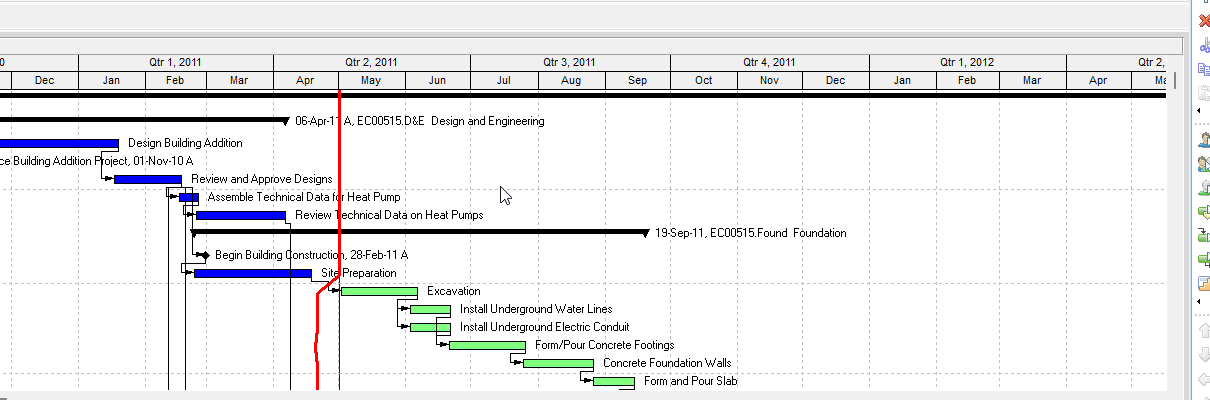
What a planner means
Change a Gantt Chart bar's style is Oracle Change a Gantt Chart bar's style (and Oracle Change a Gantt Chart bar's style - under Gantt Chart). Select the bar. Bar Style tab. Change Start Endpoint / body / Finish Endpoint shape, color, and pattern. Show when collapsed and/or as a summary bar only. Specify a row. OK, or Apply to view without closing. The two titles do not print the same menu. One page prints View, Top Layout Options, Bars. The Gantt Chart sibling prints View, Bars (or Layout Options bar → Bars) and a Note about stacked bars overlapping. It is a how-to. It is not stored as its own table. It does not create, edit, or delete a relationship. It is not Change a bar in the Gantt Chart, not Position a bar in the Gantt Chart, not Change a Gantt Chart bar's settings / filter / label / timescale, not the Gantt bars object, not TASKPRED, not EPPM Configuring Activity View Gantt Chart Bars copied onto Professional, and not Microsoft Format Bar.
Oracle does print how-tos titled Change a Gantt Chart bar's style and Change a Gantt Chart bar's style - under Gantt Chart. Oracle does not print a menu item named Change a Gantt Chart bar's style. Do not invent View > Change a Gantt Chart bar's style.
Oracle Change a Gantt Chart bar's style (Professional):
- "Display the Gantt Chart, then choose View, Top Layout Options, Bars."
- "Select the bar."
- "Click the Bar Style tab."
- "To change the shape of the bar's Start Endpoint (first field), the height and position of the bar (second field), and the Finish Endpoint (end field), click each corresponding field and select a shape."
- "To change the color of the bar's Start Endpoint (first field), body (second field), and the Finish Endpoint (end field), click each corresponding field and select a color."
- "To change the pattern of the bar's Start Endpoint (first field), body (second field), and the Finish Endpoint (end field), click each corresponding field and select a pattern."
- "To show the bar when you collapse the display to summary level information or to show the bar as a summary bar only, mark the appropriate checkbox."
- "Specify the row in which the bar should appear in the Gantt Chart."
- "Click OK. To view your changes without closing this dialog box, click Apply."
That page fetched prints no Layout Options bar, no View, Bars, no Options section, no stacked-bar Note, no Save, and no Yes. Do not invent those on that page.
Oracle Change a Gantt Chart bar's style - under Gantt Chart (Professional):
- "Choose View, Bars. You can also click the Layout Options bar and choose Bars."
- "Select the Gantt Chart bar for which you want to change the display style."
- "Click the Bar Style tab."
- "To change the shape of the bar's Start Endpoint (first field), the height and position of the bar (second field), and Finish Endpoint (end field), click each corresponding field and select a shape."
- "To change the color of the bar's Start Endpoint (first field), body (second field), and the Finish Endpoint (end field), click each corresponding field and select a color."
- "To change the pattern of the bar's Start Endpoint (first field), body (second field), and Finish Endpoint (end field), click each corresponding field and select a pattern."
- "In the Options section, specify whether to show the bar when collapsed, as summary bars only, or both."
- "Specify a row. Rows indicate where the bars should be drawn on the Gantt Chart: bars can be drawn stacked one above another, or occupying the same row so that only some of the bars are visible."
- "Click OK. To view your changes without closing this dialog box, click Apply."
- Note: "Bars are drawn on the Gantt Chart according to their position in the Bars dialog box. When the bars are stacked, bars higher up the list are drawn overlapping bars that are lower in the list when these bars occupy the same row. If a bar low down on the list occupies the same row as a bar higher up the list and has the same dates, the lower bar might be obscured by the higher bar."
That page fetched prints no View, Top Layout Options, Bars, no "mark the appropriate checkbox" wording, no Save, and no Yes. Do not invent those on that page. Do not collapse the two titles.
Position a bar in the Gantt Chart is a different how-to. Options row only. This how-to is shape / color / pattern plus row. See Position a Bar in the Gantt Chart.
Change a Gantt Chart bar's settings is a different how-to. Bar Settings tab (Show bar when collapsed / grouping bands / necking). The style pages also mention collapsed / summary, but on the Bar Style tab. Do not collapse. See Change a Gantt Chart Bar's Settings.
Change a bar in the Gantt Chart is a different how-to. Display, Name, Timescale, Filter, and all three style tabs. See Change a Bar in the Gantt Chart.
Gantt bars is a different object note. The Bars dialog as layout settings. See Gantt Bars Are Layout Bar Definitions, Not an XER Table.
Professional vs EPPM
Professional — two menus, do not mix them. One page: display the Gantt Chart; View, Top Layout Options, Bars; Bar Style; shape / color / pattern; collapsed / summary checkboxes; row; OK or Apply. Gantt Chart sibling: View, Bars / Layout Options bar → Bars; Bar Style; shape / color / pattern; Options section collapsed / summary; row; stacked-bar Note; OK or Apply. No Save on those pages.
EPPM web — Oracle Configuring Activity View Gantt Chart Bars has Bar Type, Height, colors, Show Progress, Show Critical. That page fetched does not print View, Bars, View, Top Layout Options, Bars, Start Endpoint / Finish Endpoint fields, Pattern, or Options row 1–3. Do not copy Professional Bar Style endpoints onto EPPM. Do not copy EPPM Bar Type / Height list onto Professional.
Primavera Cloud is a different product. Do not copy it here.
XER
The how-to is not an XER table. Oracle’s project XER map TOC has no BARSTYLE / GANTTSTYLE / BARSHAPE table. Do not invent a view %T. Changing a bar's style does not write TASK. Layouts travel as .plf. A Viewer cannot reconstruct that the planner used this how-to.
Microsoft Project
Microsoft Project can format Gantt bar styles. Do not map that as P6 Change a Gantt Chart bar's style. Do not claim MPXJ writes a real MPP.
Don't
- Invent View > Change a Gantt Chart bar's style, or invent Save / Yes on these how-tos.
- Copy View, Bars / Options section / stacked-bar Note onto the Top Layout Options page, or View, Top Layout Options, Bars onto the Gantt Chart sibling.
- Collapse this onto Position a bar, Change a Gantt Chart bar's settings, Change a bar, or the Gantt bars object.
- Copy EPPM Bar Type / Height onto Professional, or Professional Start Endpoint / Pattern onto EPPM.
- Invent a BARSTYLE XER table, or reconstruct the how-to from TASK dates.
- Map MSP Format Bar as this how-to.
- Claim MPXJ writes a real MPP.