
Views, Filters & Print
Gantt Bars Are Layout Bar Definitions, Not an XER Table
Gantt bars are View > Bars / Bar Chart Options layout definitions (Current / Baseline / Float timescales, filters, necking, labels); .plf not XER; not…

What a planner means
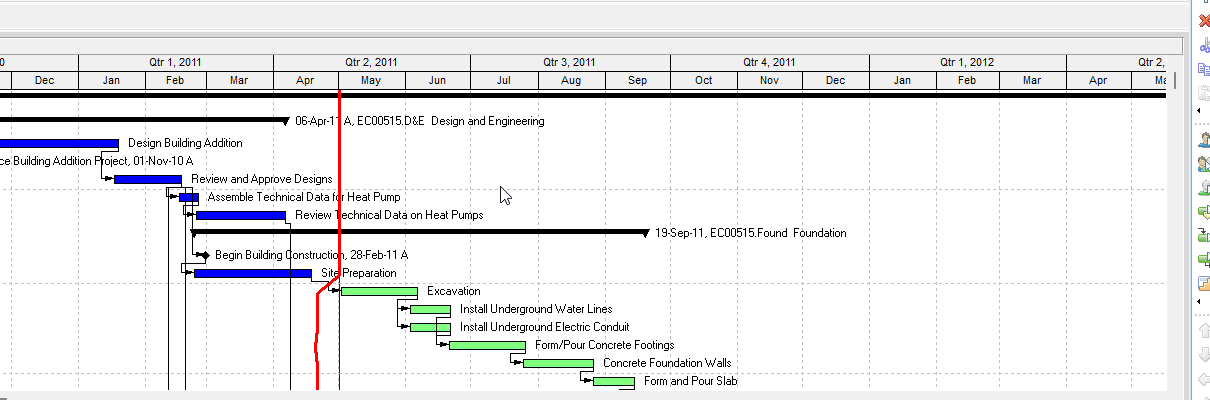
Gantt bars (Oracle: the Bars dialog) are layout settings that say which date ranges draw on the Gantt, in what style, with which filter and labels. Oracle: "Use the Bars dialog box to specify the style and labels for the bars in a Gantt Chart." They are not Progress Line (Bar Chart Options Progress Line tab — Progress Line), not Progress Spotlight (Progress Spotlight (a View, Not a Field)), not a curtain attachment (Curtain Attachment), not a text attachment (Text Attachment), not the filter/layout object itself (Filters and Layouts Are a View, Not the Schedule — a bar can attach a filter), not the baseline snapshot (baselines.md), and not total/free float hours (float.md).
Professional — Activities Gantt (and Tracking / project Gantt). Oracle Add / Change pages: View, Bars, or Layout Options bar → Bars. The timescale page also prints View, Top Layout Options, Bars.
Oracle names these Bars-dialog columns and buttons:
- Display — "Mark to display the corresponding bar in the Gantt Chart."
- Name — "The bar name; this does not display in the layout."
- Timescale — "The timescaled data that the bar represents."
- Filter — "The filter applied to the data item represented by the bar type." Add page: "Filters determine which activities the bar represents." Filter page: double-click Filter; "Mark the checkbox next to each filter you want to use." "You can only view and modify user-defined filters."
- Preview — "Shows how the bar will appear."
- Add / Delete — Add "a bar to the current layout." Delete "the selected bar." "To remove a specific bar from the layout display without deleting it, clear the Display checkbox next to the bar."
- Copy From — "(Activity Layouts only) To apply Gantt Chart settings from another layout to the current activity layout."
- ShiftUp / ShiftDown — move the selected bar one position.
- Options — "specify Gantt Chart background line and legend options" (opens Bar Chart Options, not this bar list).
- Default — "apply the default Gantt Chart settings."
Tabs Oracle names: Bar Style, Bar Settings, Bar Labels.
Timescale (which dates a bar uses) — Oracle More Detail: "Depending on whether an activity, project, or tracking layout is displayed, the options vary." "In activity layouts the bars represent dates for an activity; in project layouts, bars represent EPS node or project elements; in tracking layouts, depending on the current view, bars may represent an EPS node, project, or WBS element."
Activity layout bars Oracle named (quote the timescale, not a guessed date column):
| Oracle bar | Oracle: represents |
|---|---|
| Current Bar | Start Date to Finish Date |
| % Complete Bar | the percent complete of the activity |
| Performance % Complete Bar | Performance Percent Complete |
| Plan Bar | Planned Start Date to Planned Finish Date |
| Actual Bar | Actual Start Date to Actual Finish Date |
| Remain Bar | Remaining Start Date to Remaining Finish Date |
| Primary Baseline Bar | the primary baseline's Project Planned Start Date to the primary baseline's Planned Finish Date |
| Project Baseline Bar | the project baseline's Project Planned Start Date to the project baseline's Planned Finish Date |
| Secondary Baseline Bar | the second baseline's Project Planned Start Date to the second baseline's Planned Finish Date |
| Tertiary Baseline Bar | the third baseline's Project Planned Start Date to the third baseline's Planned Finish Date |
| Early Bar | Early Start Date to Early Finish Date |
| Late Bar | Late Start Date to Late Finish Date |
| Float Bar | Remaining Finish Date to Late Finish Date "where the remaining date is before the late date" |
| Neg Float Bar | Remaining Finish Date to Late Finish Date "where the remaining date is after the late date" |
| User Dates | "the activity's user start and end dates as defined in the activity columns" |
Oracle: "The % Complete bar will not display for negative values."
Project and Tracking layout bars Oracle named on the same page (do not copy the activity-only list onto Tracking):
| Oracle bar | Oracle: represents |
|---|---|
| Current Bar | Start Date to Finish Date |
| Actual Bar | Actual Start Date to Actual Finish Date |
| Remain Bar | Remaining Start Date to Remaining Finish Date |
| Baseline Bar | "the baseline's Planned Start Date to the baseline's Planned Finish Date. For closed projects, the dates are derived from the project baseline. For open projects, the dates are derived from the primary baseline." |
| Forecast Bar | Project Planned Start Date to Planned Finish Date |
| Performance % Complete Bar | Performance Percent Complete |
Oracle: "The Performance % Complete bar will not display for negative values."
The Change-timescale page's activity/tracking table is a shorter list (no Project Baseline Bar / Forecast Bar / Baseline Bar split; it prints User Defined Bars for "User start and end dates defined in the activity columns"). Quote More Detail for the named bars. Do not invent a bar Oracle did not print.
User Dates — Oracle UDF page: Timescale User Dates enables User Start Date and User Finish Date. "You must create user-defined start date and finish date fields in the User Defined Fields dialog before you can create bars for these fields in the Gantt chart." "If you select a User Finish Date that is earlier than the User Start Date, or if there is no value associated with those fields, the bar will not be displayed."
Bar Style — Shape, Color, and Pattern for "the selected bar's start endpoint, the bar itself, and the finish endpoint." Row: "Select 1, 2, or 3." Change-style page: "Rows indicate where the bars should be drawn on the Gantt Chart: bars can be drawn stacked one above another, or occupying the same row so that only some of the bars are visible." "Bars are drawn on the Gantt Chart according to their position in the Bars dialog box. When the bars are stacked, bars higher up the list are drawn overlapping bars that are lower in the list when these bars occupy the same row. If a bar low down on the list occupies the same row as a bar higher up the list and has the same dates, the lower bar might be obscured by the higher bar."
Bar Settings — Grouping Band: Show bar when collapsed ("include the selected bar when you collapse the display to summary level information"); Show bar for grouping bands ("display the selected bar as a summary bar only"). Bar Necking Settings (Activities window): Calendar nonwork time ("nonwork time, based on the activity's calendar, as a neck"); Activity nonwork intervals ("nonwork intervals as a neck, based on out-of-sequence progress and suspended/resumed activities"). Oracle: "Necking does not apply for summary bars."
Bar Labels — Position ("the position of the selected bar's label"); Label ("a database field for the selected bar's label"); Add / Delete a label. Notebook-on-bar is this tab, not View > Attachments → Text: Layout Options bar → Bars → Bar Labels; "Only one notebook item can be attached to each bar." "Notebook items can be printed with the layout or published with the layout to the project Web site." See Text Attachment and Notebooks (MEMOTYPE / TASKMEMO / WBSMEMO) — Not Schedule Logic.
Bar Chart Options (Bars → Options, or View, Barchart Options) is a different dialog. Oracle: "customize your current Gantt Chart display." Tabs: General, Collapsed Bars, Data Date (Activities and Tracking only), Sight Lines, Progress Line (Activities window only). General tab names Show Relationships, Show Legend, Limit Text Label Characters To, horizontal major/minor lines, and default notebook-item Width/Height. Those are chart decorations, not a bar's Timescale. Progress Line is Progress Line. Do not treat Show Relationships as TASKPRED.
EPPM web — Oracle Configuring Activity View Gantt Chart Bars: Activities page → Customize View → Bars tab → Configure. Bar Type, Height, Bar Color by Activity Code, current-bar Show Progress / Progress Color / Progress Style / Progress Color by Activity Code, Show Critical, User Defined bar (Bar Name, Start Date Field, Finish Date Field), labels (Label Field / Color). Tip: "A Late Bar does not display if the project has not been scheduled." That page does not print View > Bars, Layout Options bar → Bars, or the Professional Timescale / Filter / Bar Settings necking columns. Do not copy those Professional menus onto EPPM. EPPM Show Progress on a current bar is a bar setting, not Progress Line.
XER
Bar definitions (Display, Name, Timescale, Filter, style, necking, labels, row) are layout settings. Oracle's project XER data map TOC lists no BAR, BARS, GANTT, LAYOUT, or VIEW table. Do not invent one. Layouts travel as .plf, not in a project XER. See Filters and Layouts Are a View, Not the Schedule.
Oracle did not name an XER column for which bars are on, which Timescale each uses, the bar filter, shape/color/pattern, row 1–3, necking, or labels.
Dates a bar can draw are ordinary TASK (or baseline-project) dates — Planned Start/Finish, Actual, Remaining, Early/Late, and the assigned baseline's planned dates. Those columns are not the bar list. Do not treat target_* as a baseline bar (baselines.md). Do not treat total_float_hr_cnt / free_float_hr_cnt as the Float Bar (float.md — Float Bar is Remaining Finish to Late Finish).
A Viewer parse of one XER cannot reconstruct the planner's Bars dialog.
Microsoft Project
Desktop Project has Bar Styles. Microsoft: double-click the chart (not an individual bar) to open the Bar Styles window, or Gantt Chart Format > Bar Styles. Name; Show For Tasks (task type; not to exclude; comma for multiple types); From and To fields for the bar's start and finish; Bars tab Start / Middle / End shapes, patterns, colors. Text tab: Left, Right, Top, Bottom, Inside (a field, or a custom Text1–Text3). Format a single bar: right-click the bar for fill, or double-click the bar → Format Bar / Bar Text. Gantt Chart Style applies a predefined style to all bars in that view. "Any changes you make to one Gantt Chart view does not change the look of another Gantt Chart view." VBA: GanttBarStyleEdit "Changes or creates a Gantt bar style"; the Bar Styles dialog "can contain up to 200 style entries."
They are not the same object. Oracle's bar is a layout Timescale pick (Current Bar, Plan Bar, Float Bar, Primary Baseline Bar, …) plus a bar filter. Microsoft's bar style is Show For Tasks + From/To fields on the task. Do not map P6 Current / Baseline / Float bars to MSP Task / Baseline / Slack bars and call them the same command. Microsoft's Progress / Complete Through bar is a bar style ("the point up to which actuals have been reported"), not P6 Progress Line and not EPPM Show Progress. Do not claim MPXJ can write a real MPP.
Don't
- Treat Gantt bars as Progress Line, Progress Spotlight, a curtain, a text attachment, the Data Date, or total/free float hours.
- Treat EPPM current-bar Show Progress as Progress Line, or as the MSP Progress / Complete Through bar.
- Invent a BAR / BARS / GANTT / LAYOUT / VIEW XER table, or treat any TASK / PROJECT date column as the bar definition.
- Treat
target_*as a baseline bar, ortotal_float_hr_cntas the Float Bar. - Copy Professional View > Bars / Layout Options bar → Bars / Timescale / Filter / necking onto EPPM as if Oracle printed those menus there.
- Copy the activity-layout bar list onto Tracking, or the Tracking Baseline / Forecast bars onto Activities, as if Oracle printed one list.
- Treat clear Display as Delete. Oracle: clearing Display hides the bar without deleting it.
- Treat notebook-on-bar (Bars → Bar Labels) as View > Attachments → Text.
- Treat Bar Chart Options (Show Relationships, legend, sight lines, Progress Line) as a bar Timescale.
- Map this object to MSP Bar Styles, Gantt Chart Style, or the Progress bar and call them the same.
- Claim MPXJ writes a real MPP.
- Claim a Viewer reconstructed the planner's Bars dialog from an XER.
Sources
- Oracle Bars dialog box [27 Aug 2026]
- Oracle More Detail: Specifying a bar's timescale [27 Aug 2026]
- Oracle Change a Gantt Chart bar's timescale [27 Aug 2026]
- Oracle Change a bar in the Gantt Chart [27 Aug 2026]
- Oracle Add a bar to the Gantt Chart [27 Aug 2026]
- Oracle Change a Gantt Chart bar's filter [27 Aug 2026]
- Oracle Bar Style tab [27 Aug 2026]
- Oracle Change a Gantt Chart bar's style [27 Aug 2026]
- Oracle Bar Settings tab [27 Aug 2026]
- Oracle Change a Gantt Chart bar's settings [27 Aug 2026]
- Oracle Bar Labels tab [27 Aug 2026]
- Oracle Attach notebook items to bars [27 Aug 2026]
- Oracle User-defined fields [27 Aug 2026]
- Oracle Bar Chart Options dialog [27 Aug 2026]
- Oracle General tab - Bar Chart Options [27 Aug 2026]
- Oracle Configuring Activity View Gantt Chart Bars [27 Aug 2026]
- Oracle XER project map TOC [27 Aug 2026]
- Oracle Exporting and Importing Layouts [27 Aug 2026]
- Microsoft Format the bar chart of a Gantt Chart view [27 Aug 2026]
- Microsoft Application.GanttBarStyleEdit [27 Aug 2026]
- Microsoft Complete Through [27 Aug 2026]