
In Primavera P6
Collapsed Bars
Collapsed Bars is Bar Chart Options Collapsed Bars-tab Gantt format when grouping bands are collapsed; .plf not XER; not Collapse To, Bars, or bar necking…

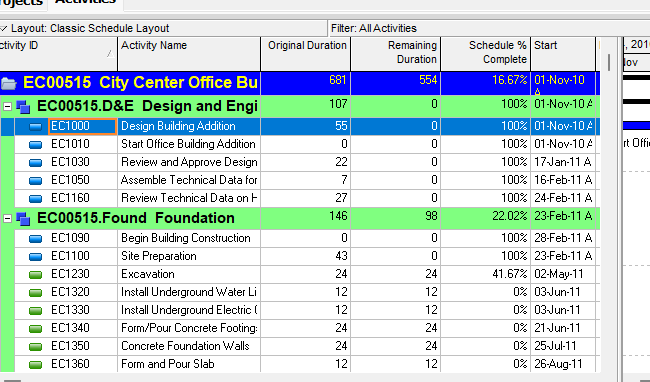
What a planner means
Collapsed Bars (Oracle: the Collapsed Bars tab of Bar Chart Options) is a Gantt Chart layout setting for how activity bars draw when grouping bands are collapsed. Oracle heading: Collapsed Bar Formatting. It is not Collapse To (View > Collapse To — which grouping band the layout collapses to — P6 View > Collapse to (WBS Level)), not Group and Sort (the bands themselves — Group and Sort), not the Bars dialog bar list (Timescale / Filter / style — Gantt Bars Are Layout Bar Definitions, Not an XER Table), not Bar Settings Show bar when collapsed (which bar definitions still draw on a collapsed band), not Show Legend (Show Legend), not Show Relationships (General-tab line show/hide — Show Relationships), not Non-work time shading (timescale-background decoration — Non-Work Time Shading), and not stored calendar exceptions (P6 Calendars (Global, Project, Resource, Activity)). Changing Collapsed Bars does not add or delete activities.
Professional — Oracle Customize collapsed bars: Bars dialog → Options → Collapsed Bars tab. Bar Chart Options: "Use the Bar Chart Options dialog box to customize your current Gantt Chart display." Tabs Oracle names: General, Collapsed Bars, Data Date (Activities and Tracking only), Sight Lines, Progress Line (Activities window only). Oracle did not mark Collapsed Bars "(Activities window only)" or "(Activities and Tracking only)".
Collapsed Bars tab fields Oracle names (quote Oracle):
- Collapse to grouping bands — "Choose this option to display one bar for all activities in the bar chart." Customize page: "display the activity bars as a single bar."
- Show Relationships for Collapsed Bars — "show relationship lines from the collapsed bar to other collapsed and individual bars." "This setting is available if the Show Relationships checkbox is marked in the General tab." Customize: "If the Show Relationships checkbox in the General tab is marked, you can mark the Show Relationships for Collapsed Bars…"
- Show bar necking for
- Calendar Nonwork Time — "Select Calendar Nonwork Time to show nonwork time, based on the activity's calendar, as a neck on the collapsed bar." - Activity Nonwork Intervals — "Select Activity Nonwork Intervals to show a neck on the collapsed bar for activity and its calendar nonwork intervals, including suspend/resume dates, out of sequence progress, and gaps of time when activities are not working."
- Collapse to individual bars to minimize space — "Choose this option to move individual bars as close to the grouping band as possible, under the correct timescale date in the bar chart."
- Allow Overlapping of Bar Labels — "Mark Allow Overlapping of Bar Labels to allow P6 Professional to move the individual bars to minimize space, without overlapping other bars, under the correct timescale date,within the grouping band."
The Collapsed Bars tab pages fetched do not print how the single grouping-band bar computes its start/finish, a Timescale pick for that bar, a color/shape, a Default button, or Collapse To. Do not invent them.
The Customize collapsed bars procedure page fetched walks only the Collapse to Grouping Bands path (Options → Collapsed Bars tab → that option → Show Relationships for Collapsed Bars), then sends necking to the Bars dialog Bar Settings tab. That procedure page does not print Collapse to individual bars to minimize space or Allow Overlapping of Bar Labels. Do not invent those steps on that how-to.
Related Bar Settings (different controls). Oracle Bar Settings tab / Change a Gantt Chart bar's settings:
- Show bar when collapsed — "Mark to include the selected bar when you collapse the display to summary level information." Change page: "To include the selected bar when you collapse the display to summary-level information, select Show bar when collapsed." That is which bar definition still draws. It is not this tab's Collapse to grouping bands / Collapse to individual bars choice.
- Show bar for grouping bands — "Mark to display the selected bar as a summary bar only."
- Bar Necking Settings (Activities window) — Calendar nonwork time: "Mark to show the selected bar's nonwork time, based on the activity's calendar, as a neck." Activity nonwork intervals: "Mark to show the selected bar's nonwork intervals as a neck, based on out-of-sequence progress and suspended/resumed activities." Note: "Necking does not apply for summary bars."
Oracle printed necking in two places. Do not collapse them into one checkbox. Collapsed Bars Show bar necking for is "on the collapsed bar." Bar Settings necking is "the selected bar" and "does not apply for summary bars." The Customize collapsed bars how-to then tells you to mark Bar Settings Calendar Nonwork Time / Activity Nonwork Intervals "as a neck, or thin bar, on the collapsed bar" / "for activity and/or calendar nonwork time, including suspend/resume dates." Quote both pages; do not invent that they are the same control.
Bar Settings Note: "To improve performance, Oracle recommends that the Show bar when collapsed setting is used only for the essential bars you want to show when a layout is collapsed. Performance will also be improved if the Show bar when collapsed setting is not selected against any bars if you intend to use a the layout when loading large amounts of data."
Collapse To is a different command. Oracle: use Collapse To "to select the grouping band you want to collapse or expand to in the current layout. The selection available in the list is based on the grouping bands displayed in the current layout." That picks the band. This tab formats the Gantt after bands are collapsed. See P6 View > Collapse to (WBS Level).
Group and Sort is a different dialog. Show Summaries Only hides details under grouping bands. It does not name Collapse to grouping bands / Collapse to individual bars. See Group and Sort.
Necking is not shading. Collapsed-bar / Bar Settings necking thins a bar. EPPM Non-work time shading paints the timescale background. Calendar exceptions live in CALENDAR. See Non-Work Time Shading and P6 Calendars (Global, Project, Resource, Activity).
EPPM web — Configuring Activity View Gantt Chart (Customize View → Gantt tab) names Data date line, Relationship lines, Non-driving relationships, Sight Lines, Non-work time shading, and Timescale. It does not print View, Bars, Bar Chart Options, the Collapsed Bars tab, Collapse to grouping bands, Collapse to individual bars, Show Relationships for Collapsed Bars, Show bar necking for, or Allow Overlapping of Bar Labels. Do not copy those Professional menus onto EPPM.
Configuring Activity View Grouping: "When activities are grouped, the Gantt chart on the Activities page displays a summary bar for each group. The summary bar represents the time period from the earliest Early Start to the latest Early Finish for the group." That is an EPPM grouping sentence. Oracle did not print earliest Early Start / latest Early Finish on the Professional Collapsed Bars tab pages fetched. Do not copy that date rule onto Professional.
XER
Collapsed Bars (Collapse to grouping bands / Collapse to individual bars, Show Relationships for Collapsed Bars, Show bar necking for, Allow Overlapping of Bar Labels) is a Gantt / layout setting. Oracle's project XER data map TOC lists no COLLAPSEDBARS, COLLAPSE, GANTT, LAYOUT, or VIEW table. Do not invent one. Layouts travel as .plf, not in a project XER. See Filters and Layouts Are a View, Not the Schedule.
Oracle did not name an XER column for the collapsed-bar format, Show Relationships for Collapsed Bars, collapsed-bar necking, or Allow Overlapping of Bar Labels.
What a collapsed band can draw from is not this tab:
- Bar definitions (which Timescale / Filter / style): layout .plf, not XER. See Gantt Bars Are Layout Bar Definitions, Not an XER Table.
- Show bar when collapsed / Show bar for grouping bands: same Bars dialog, still .plf.
- Grouping bands: Group and Sort, .plf. See Group and Sort.
- Stored relationships:
TASKPRED. Show Relationships for Collapsed Bars is a decoration, not that table. See Show Relationships. - Work calendars / exceptions:
CALENDAR. Necking can draw from an activity calendar; that is not this tab.
A Viewer parse of one XER cannot reconstruct the planner's Collapsed Bars tab.
Microsoft Project
Desktop Project has Rollup onto a summary task bar. It is not the same object.
Microsoft Rollup (task field): Yes/No, entered. "For subtasks, the Rollup field indicates whether information on the subtask Gantt bars will be rolled up to the summary task bar. For summary tasks, the Rollup field indicates whether the summary task bar displays rolled up bars. You must have the Rollup field for summary tasks set to Yes for any subtasks to roll up to them." "By default, all summary tasks are set to Yes and all subtasks are set to No." Example: set Rollup to Yes on milestone tasks so they appear on the summary task. Task Information: "choose whether you want to show rolled up Gantt bars and whether to use the Rollup field for subtasks." "If you are rolling up several subtasks, you can also hide the summary task bar in Task Information dialog box." "You can globally set rollup behavior for all summary tasks on a Gantt Chart view in the Layout dialog box." The pages fetched do not print the Layout-dialog checkbox caption. Do not invent it.
Microsoft VBA Task.Rollup: "True if the dates of a subtask appear on its corresponding summary task bar." "The Rollup property must be True on the summary task as well as the subtasks for the rollup to occur."
Microsoft Hide Bar (task field): Yes/No. "The Hide Bar field indicates whether the Gantt bars and Calendar bars for a task are hidden." Example: roll up milestones to a summary task and hide the summary bar so it does not distract from the rolled-up milestone symbols. Also on Task Information. "By default, the Gantt bar and Calendar bar are shown for all tasks."
Microsoft named views (Overview of Project views): Bar Rollup — "View summary tasks with labels for all subtasks. Use the Bar Rollup view with the Rollup_Formatting macro to see all tasks concisely labeled on summary Gantt bars." Milestone Rollup / Milestone Date Rollup — same pattern with milestone marks (and dates on Milestone Date Rollup).
Do not map P6 Collapsed Bars (Bar Chart Options tab: one bar for all activities in the band, or individual bars packed to the grouping band; Show Relationships for Collapsed Bars; necking on the collapsed bar) to MSP Rollup / Hide Bar / Bar Rollup view (per-task Yes/No; summary-task outline; Layout dialog global rollup) and call them the same command. P6 grouping bands are not MSP summary tasks. The pages fetched do not print Oracle's Collapse to grouping bands / Collapse to individual bars on the Microsoft Rollup field. Do not claim MPXJ can write a real MPP.
Don't
- Treat Collapsed Bars as Collapse To, Group and Sort, the Bars dialog list, Show bar when collapsed, Show Legend, Show Relationships, Non-work time shading, or stored calendar exceptions.
- Treat Collapse to grouping bands as Show bar when collapsed or as Show bar for grouping bands.
- Collapse Collapsed Bars Show bar necking for and Bar Settings Calendar nonwork time / Activity nonwork intervals into one checkbox, or treat either as timescale-background shading.
- Invent how the Professional single collapsed bar computes start/finish, or copy EPPM earliest Early Start–latest Early Finish onto that tab.
- Invent a COLLAPSEDBARS / COLLAPSE / GANTT / LAYOUT / VIEW XER table.
- Copy Professional Bars → Options → Collapsed Bars onto EPPM as if Oracle printed those menus there.
- Copy EPPM grouping summary bar (earliest Early Start to latest Early Finish) onto the Professional Collapsed Bars tab as if Oracle printed that rule there.
- Map this object to MSP Rollup, Hide Bar, Bar Rollup / Milestone Rollup views, or the Layout-dialog global rollup and call them the same.
- Claim MPXJ writes a real MPP.
- Claim a Viewer reconstructed the planner's Collapsed Bars tab from an XER.
Sources
- Oracle Collapsed Bars tab - Bar Chart Options [27 Aug 2026]
- Oracle Customize collapsed bars in the Gantt Chart [27 Aug 2026]
- Oracle Bar Chart Options dialog [27 Aug 2026]
- Oracle General tab - Bar Chart Options [27 Aug 2026]
- Oracle Bar Settings tab - Bars dialog [27 Aug 2026]
- Oracle Change a Gantt Chart bar's settings [27 Aug 2026]
- Oracle Display toolbar / View > Collapse To [27 Aug 2026]
- Oracle Configuring Activity View Gantt Chart [27 Aug 2026]
- Oracle Configuring Activity View Grouping [27 Aug 2026]
- Oracle XER project map TOC [27 Aug 2026]
- Oracle Exporting and Importing Layouts [27 Aug 2026]
- Microsoft Rollup (task field) [27 Aug 2026]
- Microsoft Hide Bar (task field) [27 Aug 2026]
- Microsoft Task.Rollup [27 Aug 2026]
- Microsoft Overview of Project views [27 Aug 2026]