
In Primavera P6
Renumber Activity Ids
Renumber Activity IDs is Edit > Renumber Activity IDs of selected activities; not the on-paste Renumber dialog

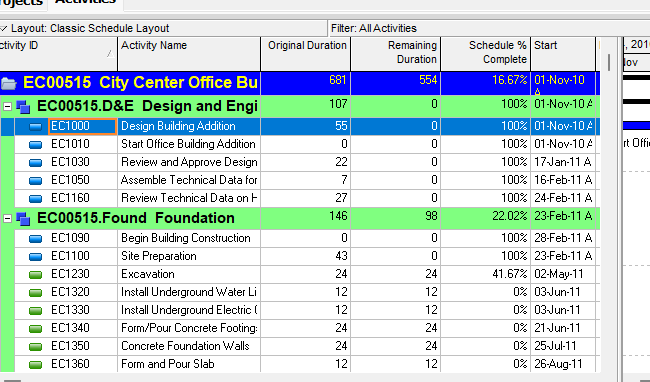
What a planner means
Renumber Activity IDs is Edit > Renumber Activity IDs of selected activities in the Activities window. Oracle names the how-to Renumber activity IDs in the Activity Table. It opens the Renumber Activity IDs dialog. It is a command. It is not stored data. It is not the on-paste Renumber Activity IDs dialog that opens after Copy Activity / Copy WBS, not Copy Activity, not Fill Down, not Line Numbers, not Global Change, not typing one Activity ID, and not EPPM Context Renumber Activity IDs copied onto Professional.
Oracle Renumber activity IDs in the Activity Table: "This task renumbers activity IDs for the current project and, if applicable, renumbers the same activity IDs in baselines for this project." Steps: "Select the activity you want to renumber. To select multiple activities, use Ctrl+click or Shift+click." "Choose Edit, Renumber Activity IDs." Then specify how to renumber. "The Renumber Selected Activities in Baselines checkbox is marked by default if baselines exist for the project. Be aware that if you clear this checkbox, all renumbered activities are disconnected from the baselines and are treated as new activities." "Click OK." "The Duplicates dialog box may appear after clicking OK. If it appears, type new activity IDs, as applicable, and click OK." "If you click Cancel in the Duplicates dialog box, no activity IDs are renumbered, including activity IDs that are not duplicates."
Quote that how-to. The Activities-window task list names Renumber activity IDs in the Activity Table once, under adding and defining general activity information. That page fetched does not print a Network how-to. Do not invent Renumber activity IDs in the Activity Network.
Professional — Activities window: "Use the Edit menu on the Menu bar or use the Edit toolbar to add, delete, cut, copy, paste, link, renumber, or dissolve activities, and to undo an action." Edit Menu: Renumber Activity IDs "Opens the Renumber Activity IDs dialog box. Use the Renumber Activities IDs dialog box to specify how to renumber selected activity IDs." Enabled when "Activities." Corresponding toolbar: None. Oracle Using Hot Keys: "If an option is not listed, it does not have a hot key." That table fetched does not list Renumber Activity IDs. Do not invent a toolbar icon, Ctrl key, or Alt-E letter.
Notes Oracle printed on that how-to (quote Oracle):
- "You must have the Edit Activity ID project security privilege to renumber activity IDs."
- "When connected to a P6 Professional database: If the current project has baselines, you must have the Maintain Project Baselines project privilege to access the Renumber Activity IDs dialog box."
- "When connected to a P6 EPPM database: If the current project has baselines, you must have the appropriate project privilege assigned using P6 to access the Renumber Activity IDs dialog box."
- "You can renumber activity IDs in a single project only."
- "You can renumber activity IDs when multiple projects are open; however, you can not renumber activity IDs when you select activities in multiple projects."
Quote both privilege sentences. Do not collapse "Maintain Project Baselines" (Professional-database) and "the appropriate project privilege assigned using P6" (EPPM-database) into one invented privilege.
Oracle Edit Activity ID (Professional project profile): "Determines whether the profile will enable users to modify activity IDs. To modify activity IDs, users must also have the 'Add/Edit Activities Except Relationships' project privilege assigned to their profile." Add/Edit Activities Except Relationships: "To modify activity IDs, users must also have the 'Edit Activity ID' project privilege assigned to their profile." Quote both. Do not invent that Edit Activity ID alone is enough.
The on-paste Renumber Activity IDs dialog is a different page. After Copy Activity Options (or Copy WBS with Activities marked), Oracle opens a same-named dialog: "Use the Renumber Activity IDs dialog box to specify how to create activity IDs when you copy and paste an activity." "This dialog box does not appear when you copy a project." That page names Do not show this dialog again. It does not name Renumber Selected Activities in Baselines. See Copy Activity. Do not rewrite that note. Do not collapse the two same-named dialog pages.
Copy Activity is a different command. Edit > Copy / Paste plus Copy Activity Options, then the on-paste Renumber page. This command does not copy an activity.
Fill Down is a different command. Edit > Fill Down copies first-selected-row text down a column. It does not open this dialog. See Fill Down Copies First-Selected-Row Text Down a Table Column.
Line Numbers is a different command. View > Line Numbers numbers visible rows. It does not rewrite Activity IDs. See Line Numbers.
Global Change is a different command. Tools > Global Change If/Then. See Global Change.
Update Baseline is a different command. Project > Maintain Baselines > Update. This dialog names it only as the later path if you clear Renumber Selected Activities in Baselines. See Update Baseline Merges Selected Current-Project Data Into an Existing Baseline.
Professional dialog fields Oracle names
Oracle Renumber Activity IDs dialog box (this command): "Use the Renumber Activity IDs dialog box to specify how to renumber selected activity IDs in the current project and, if applicable, to renumber the same activity IDs in all applicable baselines for this project." Quote the options Oracle printed on that page. Do not copy the on-paste page onto this dialog.
- Increment Activity Based on Selected Activities — "Select to increment activity IDs using the increment value you specify. For example, suppose you select activity IDs AB100, AB130, AB150, AB160, and AB180. If you type 100 in the Increment Value text field, the selected activity IDs are renumbered AB200, AB230, AB250, AB260, and AB280." Note: "Increment Activity Based on Selected Activities renumbers selected activity IDs in the order from largest to smallest. So in the example above, activity ID AB180 is first renumbered to AB280, then AB160 is renumbered to AB260, and so on. If P6 Professional detects that it would renumber a selected activity ID to an activity ID that already exists, exclusive of those you selected, then the Duplicates dialog box appears."
- Auto-Number — "Select to renumber activity IDs using the criteria you specify. For example, suppose you select activity IDs AB100, AB130, AB150, AB160, and AB180. If you type AB in the Prefix text field, 100 in the Suffix text field, and 10 in the Increment Value text field, the selected activity IDs are renumbered AB100, AB110, AB120, AB130, and AB140." Note: "Auto-Number renumbers selected activity IDs based on the sort order of activities in the activity table. The first activity in the sort order is renumbered using the values you type in the Prefix and Suffix text fields. The remaining selected activities are renumbered using the same suffix and prefix, and they are incremented using the value you type in the Increment Value text field." Same exclusive-of-selected Duplicates sentence.
- Replace Beginning Characters — "Select to replace the beginning characters of the selected activity IDs with the characters specified in the Replace With text field. Type the number of beginning characters to be replaced in the Number of Characters text field. For example, suppose you select activity IDs AB100, AB130, AB150, AB160, and AB180. If you type 3 in the Number of Characters text field and CD5 in the Replace with text field, the selected activity IDs are renumbered to CD500, CD530, CD550, CD560, and CD580." Same exclusive-of-selected Duplicates sentence.
- Renumber Selected Activities in Baselines — "Mark to renumber the selected activity IDs in all applicable baselines for this project. (P6 Professional does not renumber activities in baselines where duplicate activity IDs would be created.) Be aware that if you clear this checkbox, all renumbered activities are disconnected from the baselines and are treated as new activities." "This checkbox is disabled if no baselines exist for the project." When marked and no baseline duplicates: "the current project and its associated baselines are renumbered, and the baseline renumbering is committed to the database with no chance for you to undo the renumbering." When marked and baseline duplicates exist: Baseline Duplicates Yes/No.
Do not collapse Increment Activity Based on Selected Activities (this page) and Increment Activity ID Based on Selected Activities (on-paste page) into one invented option name. Do not invent Do not show this dialog again on this page. The on-paste page fetched does not print Prefix / Suffix / Increment Value field names the way this page does. Do not copy this page's AB100 worked examples onto the on-paste AF567 examples.
If you do not mark Renumber Selected Activities in Baselines, Oracle: "you can subsequently update the baselines to reflect the new activity IDs" but "the renumbered activities are treated as new activities by the update baseline tool, you must select the Add New Activities and Activity Data (Except Actuals) and the Delete from Baseline Any Activities No Longer in the Current Project options in the Update Baseline dialog box to add the new renumbered activities to the baseline and to remove the original activities." "Doing this updates the baseline with the renumbered activities, but the activities will have the current data in the baseline, rather than the original activity data."
Oracle Duplicates dialog box: "Use the Duplicates dialog box to enter a unique activity ID when renumbering or pasting an activity." Cancel: "When pasting activities, cancels the action and does not paste the activities listed in the dialog box. When renumbering activities, does not renumber any activity IDs, including activity IDs that are not duplicates." Quote both Cancel sentences. Do not collapse paste-cancel and renumber-cancel.
Oracle Baseline Duplicates dialog box: "Use the Baseline Duplicates dialog box to choose whether to renumber selected activity IDs in the baselines when you are renumbering activity IDs." "The top section of this dialog box lists baselines associated with the current project that P6 Professional will not update because doing so would create duplicate activity IDs." No: "Click No to cancel the renumbering process for baselines and to undo renumbering in the current project." Yes: "Click Yes to renumber the selected activity IDs in the baselines that do not contain duplicates. Be aware that once you click Yes, the changes are committed to the database with no chance for you to undo the renumbering. Furthermore, if you click Yes, the baselines listed in the Baseline Duplicates dialog box will not synchronize with the current project, which impacts the accuracy of comparison data and earned value if these baselines are subsequently used against the current project." This dialog "appears if you marked the Renumber Selected Activities in Baselines checkbox in the Renumber Activity IDs dialog box and P6 Professional subsequently detects baselines where duplicate activity IDs would be created." The on-paste page fetched does not name Baseline Duplicates. Do not invent that paste opens it.
Professional vs EPPM
Professional — the how-to, Edit Menu / toolbar None, and dialog fields above.
EPPM web — do not copy Professional Edit > Renumber Activity IDs / Edit Menu / toolbar None / the Professional Prefix / Suffix / Increment Value examples onto EPPM.
Oracle EPPM Renumbering Activities: "If you copy and paste activities, you might need to renumber the activities to fit the numbering format of their new location." Steps: Navigation Menu → Projects → Activities → select activities → Context and select Renumber Activity IDs → choose a method → choose whether to Renumber selected activities in baselines → OK. Methods on that how-to:
- Increment Activity ID based on selected activities — "increment the IDs of the selected activities by the same amount, then specify the amount to increment in the Increment Value box."
- Auto-number — "re-write the IDs of the selected activities according to a numbering scheme you specify, then specify the Prefix, Starting Number and Increment Value to use."
- Replace beginning characters — "replace the first few characters of the activity IDs of the selected activities with specific text, then specify the Number of characters you want to replace and the text you want to Replace with."
Do not collapse Professional Auto-Number Suffix and EPPM how-to Starting Number into one invented field. The EPPM how-to fetched does not print largest-to-smallest, activity-table sort order, Duplicates, or Baseline Duplicates. Do not invent them there.
Oracle EPPM Renumber Activity IDs Dialog Box of the Activities Page: "Use the Renumber Activity IDs dialog box to specify how to renumber selected activity IDs in the current project and, if applicable, to renumber the same activity IDs in all applicable baselines for this project." Getting Here: select an activity → Context and select Renumber Activity IDs. Screen elements that page names: Increment Activity ID based on selected activities; Auto-number ("using the criteria you specify"); Replace beginning characters (Replace with / Number of characters); Renumber selected activities in baselines. That dialog page fetched does not print Prefix, Suffix, Starting Number, or Increment Value field names. Do not invent them on that dialog page. Quote Prefix / Starting Number / Increment Value from the EPPM how-to only.
The EPPM Copying and Pasting Activities how-to fetched does not print Renumber Activity IDs as a paste step. Do not invent that EPPM paste opens this dialog. See Copy Activity.
XER
None. Oracle’s project XER map TOC has no RENUMBER / RENUMBERACTIVITY / RENUMBER_ACTIVITY_IDS / RENUMBERACT table. After the command you see changed TASK.task_code (Activity ID). Do not treat a changed task_code as “the planner used Edit > Renumber Activity IDs.” A Viewer cannot tell Renumber from typed IDs, paste, import, or Global Change.
TASK is the activity. TASK.task_code is Activity ID. TASK.task_id is Unique ID. See P6 Activity Types (Six) — Not MSP Task Type. Do not invent that this command rewrites task_id.
Microsoft Project
Microsoft ID is list position: "The ID indicates the position of a task with respect to the other tasks." "When you insert, move, or delete a task, Project automatically updates the ID numbers so that the ID numbers always reflect the current task order." That is not P6 Activity ID (TASK.task_code).
Microsoft Unique ID "is never rearranged or reused if the task is moved or deleted." "If tasks are moved, inserted, or deleted, the task IDs change to reflect the new task sequence. However, the Unique ID always remains constant."
Microsoft Renumber WBS codes is Project > WBS > Renumber of WBS codes, not task IDs. "When you move or delete tasks, Project doesn’t automatically renumber the WBS codes." Selected tasks or Entire project. "The first task you pick will not be renumbered."
Microsoft Sort (View > Sort > Sort By) on the page fetched names Keep outline structure and Reset. That page does not print Permanently renumber tasks. Do not invent that sentence from this fetch.
They are not the same command. P6 Renumber Activity IDs rewrites selected Activity IDs (TASK.task_code) with Increment / Auto-Number / Replace Beginning Characters and optional baseline renumber. Project ID follows list order. Project WBS > Renumber rewrites WBS codes. Microsoft did not print Edit > Renumber Activity IDs, Prefix / Suffix, or Renumber Selected Activities in Baselines. Do not map them as the same command. Do not claim MPXJ writes a real MPP.
Don't
- Treat Renumber Activity IDs as the on-paste Renumber dialog, as Copy Activity, as Fill Down, as Line Numbers, as Global Change, as typing one Activity ID, or as Update Baseline.
- Collapse the Edit > Renumber page ("renumber selected activity IDs in the current project" / Renumber Selected Activities in Baselines) and the on-paste page ("how to create activity IDs when you copy and paste an activity" / Do not show this dialog again).
- Collapse Increment Activity Based on Selected Activities (this page) and Increment Activity ID Based on Selected Activities (on-paste).
- Collapse Professional Auto-Number Suffix and EPPM how-to Starting Number.
- Invent a Network how-to, a toolbar icon, a Ctrl key, or an Alt-E hot key. Oracle printed toolbar None and did not list this command on Using Hot Keys.
- Invent a RENUMBER / RENUMBERACTIVITY XER table, or treat a changed TASK.task_code as “the planner used Edit > Renumber.”
- Invent that this command rewrites TASK.task_id.
- Copy Professional Edit > Renumber / Prefix / Suffix / AB100 examples onto EPPM Context Renumber, or copy EPPM Starting Number onto Professional Suffix.
- Invent that EPPM paste opens Renumber Activity IDs. The EPPM copy how-to fetched does not print that step.
- Invent Duplicates or Baseline Duplicates on the EPPM pages fetched.
- Collapse Duplicates Cancel (paste vs renumber) or Baseline Duplicates Yes vs No.
- Claim a Viewer reconstructed Renumber from an XER.
- Map P6 Renumber Activity IDs to MSP ID / Unique ID / WBS Renumber / Sort as the same command.
- Claim MPXJ writes a real MPP.
Sources
- Oracle Renumber activity IDs in the Activity Table [27 Aug 2026]
- Oracle Renumber Activity IDs dialog box [27 Aug 2026]
- Oracle Renumber Activity IDs dialog box on paste [27 Aug 2026]
- Oracle Duplicates dialog box [27 Aug 2026]
- Oracle Baseline Duplicates dialog box [27 Aug 2026]
- Oracle Activities window [27 Aug 2026]
- Oracle Edit Menu [27 Aug 2026]
- Oracle Using Hot Keys [27 Aug 2026]
- Oracle Project Privilege Definitions [27 Aug 2026]
- Oracle Renumbering Activities [27 Aug 2026]
- Oracle Renumber Activity IDs Dialog Box of the… [27 Aug 2026]
- Oracle Copying and Pasting Activities [27 Aug 2026]
- Oracle XER project map TOC [27 Aug 2026]
- Oracle TASK [27 Aug 2026]
- Microsoft ID fields [27 Aug 2026]
- Microsoft Unique ID fields [27 Aug 2026]
- Microsoft Create WBS codes in Project desktop [27 Aug 2026]
- Microsoft Sort tasks, resources, or dates in Project… [27 Aug 2026]
- Related [27 Aug 2026]