
In Primavera P6
Zoom to Best Fit
Zoom to Best Fit is View > Zoom > Zoom to Best Fit / Display toolbar chart-view resize (entire chart into the visible area); Activities / Projects /…

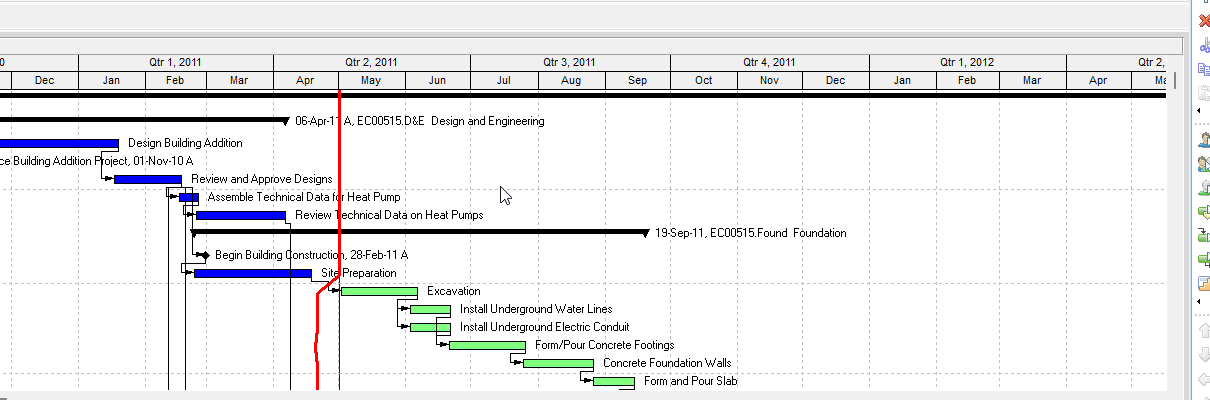
What a planner means
Zoom to Best Fit is a layout command that resizes a chart view so the whole chart fits the visible area. Oracle Display toolbar: "Re-sizes chart views to fit the entire chart into the visible area. This icon is enabled when you display a chart view in the active window." Corresponding menu: View > Zoom > Zoom to Best Fit. Enabled for Activities, Projects, Resources, WBS. It is not timescale Zoom In / Zoom Out (Timescale — shorter or longer date intervals on a Gantt, spreadsheet, or profile), not EPPM Gantt Zoom to fit, not Arrange Children / Align Children (Arrange Children / Align Children — box placement), not Chart Font and Colors (Chart Font and Colors), not Chart Box Template (Chart Box Template), not Activity Network Always Zoom to Best Fit After Reorganize (Activity Network — a checkbox after reorganize), not Visualizer (Visualizer), and not the PROJWBS / PROJECT / RSRC values a box can display. Running Zoom to Best Fit does not add or delete WBS nodes, projects, resources, or activities.
Professional — Oracle names these menus:
- View > Zoom > Zoom to Best Fit (Display toolbar corresponding-menu column)
- Display toolbar icon: Zoom to Best Fit. Displays by default? Yes. Enabled when active window is Activities, Projects, Resources, WBS. Shortcut keys: None.
- View menu Zoom: "Enables you to zoom in or out of a timescaled layout (Gantt Chart, spreadsheet, or profile). You can also re-size chart views to fit the entire chart into the visible area." Enabled for Activities, Projects, Resource Assignments, Tracking, Work Breakdown Structure. Corresponding toolbar: Display Toolbar.
- View menu hot key: Alt-V, Z Zoom. That is the Zoom menu. Oracle did not print a Zoom to Best Fit-only hot key. Display toolbar: the Zoom to Best Fit icon has shortcut keys None.
Oracle printed two enable lists. Quote both. Do not merge them.
- Zoom to Best Fit icon: Activities, Projects, Resources, WBS; "enabled when you display a chart view in the active window."
- View menu Zoom (timescale zoom in/out and chart resize): Activities, Projects, Resource Assignments, Tracking, Work Breakdown Structure.
The pages fetched do not print a zoom-percent field, a Zoom to Best Fit dialog, a Default button, a toolbar icon picture, or that the current zoom level is a named .plf field. Do not invent them.
WBS chart — Oracle View the WBS: Project, WBS, then View, Show on Top, Chart View. Table again: Table. Table plus bars: Gantt Chart. Move around the WBS chart is Display toolbar:
- Zoom In — "magnifies the view."
- Zoom Out — "reduces the size of elements in the view."
- Zoom to Best Fit — "adjusts information to fit in the window."
Those chart Zoom In / Zoom Out sentences are element size. They are not timescale Zoom In / Zoom Out (quarterly → monthly → weekly). Zoom to Best Fit is the fit command on that same chart how-to.
Activity Network — Oracle Move around in the Activity Network uses the same three Display toolbar sentences (magnifies / reduces the size of elements / adjusts information to fit in the window). Display toolbar enables Zoom to Best Fit when the active window is Activities and a chart view is displayed. Activity Network Options Always zoom to best fit after reorganize: "Automatically zooms in/out after each reorganize to find the best fit for showing all of the activity boxes in the Activity Network." That is a checkbox on reorganize, not this command. Activity Network page Alt+drag (Alt, click, drag down to zoom in / up to zoom out) is mouse zoom in/out, not Zoom to Best Fit. Box positions save as .ANP. See Activity Network.
Projects chart — Oracle Projects window: "In the top layout, you can display the Project Table, a project chart view, or a project Gantt Chart." Display toolbar enables Zoom to Best Fit when the active window is Projects (chart view). The pages fetched do not print a "Move around the project chart" field list. Do not invent Projects-only options.
Resources chart — Oracle Resources window: "In the Resources window, you can view the resource hierarchy as a table or as a chart." Display toolbar enables Zoom to Best Fit when the active window is Resources (chart view). The pages fetched do not print a "Move around the resource chart" field list. Do not invent Resources-only options.
OBS chart — Oracle Move around the OBS chart: Display Options bar → Zoom. "You can zoom in, zoom out, or zoom to best fit." Tip: Alt, click the background, drag down to zoom in / up to zoom out. The Display toolbar enable list for Zoom to Best Fit is Activities, Projects, Resources, WBS — it does not print OBS. OBS how-tos fetched do not print View > Zoom > Zoom to Best Fit. Do not copy that menu path onto OBS as if Oracle printed it there.
Oracle Using the Status Bar and Layout Options bar: "When you view data in chart view format, you can display up to 2,000 boxes." That is a chart-view limit, not a Zoom to Best Fit field.
Not these other commands
- Timescale Zoom In / Zoom Out — Display toolbar: "Zooms in on a timescaled layout (Gantt Chart, spreadsheet, or profile). Zooming in displays a shorter range of time using smaller time intervals, for example, zooming from a quarterly to monthly to weekly display." Zoom Out: "a longer range of time using larger time intervals." Enabled for Activities, Projects, Resource Assignments, Tracking, WBS. Corresponding menus: View > Zoom > Zoom In / Zoom Out. The timescaled-layout how-to does not print Zoom to Best Fit. See Timescale.
- Arrange Children / Align Children — horizontally or vertically; left, right, or center. Disabled for table or Gantt. That is placement, not zoom. See Arrange Children / Align Children.
- Chart Font and Colors — Font / Back Color / Box Color. See Chart Font and Colors.
- Chart Box Template — which fields appear in the boxes. See Chart Box Template.
- Always Zoom to Best Fit After Reorganize — Activity Network Options checkbox. See Activity Network.
- Visualizer — Tools > Visualizer; layouts export as .vlf. See Visualizer.
The Professional Zoom to Best Fit pages fetched do not print Manage Views, a Zoom tab, View menu → Zoom as an EPPM-style Customize View, Zoom to 100%, or that enabling Zoom to Best Fit is a named .plf field. Do not invent them. Layouts travel as .plf. See Filters and Layouts Are a View, Not the Schedule.
EPPM web — Gantt View Format of the Activities Page: right-click the timescale → Zoom to fit "Adjusts the current view's height and width or timescale to fit as much of the data as possible into the current work area." "You cannot zoom the financial period Gantt timescale using Zoom to Fit, nor by dragging the timescale." That is a Gantt timescale command. It is not Professional View > Zoom > Zoom to Best Fit.
EPPM Activity Network Format floating toolbar: Zoom In "Magnifies items in the work area so they appear larger."; Zoom Out "Minimizes items in the work area so they appear smaller."; Zoom to 100% "Restores the magnification of the current work area to its default size of 100%."; Zoom to Fit "Adjusts the height and width or timescale of the current view to fit as much of the data as possible into the current work area."
Those EPPM pages do not print View > Zoom > Zoom to Best Fit, Display toolbar Zoom to Best Fit, "Re-sizes chart views to fit the entire chart into the visible area," Move around the WBS chart, or Display Options bar → Zoom. Do not copy those Professional menus onto EPPM. Do not copy EPPM Zoom to fit / Zoom to 100% / "height and width or timescale" onto Professional as if Oracle printed them there.
XER
Zoom to Best Fit is a view command. Oracle's project XER data map TOC lists no ZOOM, ZOOMBESTFIT, LAYOUT, or VIEW table. Do not invent one. Layouts travel as .plf, not in a project XER. See Filters and Layouts Are a View, Not the Schedule.
Oracle did not name an XER column for Zoom to Best Fit or chart zoom level. Oracle did not print that the current zoom level lives in a .plf.
Activity Network box positions travel as a separate .ANP file (Save / Open Network Positions). That is not this command. See Activity Network.
What a box can display is not this command:
- WBS nodes:
PROJWBS. See XER Tables That Matter for a Viewer or Converter. - Projects:
PROJECT. - Resources:
RSRC. - Activities:
TASK.
A Viewer parse of one XER cannot reconstruct whether the planner ran Zoom to Best Fit, or the last chart zoom.
Microsoft Project
Desktop Project has Zoom. It is not the same object as P6 Zoom to Best Fit.
Microsoft Change the timescale: View > Zoom > Timescale dropdown (bottom-tier time unit; "Project automatically adjusts the top and middle tier"); Timescale dialog (up to three tiers; Units / Label / Count / Use fiscal year). Zoom Slider "near the bottom of the Project window." Ctrl+/ smaller time units; Ctrl+* larger time units. That is timescale zoom. It is closer to P6 Zoom In / Zoom Out of a timescaled layout than to chart-view Zoom to Best Fit.
Microsoft VBA Application.Zoom: "Displays the Zoom dialog box, which prompts the user to change the timescale range of the active view."
Microsoft VBA ZoomTimescale: Gantt Chart, Resource Graph, Resource Usage, or Task Usage. Entire "True if the view resizes to fit the entire project onto the screen." Selection "True if the view resizes to fit only the selected tasks onto the screen." Except Resource Graph, "all zooming occurs in the non-entry portion of the active view."
Microsoft VBA BoxZoom: "Zooms in to or out from the Network Diagram." Entire "True if the Network Diagram resizes to fit the entire project onto the screen." Percent 25–400; ignored when Entire is True. That is a task-dependency diagram. It is closer to P6 Activity Network zoom than to Projects / Resources / WBS Chart View.
The pages fetched do not print a Microsoft Project WBS chart, EPS chart, or resource-hierarchy chart with Zoom to Best Fit. Do not invent one. Do not map P6 Zoom to Best Fit (chart-view resize; entire chart into the visible area; Activities / Projects / Resources / WBS; disabled unless a chart view is displayed) to MSP View > Zoom > Timescale / Zoom Slider / ZoomTimescale Entire / BoxZoom Entire and call them the same command. Do not claim MPXJ can write a real MPP.
Don't
- Treat Zoom to Best Fit as timescale Zoom In / Zoom Out, as EPPM Gantt Zoom to fit, as Arrange Children / Align Children, as Chart Font and Colors, as Chart Box Template, as Activity Network Always Zoom to Best Fit After Reorganize, as Visualizer, or as the PROJWBS / PROJECT / RSRC / TASK values a box can display.
- Treat chart-view Zoom In / Zoom Out ("magnifies the view" / "reduces the size of elements") as timescale Zoom In / Zoom Out (quarterly → monthly → weekly).
- Treat View > Zoom > Zoom to Best Fit (Activities / Projects / Resources / WBS; chart view) as the OBS Display Options bar → Zoom path, or copy one menu path onto the other.
- Merge the Display-toolbar Zoom to Best Fit enable list with the View menu Zoom enable list (Resource Assignments / Tracking vs Resources).
- Invent a zoom-percent field, a Zoom to Best Fit dialog, Zoom to 100%, or that zoom level is a named
.plfor XER column. - Invent a ZOOM / ZOOMBESTFIT / LAYOUT / VIEW XER table.
- Treat EPPM Zoom to fit / Zoom to 100% / "height and width or timescale" as the Professional View > Zoom > Zoom to Best Fit command.
- Copy Professional View > Zoom > Zoom to Best Fit / Display toolbar / Move around the WBS chart onto EPPM as if Oracle printed those menus there.
- Map this object to MSP View > Zoom > Timescale, Zoom Slider, ZoomTimescale Entire, or BoxZoom Entire and call them the same.
- Claim MPXJ writes a real MPP.
- Claim a Viewer reconstructed Zoom to Best Fit or the last chart zoom from an XER.
Sources
- Oracle Display Toolbar [27 Aug 2026]
- Oracle View Menu [27 Aug 2026]
- Oracle Move around the WBS chart [27 Aug 2026]
- Oracle Move around in the Activity Network [27 Aug 2026]
- Oracle Move around the OBS chart [27 Aug 2026]
- Oracle Activity Network Layout tab [27 Aug 2026]
- Oracle Zoom in and out of a timescaled layout [27 Aug 2026]
- Oracle View the WBS [27 Aug 2026]
- Oracle Work Breakdown Structure window [27 Aug 2026]
- Oracle Projects window [27 Aug 2026]
- Oracle Resources window [27 Aug 2026]
- Oracle Using Hot Keys [27 Aug 2026]
- Oracle Using the Status Bar and Layout Options bar [27 Aug 2026]
- Oracle Gantt View Format of the Activities Page [27 Aug 2026]
- Oracle Activity Network Format of the Activities Page [27 Aug 2026]
- Oracle XER project map TOC [27 Aug 2026]
- Oracle Exporting and Importing Layouts [27 Aug 2026]
- Microsoft Change the timescale in a Project view in… [27 Aug 2026]
- Microsoft Application.Zoom method [27 Aug 2026]
- Microsoft Application.ZoomTimescale method [27 Aug 2026]
- Microsoft Application.BoxZoom method [27 Aug 2026]