
Views, Filters & Print
Timescale
Timescale is Layout Options bar Gantt/profile/spreadsheet date-axis format (Calendar/Fiscal/Week of Year, Date Interval, ordinal); .plf not XER; not print…

What a planner means
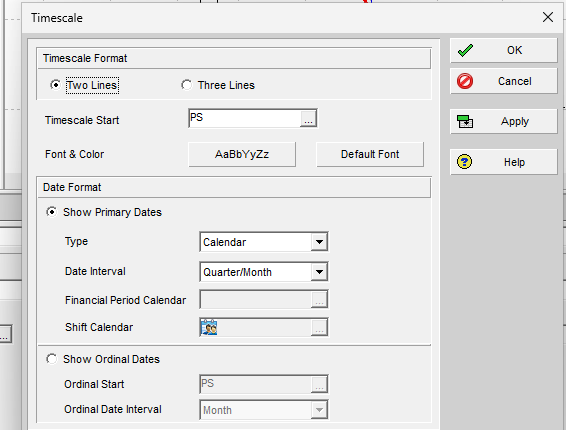
Timescale (Oracle: the Timescale dialog) is the date-axis format for the current Gantt Chart, profile, or spreadsheet. Oracle: "Use the Timescale dialog box to specify the timescale you want to display in the current Gantt Chart, profile, or spreadsheet layout." "You can change the timescale for a Gantt Chart, profile, or spreadsheet." It is not Page Setup Timescale Start / Timescale Finish (P6 Schedule Print / PDF (Table + Gantt) — a print date-range control), not the Bars-dialog Timescale column (Gantt Bars Are Layout Bar Definitions, Not an XER Table — which dates a bar draws), not a work calendar (P6 Calendars (Global, Project, Resource, Activity)), not FINDATES (Financial Periods Are Named Buckets, Not the Data Date), not Sight Lines (Sight Lines Are Gantt Background Gridlines, Not an XER Table), not the Activity Usage Spreadsheet view (Activity Usage Spreadsheet — that view uses a timescale), not typed future-period buckets (Future Period Buckets Are Typed Assignment Units, Not a Curve), and not a resource shift (A Shift).
Professional — Oracle Change page: display the Gantt Chart, profile, or spreadsheet, then Layout Options bar → Timescale. "When one of these layout components is displayed in both the Top and Bottom Layout windows, changing the timescale affects both windows." Apply "To see the timescale settings without closing the Timescale dialog box."
Oracle names these Timescale dialog fields:
Timescale Format
- Two Lines — "Choose to display two time units on the timescale."
- Three Lines — "Choose to display three time units on the timescale."
- Timescale Start — Dialog: "The date from which you want to display project information. Click to select a new date." Change page: "To indicate the beginning date from which you want to display data, in the Timescale Start field click, then select a standard date or a custom date."
- Font & Color — Dialog: "The font style, size, and color settings for the timescale and column headings. Click to format the font and background color. Click the Default Font button to change the timescale font and color to its original settings." Change page: "Click the Font & Color button to format the font type, size, and color for the timescale and column headings. Click Default Font to change the timescale to its original font and color settings."
The Timescale dialog pages fetched do not print a Timescale Finish field. Do not invent one. Print Page Setup Timescale Finish is a different control.
Date Format
- Show Primary Dates — "Choose or mark to select the type, date interval, and shift calendar to display for the timescale." Change page: primary dates "specify the date interval increments for the timescale."
- Type — "Select Calendar to display date intervals according to the standard calendar. Select Fiscal to display the date intervals according to the fiscal periods. Select Week of Year to display the date intervals as a number for each week of the year, consecutively, beginning with January."
- Date Interval (Oracle label DateInterval) — "The current layout's timescale. Select Year/Quarter, Year/Month, Quarter/Month, Year/Financial Period, Quarter/Financial Period, Month/Financial Period, Week/Financial Period, Month/Week, Week/Day1, Week/Day2, Day/Shift, or Day/Hour."
- Shift Calendar — "If you select Day/Shift as the date interval, click to select the corresponding shift." Change page: "If you choose Day/Shift, click the Shift Calendar field and select a shift."
- Show Ordinal Dates — "Choose or mark to set and display the date intervals as sequential numbers, beginning from the ordinal start date specified. Ordinal dates that precede the ordinal start date display a negative number."
- Ordinal Start — "Specify a start date for the ordinal dates."
- Ordinal Date Interval — "Specify the interval to display for ordinal dates in the timescale."
Change page: if Show Primary Dates and "an interval which includes Financial Period," "click the Financial Period Calendar field and select the calendar to use." If Show Ordinal Dates, "specify a start date for the ordinal dates in the Ordinal Start field. Then, select the ordinal date interval."
Oracle did not print what Week/Day1 vs Week/Day2 means, the Ordinal Date Interval tokens, what "standard calendar" is (Gregorian vs a P6 CALENDAR), or a fiscal-year start month on these Timescale pages. Do not invent them.
Financial-period timescale — Oracle: "If you customize a profile or spreadsheet to display past period actual data (rather than actual to date values) and you want to display a financial period timescale, choose Calendar or Fiscal as the Type. Then, in the Date Interval field choose Year/Financial Period, Quarter/Financial Period, Month/Financial Period, or Week/Financial Period and in the Financial Period Calendar field select the calendar to use. You can display a financial period timescale at any time, even if you do not store past period actuals."
"When you customize a profile or spreadsheet to display a financial period timescale, activity and resource data must be summarized by financial period to accurately display actual to date values for closed projects." Professional database: Admin, Preferences, Options tab, By financial period. EPPM database (Professional connected to EPPM): "from the P6 Application Settings."
That is a display interval. It is not FINDATES itself and not a work calendar.
Zoom — Oracle: zooming in on a "timescaled layout (Gantt Chart, spreadsheet, or profile)" "displays a shorter range of time using smaller time intervals, for example, zooming from a quarterly to monthly to weekly display." Zooming out "displays a longer range of time using larger time intervals, for example, zooming from a weekly to monthly to quarterly display." Display toolbar, or right-click Zoom In / Zoom Out. "When the Top and Bottom Layout windows both display a timescaled layout, zooming in or out changes the timescale in both windows." "The right-click zoom options are not available in the Gantt Chart." Display toolbar corresponding menus: View > Zoom > Zoom In / Zoom Out. Enabled for Activities, Projects, Resource Assignments, Tracking, WBS.
Not these other "Timescale" words
- Page Setup Options — Timescale Start "the type of date or a custom date from which data should be included"; Timescale Finish "the type of date or a custom date up to which data should be included." That is the print date range. See P6 Schedule Print / PDF (Table + Gantt).
- Bars dialog Timescale — "The timescaled data that the bar represents" (Current Bar, Plan Bar, Remain Bar, …). See Gantt Bars Are Layout Bar Definitions, Not an XER Table.
- Sight Lines vertical date interval — Bar Chart Options background lines. See Sight Lines Are Gantt Background Gridlines, Not an XER Table.
- Progress Spotlight — EPPM: the spotlight window is "defined by the smallest increment of the current timescale since the last data date." That uses the timescale; it is not this dialog. See Progress Spotlight (a View, Not a Field).
The Timescale dialog pages fetched do not print View, Barchart Options, Sight Lines, Bars Timescale, or Page Setup. Do not invent those menus on this dialog.
EPPM web — Configuring Activity View Gantt Chart (Customize View → Gantt tab): "Select a Timescale." "You can right click on the timescale to change the timescale of the Gantt." That page also names Data date line, Relationship lines, Non-driving relationships, Sight Lines, and Non-work time shading.
Gantt View Format: right-click the timescale → Timescale list: Week/Day, Month/Week, Quarter/Month, Year/Month, Year/Quarter, Financial Period ("The Gantt chart is divided into years which are then divided into financial periods."), Zoom to fit. Gantt Settings: Timescale "Select a timescale for the Gantt." Hover a financial-period increment for start and finish dates. "If financial periods do not exist for part of the duration of your project, the Gantt chart does not show data for the parts of your project whose dates fall outside the existing financial periods." "If financial periods do not exist for the whole of the duration of your project, the Gantt chart does not show any data." "You cannot zoom the financial period Gantt timescale using Zoom to Fit, nor by dragging the timescale."
Working with the Activity Gantt Chart: "You can change the progress line options or the timescale for the Gantt chart in the Manage Views dialog box." "Vertical sightlines appear at each minor increment (bottom) of the timescale." "The timescale background is shaded to indicate non-work time based on the global default calendar." Progress Spotlight uses "the smallest increment of the current timescale since the last data date" (example: Month/Week → the week since the data date).
Those EPPM pages do not print Layout Options bar → Timescale, Two Lines / Three Lines, Type Calendar / Fiscal / Week of Year, the Professional Date Interval list (Week/Day1, Week/Day2, Day/Shift, Day/Hour, * /Financial Period), Shift Calendar, Financial Period Calendar, Show Ordinal Dates, Ordinal Start, Font & Color, or View > Zoom. Do not copy those Professional menus onto EPPM.
EPPM print Timescale tab (Print Options → Edit Content) is a print control: the same Week/Day … Financial Period list, plus Use rolling dates / Start Date / End Date. That is not the Professional Timescale dialog and not Professional Page Setup Timescale Start/Finish. See P6 Schedule Print / PDF (Table + Gantt).
XER
Timescale (Two/Three Lines, Timescale Start, Font & Color, Type, Date Interval, Shift Calendar, Financial Period Calendar, ordinal dates) is a Gantt / profile / spreadsheet layout setting. Oracle's project XER data map TOC lists no TIMESCALE, TIMESCL, DATEINTERVAL, ORDINAL, GANTT, LAYOUT, or VIEW table. Do not invent one. Layouts travel as .plf, not in a project XER. See Filters and Layouts Are a View, Not the Schedule.
Oracle did not name an XER column for Type, Date Interval, Timescale Start, Two/Three Lines, Shift Calendar, Financial Period Calendar, or ordinal dates.
What a financial-period interval can display is not this dialog:
- Named financial-period calendar:
FINDATES. See Financial Periods Are Named Buckets, Not the Data Date. - Stored past-period actuals:
TASKFIN/TRSRCFIN. See Store Period Performance Posts This Period, Then Zeros It. - Work calendars:
CALENDAR. See P6 Calendars (Global, Project, Resource, Activity). - Resource-shift names:
SHIFT/SHIFTPER. Oracle did not say Timescale Shift Calendar is that table. See A Shift.
A Viewer parse of one XER cannot reconstruct the planner's last timescale.
Microsoft Project
Desktop Project has Timescale. It is not the same object.
Microsoft: "Most views in Project have a timescale, which shows time. You can adjust the timescale to show smaller or greater time units, from hours all the way up to years. For example, you might want to show time in fiscal, not calendar years, or you might want to show Gantt bars across months, not days."
View > Zoom > Timescale dropdown: pick the time unit for the bottom tier; "Project automatically adjusts the top and middle tier." Or open Timescale. "You can show up to three timescale tiers in each timescale view and format each tier individually." Preview box. Microsoft names: Show (number of tiers); Units; Label; Count ("if the unit is weeks and you enter 2, the timescale tier will show 2-week segments"); Align Left / Center / Right; Tick Lines; Use fiscal year ("base the timescale on fiscal or calendar years"); Size (percentage spacing); Scale separator.
Zoom Slider; Ctrl+/ smaller units; Ctrl+* larger units.
Calendar view has its own Timescale dialog (Week Headings / Date Boxes / Date Shading). That is not the Gantt timescale.
Microsoft fiscal-year page: "it is the fiscal-year setting that controls how time is displayed on the timescale, but that it doesn't change the way that task dates and assignment dates appear in a view." Per-tier Use fiscal year. "Settings can be changed only in the timescale of the current view."
Do not map P6 Type Calendar / Fiscal / Week of Year, Date Interval (Year/Quarter … Day/Hour), Shift Calendar, Financial Period Calendar, or Show Ordinal Dates to MSP View > Zoom > Timescale (tiers / Units / Count / Use fiscal year) and call them the same command. The pages fetched do not print Oracle's Type / Date Interval / Shift Calendar / ordinal fields on the Microsoft Timescale dialog. Do not claim MPXJ can write a real MPP.
Don't
- Treat this Timescale dialog as Page Setup Timescale Start/Finish, as the Bars-dialog Timescale column, as a work calendar, as FINDATES, as Sight Lines, as Activity Usage Spreadsheet, as future-period buckets, or as a resource shift.
- Invent a Timescale Finish field on the Professional Timescale dialog. Oracle printed Timescale Finish on Page Setup Options, not on the Timescale dialog pages fetched.
- Invent Week/Day1 vs Week/Day2 meaning, Ordinal Date Interval tokens, a fiscal-year start month, or that Type Calendar is a P6 CALENDAR row.
- Treat EPPM Timescale (Week/Day … Financial Period / Zoom to fit / Manage Views) as the Professional Layout Options bar → Timescale dialog (Two/Three Lines, Type, Date Interval, Shift Calendar, ordinal, Font & Color).
- Treat EPPM print Timescale tab (rolling dates / Start / End) as the Professional Timescale dialog or as Professional Page Setup Timescale Start/Finish.
- Copy Professional Layout Options bar → Timescale / View > Zoom onto EPPM as if Oracle printed those menus there.
- Copy EPPM Zoom to fit, Financial Period hover, or "cannot zoom the financial period Gantt timescale" onto Professional as if Oracle printed them there.
- Invent a TIMESCALE / TIMESCL / DATEINTERVAL / ORDINAL / GANTT / LAYOUT / VIEW XER table, or treat FINDATES / CALENDAR / SHIFT as this dialog.
- Map this object to MSP View > Zoom > Timescale and call them the same.
- Claim MPXJ writes a real MPP.
- Claim a Viewer reconstructed the planner's last timescale from an XER.
Sources
- Oracle Change a layout's timescale format [27 Aug 2026]
- Oracle Timescale dialog box [27 Aug 2026]
- Oracle Zoom in and out of a timescaled layout [27 Aug 2026]
- Oracle Display toolbar [27 Aug 2026]
- Oracle Options tab - Page Setup [27 Aug 2026]
- Oracle Configuring Activity View Gantt Chart [27 Aug 2026]
- Oracle Gantt View Format of the Activities Page [27 Aug 2026]
- Oracle Working with the Activity Gantt Chart [27 Aug 2026]
- Oracle Edit View of the Print Options Dialog Box [27 Aug 2026]
- Oracle XER project map TOC [27 Aug 2026]
- Oracle Exporting and Importing Layouts [27 Aug 2026]
- Microsoft Change the timescale in a Project view in… [27 Aug 2026]
- Microsoft Set the month a fiscal year starts with [27 Aug 2026]