
In Primavera P6
View Activity Relationships in the Activity Network
View activity relationships in the Activity Network is hierarchy table on the left; a line connecting two boxes

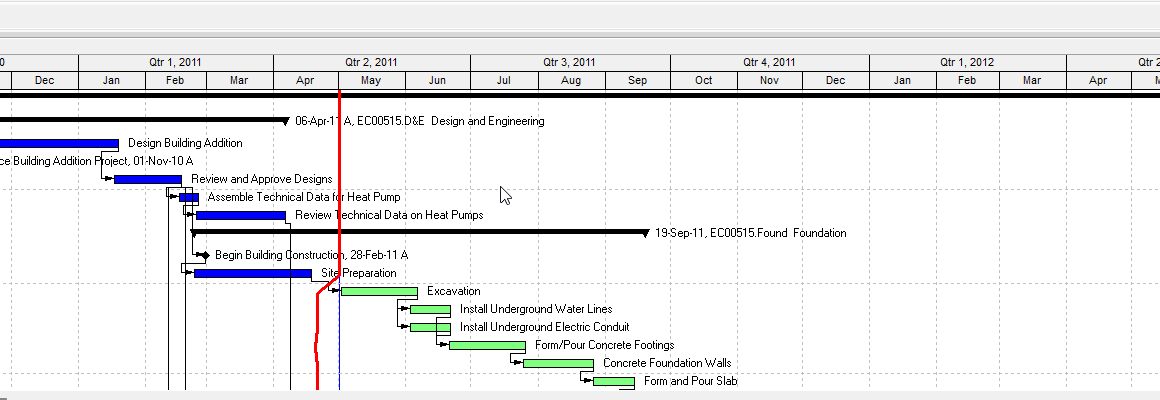
What a planner means
View activity relationships in the Activity Network is Oracle View activity relationships in the Activity Network. Hierarchy table on the left; select the hierarchy element. A line connecting two activity boxes is a relationship. The begin and end points on the boxes show the type. It is a how-to. It is view. It does not create, edit, or delete a relationship. It is not stored as its own table. It is not Display the Activity Network, not the Activity Network view, not Create / Edit / Delete relationships in the Activity Network, not View activity relationships in the Gantt Chart, not Show Relationships, not Trace Logic, not View activity relationships in Activity Details, not View activity relationships in the Activity Table, not View activity relationships in Trace logic, and not EPPM About Activity Networks copied onto Professional.
Oracle does print a how-to titled View activity relationships in the Activity Network. Oracle does not print a menu item named View activity relationships in the Activity Network. Do not invent View > View activity relationships in the Activity Network.
Oracle View activity relationships in the Activity Network (Professional):
- "The Activity Network displays a graphical view of all activity relationships for a specific activity filter."
- "In the hierarchy table on the left side of the Activity Network, select the hierarchy element whose activity relationships you want to view. The Activity Network table displays the selected hierarchy element's activities."
- "A line connecting two activity boxes indicates an activity relationship. The point at which the line begins on the predecessor box and the point at which the line ends on the successor box indicates the type of the activity relationship."
- "A finish to start relationship line begins on the right side of the predecessor's box and ends on the left side of the successor's box."
- "A finish to finish relationship line begins on the right side of the predecessor's box and ends on the right side of the successor's box."
- "A start to finish relationship line begins on the left side of the predecessor's box and ends on the right side of the successor's box."
- "A start to start relationship line begins on the left side of the predecessor's box and ends on the left side of the successor's box."
Quote activity boxes and predecessor's box / successor's box. Quote the type of the activity relationship. The Gantt view how-to prints activity bars / predecessor activity's bar / successor activity's bar and the type of activity relationship the line represents. Do not collapse them. Quote finish to start as that page printed it. Do not invent FS / FF / SF / SS codes. That how-to fetched prints no Layout Options bar, no Show on Top, no Double-click, no Delete, no OK, no lag days, no draw, no relationship pointer, no hint help window, and no menu item named View activity relationships in the Activity Network. Do not invent those.
View activity relationships in the Gantt Chart is a different how-to. Layout Options bar → Show on Top, Gantt Chart. "A line connecting two activity bars indicates an activity relationship." Four type sentences on activity's bar. Quote the type of activity relationship the line represents. See View Activity Relationships in the Gantt Chart.
Display the Activity Network is a different how-to. View > Show on Top > Activity Network / Layout Options bar / Top Layout toolbar. That opens the view. This how-to assumes the Network is already up and tells you to select a hierarchy element. See Activity Network.
The Activity Network view is a different object. Show-on-Top WBS diagram. Box positions save as .ANP. "A line connecting activity boxes indicates an activity relationship." That view page is not this view-relationships how-to. See Activity Network.
Create relationships in the Activity Network is a different how-to. Draw from box edges. That creates a line. This views one. See Create Relationships in the Activity Network.
Edit / Delete relationships in the Activity Network are different how-tos. Double-click the line. See Edit Relationships in the Activity Network and Delete Relationships in the Activity Network.
Show Relationships is a different command. Bar Chart Options / Top Layout toolbar Gantt line show/hide. See Show Relationships.
Trace Logic is a different view. Show on Bottom; "only the selected activity's relationships." See Trace Logic.
View activity relationships in Trace logic is a different how-to. Layout Options bar → Show on Bottom, Trace Logic. Blue border; left pred / right succ. That page fetched prints no hierarchy table and no four box-side type sentences.
View activity relationships in Activity Details is a different how-to. Layout Options bar → Show on Bottom, Activity Details; Predecessors / Successors / Relationships tabs.
Professional vs EPPM
Professional — hierarchy table on the left; select the hierarchy element. Line connecting two activity boxes. Four begins-on / ends-on sentences on predecessor's box / successor's box. Quote the type of the activity relationship.
EPPM web — Oracle About Activity Networks: "An Activity Network is a graphical display of activities and their logical relationships according to the WBS." You can "view activity relationship paths and the flow of work through a project." "Activity Networks also allow you to examine and edit an activity and its predecessors and successors." That page is view / examine / edit. It does not print this Professional how-to: no hierarchy table on the left, no "A line connecting two activity boxes," no four begins-on / ends-on box sentences, and no the type of the activity relationship. Do not copy About Activity Networks onto this Professional how-to.
Oracle EPPM Working with the Activity Network: arrows between boxes; red/blue outlines; solid driving / dashed non-driving; Show Driving Relationships / Show Critical Activities; hyphenated Start-to-Start / Finish-to-Start / Start-to-Finish / Finish-to-Finish. Oracle EPPM Activity Network Format of the Activities Page: red/black outlines; solid red critical relationship lines; milestone diamond; status icons. Those pages fetched print no hierarchy table, no four Professional begins-on / ends-on predecessor's box sentences, and no the type of the activity relationship. Do not copy those EPPM visual cues onto Professional. Do not copy Professional hierarchy table / four box sentences onto EPPM.
Primavera Cloud is a different product. Do not copy it here.
XER
The how-to is not an XER table. Viewing lines does not write TASKPRED. Oracle’s project XER map TOC has no VIEWNETWORK / VIEWREL / NETWORKVIEW table. A Viewer showing lines is not this Professional how-to.
Microsoft Project
Microsoft Network Diagram (View > Network Diagram) shows boxes (or nodes) and dependency lines. That is not P6 View activity relationships in the Activity Network (hierarchy table on the left; four begins-on / ends-on box sentences; the type of the activity relationship). Microsoft Rectilinear links "always enter on the left side of a Network Diagram box and exit on the right side." That is not the four P6 type sentences. Do not map them as the same how-to. Do not claim MPXJ writes a real MPP.
Don't
- Treat this as Display the Activity Network, the Activity Network view, Create / Edit / Delete Network, View Gantt, Show Relationships, Trace Logic, View Activity Details, or View Activity Table.
- Collapse Network activity boxes / predecessor's box onto Gantt activity bars / activity's bar.
- Collapse the type of the activity relationship onto Gantt the type of activity relationship the line represents.
- Invent FS / FF / SF / SS codes, Double-click, lag, draw, Layout Options bar Show on Top, or a menu item on this how-to.
- Copy EPPM About Activity Networks / Working with driving-dashed / Show Driving Relationships onto Professional, or Professional hierarchy table / four box sentences onto EPPM.
- Invent a VIEWNETWORK XER table, or treat a TASKPRED row as this view how-to.
- Map this to MSP Network Diagram as the same command.
- Claim MPXJ writes a real MPP.
Sources
- Oracle View activity relationships in the Activity… [27 Aug 2026]
- Oracle View activity relationships in the Gantt Chart [27 Aug 2026]
- Oracle Display the Activity Network [27 Aug 2026]
- Oracle Activity Network [27 Aug 2026]
- Oracle Create relationships in the Activity Network [27 Aug 2026]
- Oracle Edit relationships in the Activity Network [27 Aug 2026]
- Oracle Delete relationships in the Activity Network [27 Aug 2026]
- Oracle View activity relationships in Trace logic [27 Aug 2026]
- Oracle View activity relationships in Activity Details [27 Aug 2026]
- Oracle About Activity Networks [27 Aug 2026]
- Oracle Working with the Activity Network [27 Aug 2026]
- Oracle Activity Network Format of the Activities Page [27 Aug 2026]
- Oracle XER project map TOC [27 Aug 2026]
- Oracle TASKPRED [27 Aug 2026]
- Microsoft Create a Network Diagram in Project desktop [27 Aug 2026]
- Microsoft Layout dialog box [27 Aug 2026]
- Related [27 Aug 2026]