
In Primavera P6
Add Activity
Add Activity is Edit > Add in Activities plus optional New Activity wizard; not Add WBS

What a planner means
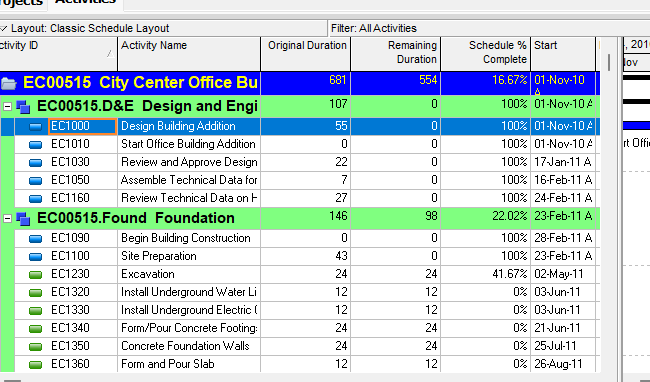
Add Activity is Edit > Add of an activity in the Activities window (Activity Table or Activity Network). Oracle does not print a menu item named Add Activity. The how-tos Oracle names are Add activities in the Activity Table and Add activities in the Activity Network. If User Preferences Use New Activity Wizard is marked, the New Activity wizard starts. It is a command. It is not stored data. It is not Add WBS, not Copy Activity, not Cut Activity, not Delete Activity, not Dissolve, not Fill Down, not Link Activities, not Edit > Renumber Activity IDs, not Change an activity's WBS assignment, not Define general activity information, not Import, not EPPM Context / Row Actions Add Activity copied onto Professional, and not Primavera Cloud Add an Activity.
Oracle Add activities in the Activity Table (Professional):
"Select an activity within the group to which you want to add a new activity. Click on the Edit toolbar or choose Edit. The new activity is placed according to the sorting options selected for the layout. Depending on your user preferences, the New Activity wizard might start and help you add an activity."
Quote that page as printed. The fetches (English user guide and client_help, G48902 and F88968) print choose Edit, not Edit, Add. An Add-icon image sits before "on the Edit toolbar." Do not invent that this page printed Edit, Add. Do not invent a Gantt add how-to. The Activities-window Gantt task list fetched does not name Add activities in the Gantt Chart.
Oracle Add activities in the Activity Network (Professional):
"In the Activity Network, select the group band or another activity box within the group band into which you want to add the new activity, then click on the Edit toolbar or choose Edit, Add. Depending on your user preferences, the New Activity wizard might start and help you add an activity."
Note Oracle printed: "If activities are not grouped in the Activity Network, the activity is added to the bottom of the Activity Network."
Quote both how-tos. Do not collapse Activity Table (activity within the group; sorting options selected for the layout; "choose Edit") onto Activity Network (group band or another activity box within the group band; Edit, Add; ungrouped = bottom of the Activity Network).
The Add how-tos fetched print no field catalog (no Activity ID, Activity Name, duration, activity type, duration type, percent complete type, calendar, WBS, status, dates, or constraint list). Do not invent one. Do not invent a default name or default ID on those pages.
Oracle Adding activities using a wizard: "Activities are the fundamental work elements of a project. They are the lowest level of a work breakdown structure ( WBS) and, as such, are the smallest subdivision of a project that directly concerns the project manager." "If the Use New Activity Wizard checkbox is marked in the User Preferences dialog box, the New Activity wizard displays each time you add an activity to guide you through the process."
That page fetched prints no wizard-step field names. Do not invent New Activity wizard pages, fields, or defaults.
Oracle Set wizard options: "You can specify whether you want wizards to help you add activities and resources."
- "Choose Edit, User Preferences."
- "Click the Assistance tab."
- "To use the New Resource wizard, mark the Use New Resource Wizard checkbox."
- "To use the New Activity wizard, mark the Use New Activity Wizard checkbox."
Oracle Assistance tab - User Preferences: "The Assistance tab enables you to specify whether you want to use wizards, rather than standard dialog boxes." Use New Activity Wizard — "Mark to use the New Activity Wizard to add activities to projects." That tab also names Use New Resource Wizard (resources, not this command). See User Preferences.
Quote the printed names. Oracle printed Use New Activity Wizard (Assistance tab; Adding activities using a wizard checkbox) and Use New Activity wizard / New Activity wizard (Set wizard options; the Add how-tos). Quote both Wizard and wizard. Do not collapse them. Do not invent that Assistance printed New Activity wizard steps.
Oracle Wizards: "You can choose to launch the New Activity and New Resource wizards automatically when you add a resource or activity." Oracle Navigate wizards (general wizard chrome, not a New Activity field list): "To move between wizard windows, click Prev or Next. To save changes and close a wizard, click Finish. To exit a wizard without saving your changes, click Cancel." Do not invent that the Add how-tos printed Prev / Next / Finish / Cancel. Do not invent New Activity wizard fields from those buttons.
Professional — Activities window: "Use the Edit menu on the Menu bar or use the Edit toolbar to add, delete, cut, copy, paste, link, renumber, or dissolve activities, and to undo an action." That is shortcut Add, not a printed item titled Add Activity. The Activities-window task list names Add activities in the Activity Table, Add activities in the Activity Network, and Adding activities using a wizard under adding and defining general activity information. This page fetched does not print a shortcut (right-click) Add for activities. Do not invent Professional right-click Add. (The WBS window does print shortcut add for WBS elements. That is Add WBS, not this command.)
Edit Menu: Add "Adds a data item in the active window. For example, in the Activities window, choosing this command adds an activity." Enabled when the active window is "All." Corresponding toolbar: Edit Toolbar. This is the same Add as any other data object. Add Activity is that command when the selected object is in Activities.
Edit Toolbar Add: "Adds a data item in the active window. For example, in the Activities window, clicking this icon adds an activity." Yes (displays by default). Enabled when "All except Tracking." Ins or Insert. Edit > Add. Do not collapse Edit Menu "All" and Edit Toolbar "All except Tracking" into one invented window list.
Hot keys: Alt-E, A = Add. Using Shortcut Keys lists Add with no Ctrl shortcut (empty cell). Quote the toolbar Ins or Insert, the empty Shortcut Keys cell, and Alt-E, A. Do not collapse them. Do not invent that Shortcut Keys printed Ins.
Add/Edit Activities Except Relationships privilege (Professional project profile): "Determines whether the profile will enable users to create and modify all activity information in projects, except activity relationships. To modify activity IDs, users must also have the 'Edit Activity ID' project privilege assigned to their profile." Activities window: "You need the Edit Activity ID privilege to modify the Activity ID." That is modify, not a sentence the Add how-tos printed. Do not invent that Add printed Edit Activity ID. The Professional privilege page fetched does not print activity owner / status reviewer / Team Member work-distribution sentences. Do not copy those EPPM extras onto Professional Add.
Project Details Defaults is a different how-to. Oracle Set activity ID options: Enterprise, Projects → Project Details → Defaults tab → Auto-Numbering Defaults (prefix, suffix, increment; Increment Activity ID Based on Selected Activity). "Your activity ID settings apply to new activities only." "When a new activity is created, the activity ID is automatically generated using auto-numbering." Worked example on that page: prefix "A", suffix "1000", increment "10" → "A1010," "A1020," "A1030," and so on. Oracle Defaults tab - Project Details also names Defaults for New Activities: Duration Type, Percent Complete Type, Activity Type ("If you add a new project, the default is set to Task Dependent."), Cost Account, Calendar. Those pages say the defaults apply to new activities and do not change existing ones. The Add how-tos fetched do not print prefix / suffix / increment / Increment Activity ID Based on Selected Activity / Duration Type / Percent Complete Type / Activity Type / Cost Account / Calendar. Do not invent that they did. Do not invent a default Activity Name on Professional Add.
Define general activity information is a different command. Oracle: Project, Activities → select the activity → Activity Details tabs. Tip: Layout Options bar → Bottom Layout Options. That how-to does not print Edit, Add.
Change activity information in the Activity Table is a different command. Oracle: "To change activity information, double-click the information you want to change." Note: "You may need the required security privileges to edit certain activity information." That is not Edit > Add.
Activity Details is a different surface. After an activity exists, Oracle Activity Details names top-of-tab Activity ("The selected activity's ID. You can type a new ID."), Activity Name, and Project. General tab - Activity Details names Activity Type, Duration Type, % Complete Type, Activity Calendar, WBS, Responsible Manager, and Primary Resource (purpose sentence also names priority level and cost account). The Add how-tos fetched do not print those labels. Do not invent that Add did. See P6 Activity Types (Six) — Not MSP Task Type and P6 Duration Types (Four) vs Project Task Types (Three).
Add WBS is a different command. Edit > Add of a child WBS element in Project > WBS. That creates a PROJWBS node, not a TASK. See Add WBS.
Copy Activity is a different command. Edit > Copy / Paste plus Copy Activity Options and on-paste Renumber Activity IDs. See Copy Activity.
Cut Activity is a different command. Edit > Cut / Paste is a move. See Cut Activity.
Delete Activity is a different command. Edit > Delete plus Yes. See Delete Activity.
Dissolve is a different command. Edit > Dissolve removes an activity and joins its predecessors to its successors. See Dissolve Removes an Activity and Joins Its Predecessors to Its Successors.
Fill Down is a different command. Edit > Fill Down copies first-selected-row text down a column. See Fill Down Copies First-Selected-Row Text Down a Table Column.
Link Activities / Unlink Activities are different commands. Edit > Link Activities creates a finish-to-start between the activities you select, in list order. Edit > Unlink Activities "Removes relationships between the selected activities." Neither adds an activity.
Edit > Renumber Activity IDs is a different command. It opens Renumber Activity IDs without adding an activity. See Copy Activity for the on-paste dialog that is also not this command.
Change an activity's WBS assignment is a different command. Activity Details General tab → WBS field. That how-to does not print Edit, Add.
Import is a different command. File > Import. See File > Import Starts the Import Wizard; It.
Professional vs EPPM
Professional — the how-tos, Edit Menu / Edit Toolbar / Ins / Alt-E, A, Use New Activity Wizard, and Add/Edit Activities Except Relationships privilege above. Do not invent a printed item titled Add Activity.
EPPM web — do not copy Professional Project, Activities / Edit > Add / "choose Edit" / Edit, Add / Edit Toolbar / Ins or Insert / Alt-E, A / New Activity wizard / Use New Activity Wizard / Assistance tab onto EPPM.
Oracle EPPM Creating Activities (G48897; Context wording): "Create activities to define a more detailed breakdown of projects or WBSs."
- "On the Navigation Menu, expand Projects and click Activities."
- "On the Activities page:"
- "Click the Context menu and select Add Activity." - "Enter a name in the Name field." - "Click Save."
That page also prints: "Enter an ID in the ID/Code field." Note: "The ID/code must be unique in the project."
Tips Oracle printed:
- "Right-click a project, WBS, or activity and select Add Activity to quickly add an activity.You can also right click in the background of the Gantt view and select Add Activity."
- "The application automatically names new activities New Activity."
- "The default limit allows you to create up to 5000 activities per activity view."
A later EPPM page (F88966 / F25599) prints Row Actions then Add Activity for the same create (and Save). F25599 numbers ID/Code as a step after Row Actions Add Activity. Oracle printed both Context and Row Actions. Do not collapse them. Do not invent that Professional prints Add Activity, ID/Code, Name, Click Save, New Activity, or 5000. Do not copy EPPM auto-name / Save / 5000 onto Professional Add (Professional Add how-tos say the New Activity wizard might start, and do not print a default name).
Oracle EPPM Working with Activities: Row Actions Menu — "Add and delete activities or add, delete, expand, and collapse WBS elements with this menu." That page fetched is not a create how-to. It does not print Edit > Add, New Activity wizard, or Save.
Oracle EPPM Configuring General Activity Information is the General detail window after an activity exists (Activity Type, Duration Type, Percent Complete Type; Save). That is not Creating Activities and not Professional Edit > Add.
Oracle EPPM About Activities: "Also known as tasks, events, or work packages, activities are the lowest level manageable work elements in a project or WBS." Do not copy that "also known as tasks" sentence onto Professional Add. Professional Activities says "fundamental work elements" / "lowest level of a work breakdown structure (WBS)."
EPPM Add/Edit Activities Except Relationships: same "create and modify all activity information in projects, except activity relationships" sentence as Professional, plus EPPM-only: "Users assigned a profile with this privilege can also designate another user as an activity owner and be assigned as a status reviewer for reviewing status updates from P6 Team Member interface users. Users assigned Team Member work distribution filters must have this privilege assigned." Quote those extras on EPPM only.
Primavera Cloud — Add an Activity is a different product. Cloud names toolbar Add, Insert, Context Add Above / Add Below, auto-save, and "You cannot add an activity in an open baseline." Do not copy those onto P6 Professional or EPPM. The P6 Add how-tos fetched do not print baseline-blocked add.
XER
None. Oracle’s project XER map TOC has no ADDACTIVITY / ADDACT / ADD_ACTIVITY / NEWACTIVITY / NEWACT / NEWACTIVITYWIZARD table. After the command you see another TASK. Do not invent a command %T. Do not treat a new TASK row as “the planner used Edit > Add.”
TASK is the activity. Columns that match names Oracle used elsewhere (Oracle XER labels): task_code (Activity ID), task_name (Activity Name), task_type (Activity Type), wbs_id (WBS), clndr_id (Calendar), duration_type (Duration Type), complete_pct_type (Percent Complete Type). The Add how-tos fetched do not print those column names. See P6 Activity Types (Six) — Not MSP Task Type. PROJECT.def_task_type is Default Activity Type — the Defaults-tab default, not “the planner used Add.”
A Viewer parse of one XER cannot reconstruct whether the planner used Edit > Add, the New Activity wizard, Copy Activity, typed a new activity, imported, or used EPPM Context / Row Actions Add Activity.
Microsoft Project
Desktop Project Add new tasks: "Select the row below where you want a new task to appear." "Select Task > Task." "Type the task name in the inserted row." "The task IDs are automatically renumbered, but the inserted task isn’t automatically linked to the surrounding tasks." You can set Project to autolink inserted tasks. Add a task to a Network Diagram: View > Network Diagram → Task > Task → type the name in the new task box. Add multiple tasks: Task Form Name, Duration, Effort driven. Microsoft Basic tasks in Project: View > Gantt Chart → type a name in the first empty Task Name field at the bottom of the list.
Microsoft ID is list position (insert/delete renumbers it). That is not P6 Activity ID (TASK.task_code). Microsoft Autolink inserted or moved tasks is a Schedule option. Microsoft indent makes a subtask; the row above becomes a summary. See Add WBS.
They are not the same command. P6 Add Activity is Edit > Add of a TASK in the Activity Table or Activity Network, plus an optional New Activity wizard when Use New Activity Wizard is marked. Project inserts a task (Task > Task or type a Task Name) and renumbers ID. Microsoft did not print Use New Activity Wizard, Copy Activity Options, or WBS-band Add. Do not map P6 Add Activity to MSP Insert Task / Task > Task / type-a-Task-Name / Network Diagram Task as the same command. Do not claim MPXJ writes a real MPP.
Don't
- Treat Add Activity as Add WBS, Copy Activity, Cut Activity, Delete Activity, Dissolve, Fill Down, Link Activities / Unlink Activities, Edit > Renumber Activity IDs, Change an activity's WBS assignment, Define general activity information, Import, EPPM Context / Row Actions Add Activity copied onto Professional, or Cloud Add an Activity.
- Invent a Professional menu named Add Activity. Oracle printed Edit > Add (Network how-to) / "choose Edit" (Table how-to) and, on EPPM, Context / Row Actions Add Activity.
- Collapse Activity Table activity within the group / sorting options / "choose Edit" onto Activity Network group band or another activity box / Edit, Add / ungrouped bottom.
- Invent that the Table how-to printed Edit, Add. The fetches print choose Edit.
- Invent a Professional Gantt add how-to, or Professional right-click Add. The Activities-window Gantt list fetched does not name Add. EPPM tips name right-click / Gantt-background Add Activity.
- Invent Add-how-to fields (Activity ID, Activity Name, duration, type, calendar, WBS, status, dates, constraints) or a default Professional name/ID. Those pages did not print them.
- Invent New Activity wizard steps or fields. Oracle printed the checkbox and that the wizard might start / displays each time you add an activity.
- Collapse Use New Activity Wizard (Assistance / wizard-how-to checkbox) onto Use New Activity wizard / New Activity wizard (Set wizard options / Add how-tos). Quote both.
- Invent that Add printed Prev / Next / Finish / Cancel. Those are on Navigate wizards.
- Collapse Edit Menu "All" and Edit Toolbar "All except Tracking" into one invented window list.
- Collapse toolbar Ins or Insert, the empty Shortcut Keys cell for Add, and hot key Alt-E, A.
- Copy Project Details Defaults / Auto-Numbering (prefix, suffix, increment, Increment Activity ID Based on Selected Activity) or Defaults for New Activities (Duration Type / Percent Complete Type / Activity Type / Cost Account / Calendar) onto the Add how-tos.
- Copy Activity Details Activity / Activity Name / General-tab fields onto the Add how-tos.
- Copy EPPM ID/Code / Name / Click Save / auto-name New Activity / 5000 / right-click / Gantt-background onto Professional, or copy Professional Edit > Add / wizard / Ins / Alt-E, A onto EPPM.
- Collapse EPPM Context and Row Actions into one invented control.
- Copy EPPM activity-owner / status-reviewer / Team Member work-distribution privilege sentences onto Professional Add.
- Copy Cloud Add Above / Add Below / Insert / auto-save / "cannot add an activity in an open baseline" onto P6.
- Invent an ADDACTIVITY / ADDACT / ADD_ACTIVITY / NEWACTIVITY / NEWACT XER table, or treat a new TASK row as “the planner used Edit > Add.”
- Claim a Viewer reconstructed that the planner last used Add Activity from an XER.
- Map P6 Add Activity to MSP Task > Task / type-a-Task-Name / Network Diagram Task / Autolink / Indent as the same command.
- Claim MPXJ writes a real MPP.
Sources
- Oracle Add activities in the Activity Table [27 Aug 2026]
- Oracle same how-to [27 Aug 2026]
- Oracle same how-to [27 Aug 2026]
- Oracle Add activities in the Activity Network [27 Aug 2026]
- Oracle same how-to [27 Aug 2026]
- Oracle Adding activities using a wizard [27 Aug 2026]
- Oracle Set wizard options [27 Aug 2026]
- Oracle Assistance tab - User Preferences [27 Aug 2026]
- Oracle Wizards [27 Aug 2026]
- Oracle Navigate wizards [27 Aug 2026]
- Oracle Activities window [27 Aug 2026]
- Oracle Activities [27 Aug 2026]
- Oracle Edit Menu [27 Aug 2026]
- Oracle Edit Toolbar [27 Aug 2026]
- Oracle Using Hot Keys [27 Aug 2026]
- Oracle Using Shortcut Keys [27 Aug 2026]
- Oracle Project Privilege Definitions [27 Aug 2026]
- Oracle Set activity ID options [27 Aug 2026]
- Oracle Defaults tab - Project Details [27 Aug 2026]
- Oracle Define general activity information [27 Aug 2026]
- Oracle Change activity information in the Activity Table [27 Aug 2026]
- Oracle Activity Details [27 Aug 2026]
- Oracle General tab - Activity Details [27 Aug 2026]
- Oracle Add a WBS element [27 Aug 2026]
- Oracle Copy and paste activities in the Activity Table [27 Aug 2026]
- Oracle Delete an activity [27 Aug 2026]
- Oracle Creating Activities [27 Aug 2026]
- Oracle Creating Activities [27 Aug 2026]
- Oracle Creating Activities [27 Aug 2026]
- Oracle Creating Activities [27 Aug 2026]
- Oracle Working with Activities [27 Aug 2026]
- Oracle About Activities [27 Aug 2026]
- Oracle Configuring General Activity Information [27 Aug 2026]
- Oracle Activities Privileges [27 Aug 2026]
- Oracle Primavera Cloud Add an Activity [27 Aug 2026]
- Oracle XER project map TOC [27 Aug 2026]
- Oracle TASK [27 Aug 2026]
- Microsoft Add new tasks [27 Aug 2026]
- Microsoft Basic tasks in Project [27 Aug 2026]
- Microsoft Link tasks in a project [27 Aug 2026]
- Related [27 Aug 2026]