
In Primavera P6
Non-Work Time Shading
Non-work time shading is EPPM Gantt-tab timescale-background decoration (global default calendar); .plf not XER; not bar necking, Sight Lines, or curtain

What a planner means
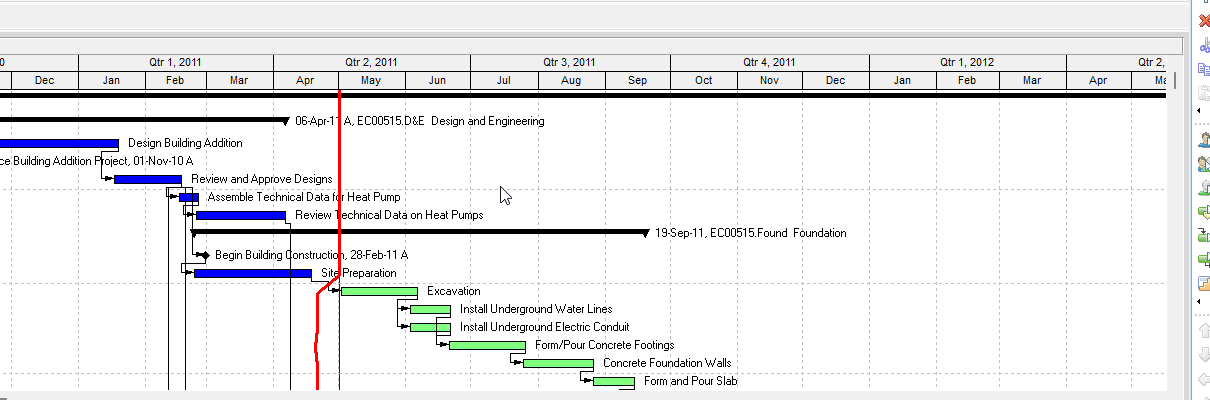
Non-work time shading (Oracle EPPM: the Non-work time shading checkbox on the Gantt tab of Customize View / Manage View) is a Gantt Chart decoration: Oracle Working with the Activity Gantt Chart: "The timescale background is shaded to indicate non-work time based on the global default calendar." Configuring: "Select the Non-work time shading option to have non-work time shaded on the Gantt." It is not Sight Lines (Bar Chart Options / EPPM vertical timescale lines — Sight Lines Are Gantt Background Gridlines, Not an XER Table), not the Timescale date-axis format (Timescale), not a curtain attachment (user-placed Start/Finish/Color/Fill band — Curtain Attachment), not Progress Line (Progress Line), not Progress Spotlight (Progress Spotlight (a View, Not a Field)), not calendar work/nonwork hours or exceptions as stored calendar data (P6 Calendars (Global, Project, Resource, Activity)), and not Bars-dialog Calendar nonwork time necking (Gantt Bars Are Layout Bar Definitions, Not an XER Table).
Professional — Oracle Bar Chart Options: "Use the Bar Chart Options dialog box to customize your current Gantt Chart display." Tabs Oracle names: General, Collapsed Bars, Data Date (Activities and Tracking only), Sight Lines, Progress Line (Activities window only). Those Bar Chart Options pages fetched do not print Non-work time shading, a nonwork-time color, or a calendar-used-for-shading list. Do not invent them.
General tab fields Oracle names: Show Relationships, Show Legend, Limit Text Label Characters To, Horizontal Lines (Show Major Lines / Show Minor Lines Every / Rows), default notebook-item Width/Height. None of those is timescale-background non-work shading.
Related Professional fields that are not this decoration (quote Oracle; do not treat them as shading):
- Bars Bar Settings tab, Bar Necking Settings (Activities window) — Calendar nonwork time: "Mark to show the selected bar's nonwork time, based on the activity's calendar, as a neck." Activity nonwork intervals: "Mark to show the selected bar's nonwork intervals as a neck, based on out-of-sequence progress and suspended/resumed activities." "Necking does not apply for summary bars."
- Collapsed Bars tab — Show bar necking for: "Select Calendar Nonwork Time to show nonwork time, based on the activity's calendar, as a neck on the collapsed bar." "Select Activity Nonwork Intervals to show a neck on the collapsed bar for activity and its calendar nonwork intervals, including suspend/resume dates, out of sequence progress, and gaps of time when activities are not working."
Necking thins a bar. Shading paints the timescale background. Calendar exceptions live in CALENDAR (P6 Calendars (Global, Project, Resource, Activity)); that is the work/nonwork data, not this show/hide decoration.
The Professional Timescale dialog pages cited in Timescale name Two/Three Lines, Timescale Start, Font & Color ("timescale and column headings"), Type, Date Interval, Shift Calendar, ordinal dates. They do not print Non-work time shading or a shading calendar. Do not invent those fields on Timescale.
EPPM web — Configuring Activity View Gantt Chart (Customize View → Manage View → Gantt tab): "Select the Non-work time shading option to have non-work time shaded on the Gantt." That page also names Data date line, Relationship lines, Non-driving relationships, Sight Lines, and Timescale. It does not print View, Bars, Layout Options bar → Bars, Bar Chart Options, a shading color, or a calendar picker. Do not copy those Professional menus onto EPPM.
Working with the Activity Gantt Chart: "The timescale background is shaded to indicate non-work time based on the global default calendar." That is the only calendar Oracle printed for this decoration on the pages fetched. Do not invent an activity-calendar or project-calendar pick. The same page names the data-date line, vertical sightlines, and Progress Spotlight as different decorations.
Gantt View Format Gantt Settings names Data Date, Relationships, Sight Lines, Progress Spotlight, and Timescale show/hide. That page does not print Non-work time shading. The named checkbox is on Customize View → Gantt tab, not on that Gantt Settings list.
Resources Assignments Gantt (Customize View → Gantt tab): "Set the timescale interval of the Gantt chart and apply shading for non-work time." "Select Non-work time shading to apply shading to non-work time represented in the Gantt." Same decoration on the assignments Gantt, not a second object.
The Configuring / Working with / Gantt View Format / Assignments pages fetched do not print a shading color or fill pattern. Do not invent them.
XER
Non-work time shading is a Gantt / view setting. Oracle's project XER data map TOC lists no NONWORK, NONWORKTIME, SHADING, NONWORKSHADING, GANTT, LAYOUT, or VIEW table. Do not invent one. Layouts travel as .plf, not in a project XER. See Filters and Layouts Are a View, Not the Schedule.
Oracle did not name an XER column for show/hide, shading color, or which calendar the Gantt uses to shade.
What shading can draw from is not this decoration:
- Work calendars / exceptions:
CALENDAR(clndr_datais labeled Data). See P6 Calendars (Global, Project, Resource, Activity). - Activity calendar FK:
TASK.clndr_id. Oracle's shading sentence on the pages fetched is global default calendar, notTASK.clndr_id. - Project default calendar:
PROJECT.clndr_idis Default Calendar. Oracle did not say that column is this decoration.
A Viewer parse of one XER cannot reconstruct whether the planner had non-work time shading on.
Microsoft Project
Desktop Project has Non-working time on the Timescale dialog. It is not the same object.
Microsoft: "You can distinguish vacations and other nonworking days from working days by using colors and patterns." "Although you can format nonworking time, you cannot remove it from the timescale in a view." View tab → Timescale dropdown → Timescale... → Non-working time tab: "select a color and a pattern to represent nonworking time in the Gantt Chart view." "If you want to change the appearance of the Gantt Chart view to display nonworking time for a particular resource (such as vacation times as well as weekends), in the Calendar list, select the calendar for the resource."
Microsoft: "Nonworking time appears in the Gantt Chart view only when it occurs in default increments of the bottom tier of the timescale or greater. For example, if the bottom tier of the timescale is weeks and Saturdays are specified as nonworking time, the nonworking days don't appear."
Microsoft VBA TimescaleNonWorking "Sets the format of nonworking times." Draw: pjBehind, pjInFront, or pjDoNotDraw. Calendar: "The name of the calendar to format." Color: a PjColor. Pattern: a PjFillPattern. "Using the TimescaleNonWorking method without specifying any arguments displays the Timescale dialog box with the Non-working Time tab selected." Example: TimescaleNonWorking Draw:=pjBehind, Color:=pjRed.
Do not map EPPM Non-work time shading (Gantt-tab checkbox; timescale background based on the global default calendar; no color/pattern/calendar list on the pages fetched) to MSP Timescale Non-working time (color, pattern, Calendar list, Draw behind/in front) and call them the same command. The pages fetched do not print Oracle's Non-work time shading checkbox on the Microsoft Timescale dialog. Do not claim MPXJ can write a real MPP.
Don't
- Treat Non-work time shading as Sight Lines, Timescale format, a curtain, Progress Line, Progress Spotlight, stored calendar exceptions, or Bars Calendar nonwork time / Activity nonwork intervals necking.
- Invent a Professional Bar Chart Options Non-work time shading checkbox, color, or shading-calendar list. Oracle did not print those fields on the Bar Chart Options / General / Timescale pages fetched.
- Treat EPPM Non-work time shading as the Professional Bar Chart Options tabs or as bar necking.
- Invent an EPPM shading color, fill pattern, or calendar picker. Oracle printed global default calendar as the basis, not a list.
- Invent a NONWORK / SHADING / NONWORKSHADING / GANTT / LAYOUT / VIEW XER table, or treat
CALENDAR/TASK.clndr_id/PROJECT.clndr_idas this decoration. - Copy Professional View > Bars / Bar Chart Options onto EPPM as if Oracle printed those menus there.
- Map this object to MSP Timescale Non-working time (color / pattern / Calendar / pjBehind / pjInFront / pjDoNotDraw) and call them the same.
- Claim MPXJ writes a real MPP.
- Claim a Viewer reconstructed the planner's non-work time shading on/off from an XER.
Sources
- Oracle Configuring Activity View Gantt Chart [27 Aug 2026]
- Oracle Working with the Activity Gantt Chart [27 Aug 2026]
- Oracle Gantt View Format of the Activities Page [27 Aug 2026]
- Oracle Setting the Resources Detailed Assignments Gantt… [27 Aug 2026]
- Oracle Bar Chart Options dialog [27 Aug 2026]
- Oracle General tab - Bar Chart Options [27 Aug 2026]
- Oracle Bar Settings tab - Bars dialog [27 Aug 2026]
- Oracle Collapsed Bars tab - Bar Chart Options [27 Aug 2026]
- Oracle XER project map TOC [27 Aug 2026]
- Oracle XER data map — CALENDAR [27 Aug 2026]
- Oracle Exporting and Importing Layouts [27 Aug 2026]
- Microsoft Change the appearance of nonworking time in… [27 Aug 2026]
- Microsoft Application.TimescaleNonWorking [27 Aug 2026]